Operating the Monitor 29
Menu and Submenus Description
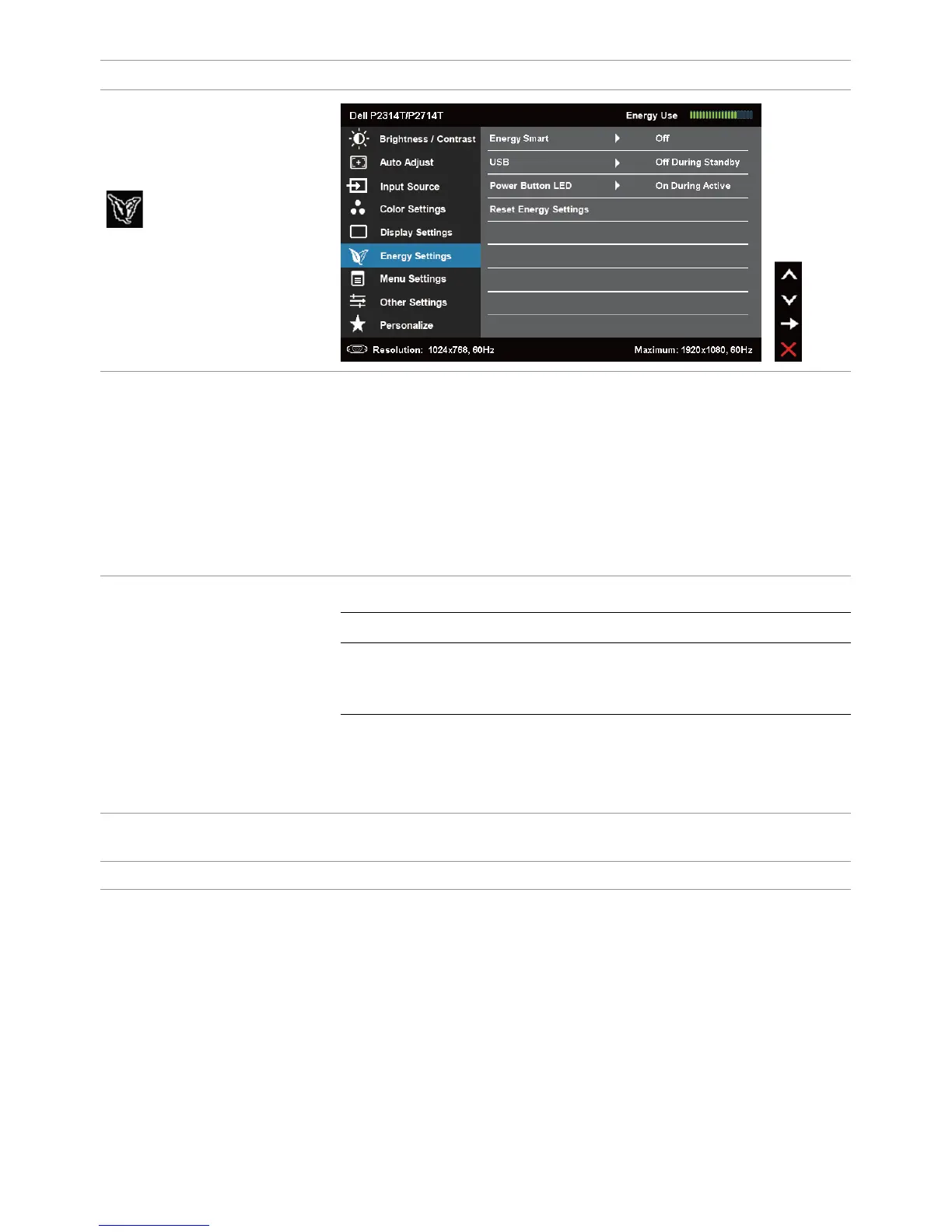
Energy Settings
Energy Smart
Turn-on or turn-off dynamic dimming.
Turning on Energy Smart activates dynamic dimming. With
Energy Smart turned on, the monitor consumes overall less
power compared to when Energy Smart is turned off.
NOTE: Under Energy Smart mode and with dark scenes
the monitor consumes less power and the Energy Use bar
decreases. For bright scenes the monitor will consume
more power and the energy level increases. This applies for
both Energy smart on or Energy smart turned off.
USB
System
Monitor status On Standby Off
Monitor with
upstream
connected
On
(Disabled)
On
(Disabled)
Off
(Disabled)
Monitor without
upstream
connected
On Off/On*
(depends
on OSD
selections)
Off
Power Button LED
Allows you to set the state of the power light to save
energy.
Reset Energy Settings Restores the energy settings to factory defaults.


 To Next Page