Removing the power button with ngerprint
reader
WARNING: Before working inside your computer, read the safety information that shipped with your computer and follow the
steps in Before working inside your computer. After working inside your computer, follow the instructions in After working inside
your computer. For more safety best practices, see the Regulatory Compliance home page at www.dell.com/
regulatory_compliance.
NOTE: Applicable only for computers that are shipped with ngerprint reader.
Prerequisites
NOTE: The power button with ngerprint reader is shipped only with the non-touchscreen conguration of the Inspiron 7380.
1 Remove the base cover.
2 Remove the wireless card.
3 Remove the I/O board.
Procedure
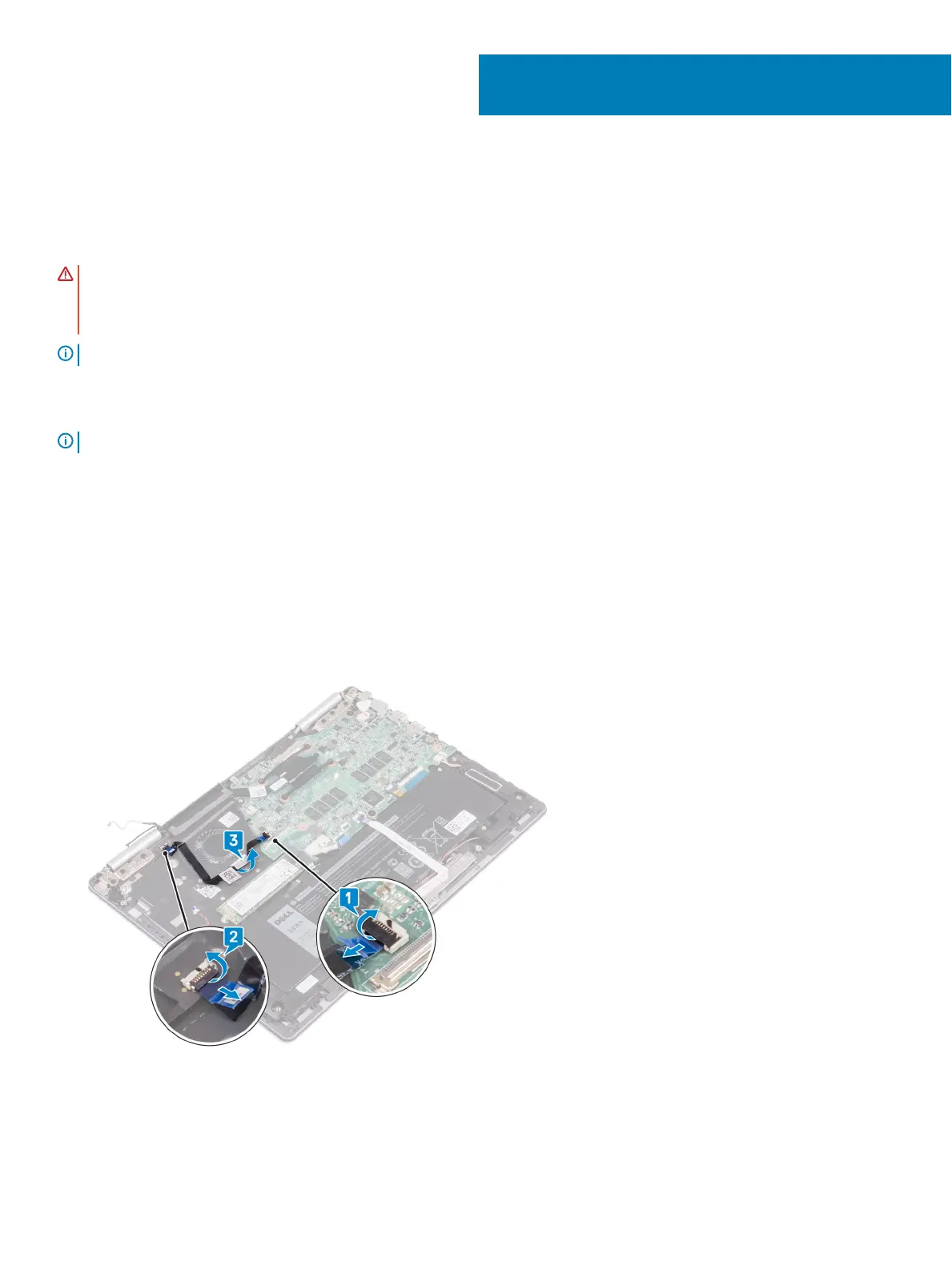
1 Open the latch and disconnect the power button with ngerprint reader cable from the system board.
2 Open the latch and disconnect the power button with ngerprint reader cable from the power button with ngerprint reader
connector cable.
3 Peel o the power button with ngerprint reader cable from the fan.
4 Remove the two screws (M2x2.5) securing the power button with ngerprint reader to the palm-rest assembly.
5 Peeling o the cable connector of the power button with ngerprint reader from the keyboard bracket. Then lift the power button
with ngerprint reader from the slot on the palm-rest assembly.
31
52 Removing the power button with ngerprint reader



 To Next Page