24
About Your Computer
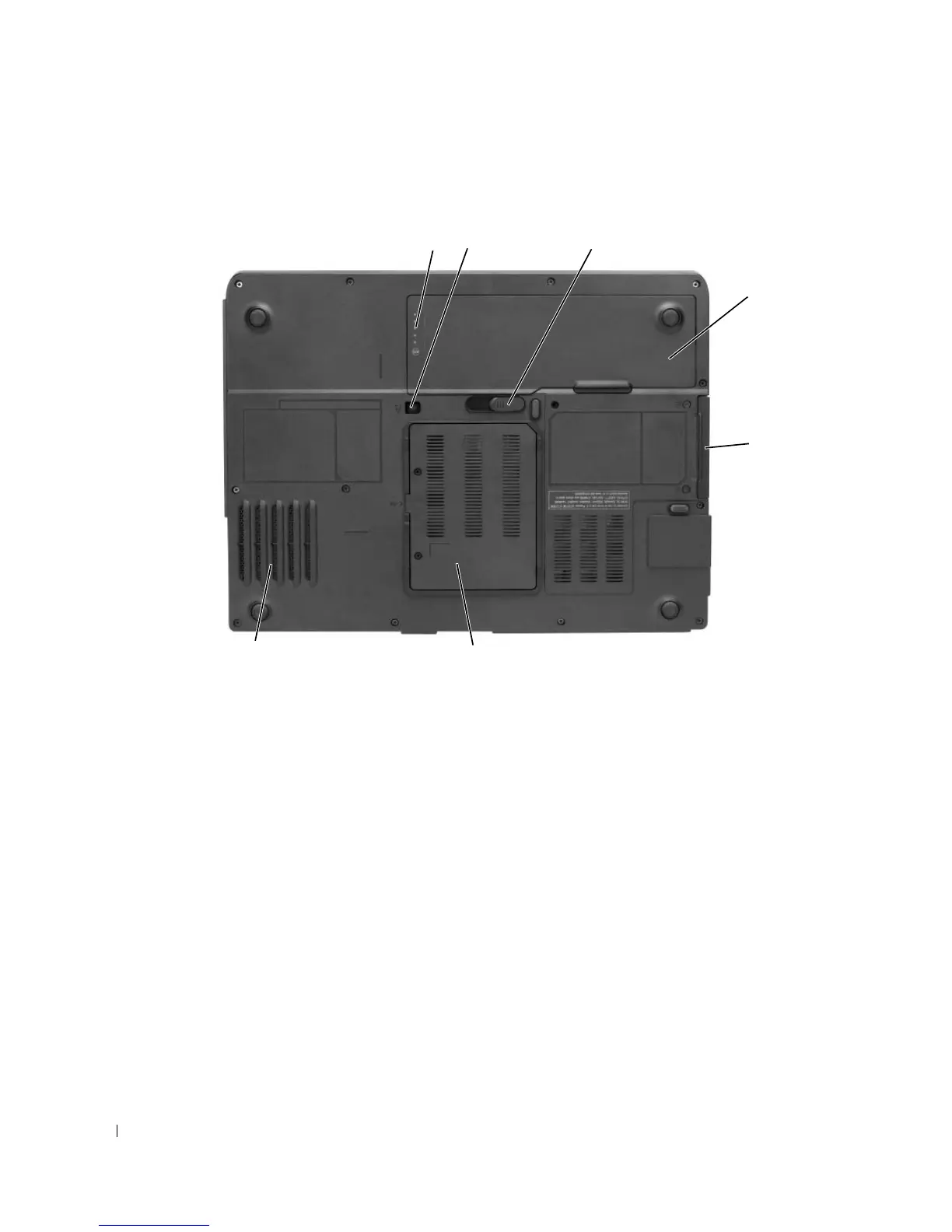
Bottom View
BATTERY
CHARGE
GAUGE
— Provides information on the battery charge status. See "Checking the Battery Charge"
on page 40.
OPTICAL
-
DRIVE
LOCKING
SCREW
— Secures the optical drive in the optical drive bay. For more information, see
"Optical Drive" on page 90.
BATTERY
-
BAY
LATCH
RELEASE
— Releases the battery from the battery bay. See "Replacing the Battery" on page 43.
BATTERY
— When a battery is installed, you can use the computer without connecting the computer to an
electrical outlet. For more information, see "Using a Battery" on page 39.
HARD
DRIVE
— Stores software and data. For more information, see "Hard Drive" on page 90 and "Hard drive
problems" on page 65.
MODEM
/MEMORY
MODULE
COVER
— Covers the compartment that contains the modem and the memory modules.
For more information, see "Modem" on page 95 and "Memory" on page 92.
FAN
— The computer uses a fan to create airflow through the vents, which prevents the computer from
overheating.
1 battery charge gauge 2 optical-drive locking screw 3 battery-bay latch release
4 battery 5 hard drive 6 modem/memory module
cover
7 fan
6
7
4
3
1 2
5
More Information : www.pcsearch.ir












 To Next Page