EasyManua.ls Logo

Dell Precision Workstation 340 - Page 49

Dell Precision Workstation 340
60 pages
Print Icon
To Next Page IconTo Next Page
To Previous Page IconTo Previous Page
Loading...
Heat Sink RemovalMini-Tower Computer
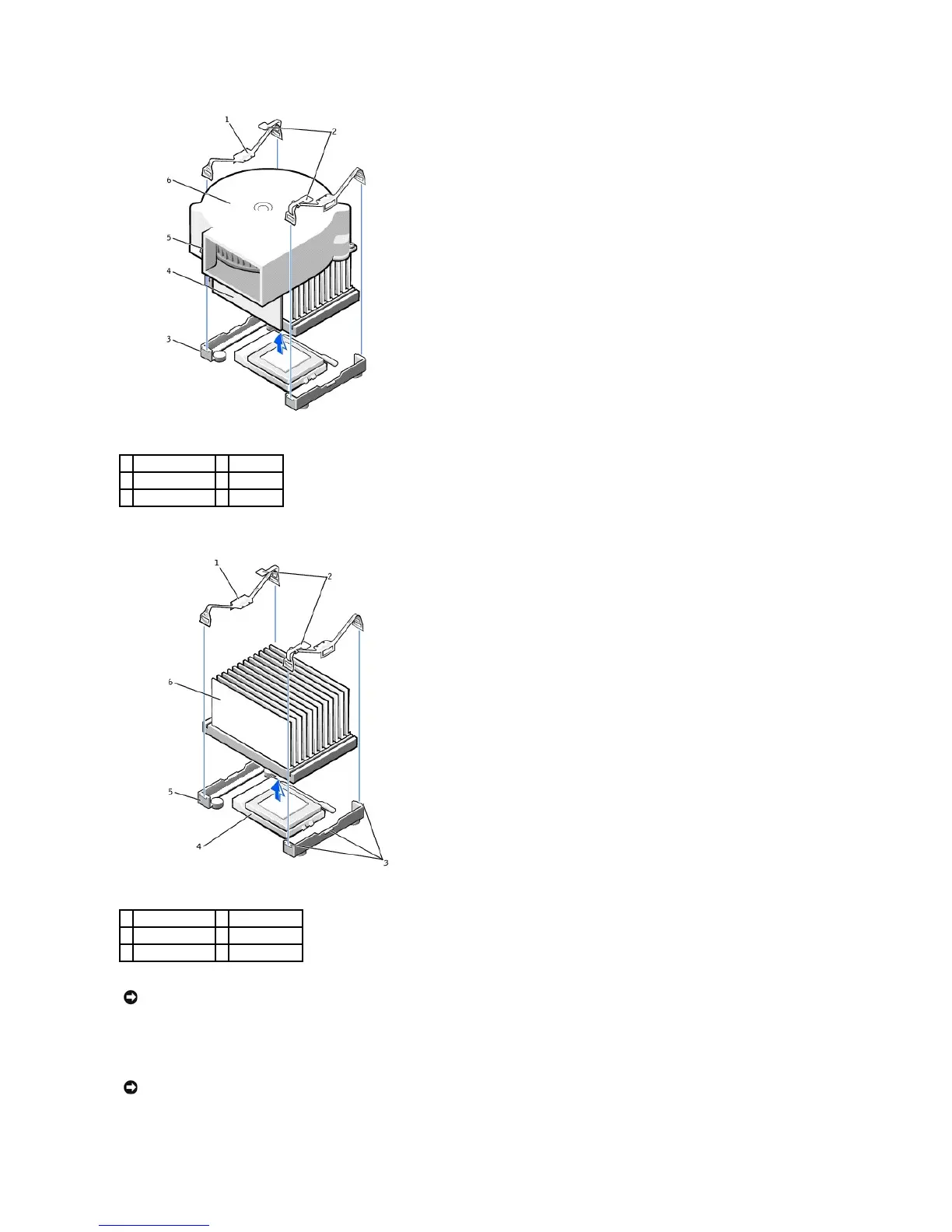
5. Lift the heat sink or heat sink/blower assembly away from the microprocessor.
6. On the small desktop computer, remove the two screws on the blower to remove it from the heat sink.
1
securing clips (2)
4
heat sink
2
latches (2)
5
screws (2)
3
retention base
6
blower
1
securing clips (2)
4
ZIF socket
2
latches (2)
5
retention base
3
tabs (3)
6
heat sink
NOTICE: Gently rock the heat sink and then lift it to remove.
NOTICE: Do not discard the original heat sink and securing clips unless you are installing a microprocessor upgrade kit from Dell. If you are not installing
a microprocessor upgrade kit from Dell, reuse the original heat sink, blower, and securing clips when installing your new microprocessor.

Related product manuals