EasyManua.ls Logo

Dell Precision Workstation 340 - Removing the Power Supply

Dell Precision Workstation 340
60 pages
Print Icon
To Next Page IconTo Next Page
To Previous Page IconTo Previous Page
Loading...
Back to Contents Page
Power Supply
DellPrecision™WorkStation340ServiceManual
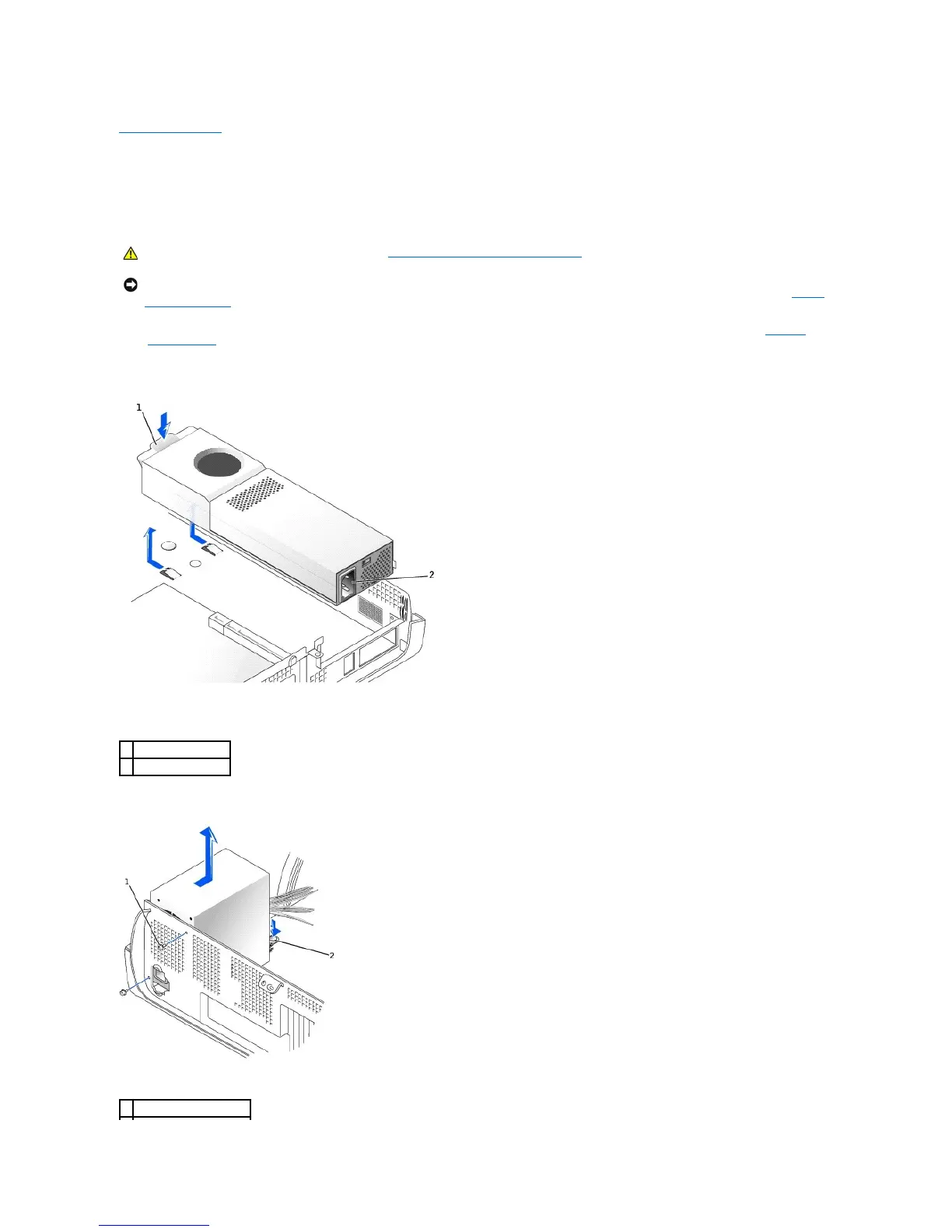
Removing the Power Supply
1. Turn off the computer and devices, disconnect them from their electrical outlets, wait 10 to 20 seconds, lay the computer on its side, and open the
computer cover.
Small Desktop Computer
Mini-Tower Computer
CAUTION: Before you perform this procedure, see "Safety FirstFor You and Your Computer."
NOTICE: Before disconnecting a device from the computer, wait 10 to 20 seconds after disconnecting the computer from its electrical outlet. Before
removing a component from the system board, verify that the standby power light on the system board has turned off. To locate this light, see "System
Board Components."
1
push button
2
AC power connector
1
power supply screws (2)

Related product manuals