Operating your monitor │ 51
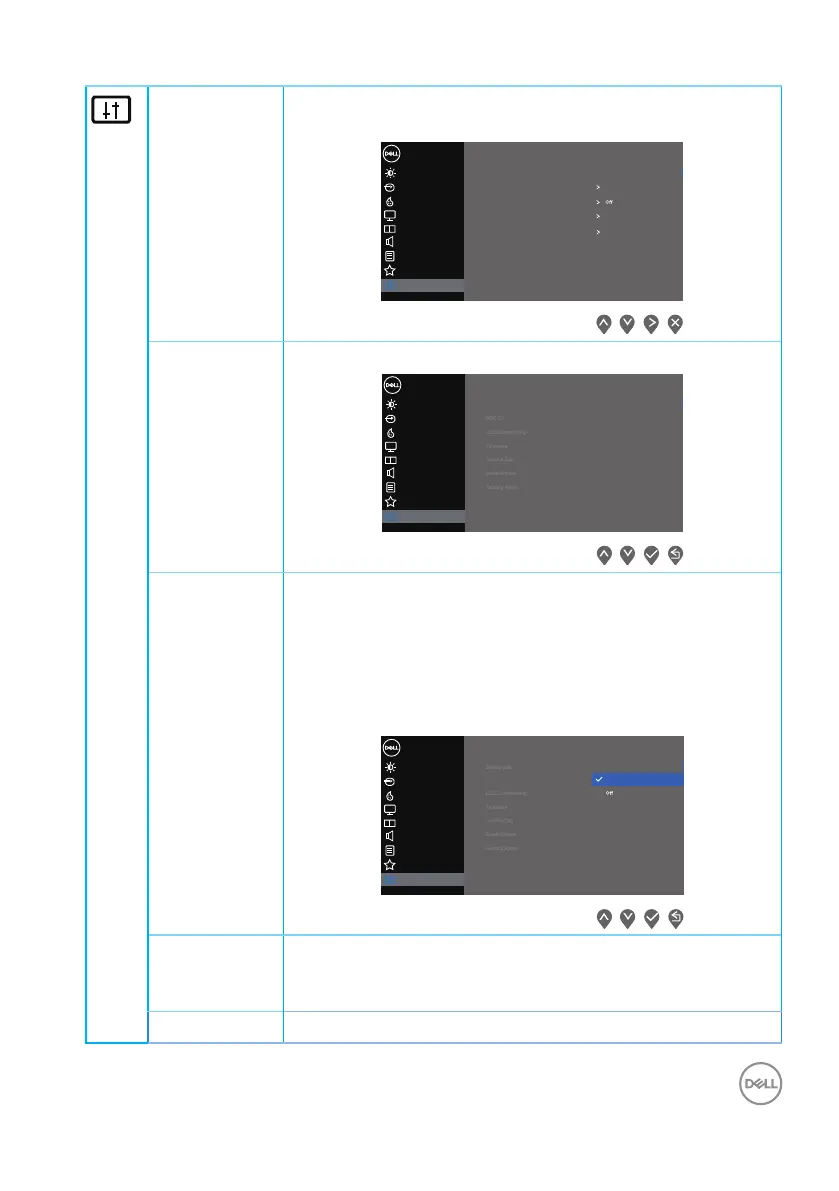
Others Select this option to adjust the OSD settings, such as the
DDC/CI, LCD conditioning, and so on.
Input Source
Color
Display
Personalize
Menu
Dell 32 Monitor
PIP/PBP
Audio
Brightness / Contrast
Others
Display Info
Reset Others
Factory Reset
LCD Conditioning
DDC/CI On
Service Tag
32C101
Firmware
ABCDEFG
Display Info Displays the monitor’s current settings.
Input Source
Color
Display
Personalize
Menu
Dell 32 Monitor
PIP/PBP
Audio
Brightness / Contrast
Others
Display Info
Current: 3840x2160, 60Hz
Input Source: HDMI 2
PBP Stutas: O
Model: Dell S3221QS
HDMI: 2.0
PIP Stutas: O
DP Capability: DP 1.2
DDC/CI DDC/CI (display data channel/command interface) allows
your monitor parameters (brightness, color balance and
etc.) to be adjustable via the software on your computer.
You can disable this feature by selecting off.
Enable this feature by selecting on for best user experi-
ence and optimum performance of your monitor.
Input Source
Color
Display
Personalize
Menu
Dell 32 Monitor
PIP/PBP
Audio
Brightness / Contrast
Others
DDC/CI On
LCD Condi-
tioning
Helps reduce minor cases of image retention. Depending
on the degree of image retention, the program may take
some time to run. To start LCD conditioning, select on.
Firmware Display the version of the firmware about the display.



 To Next Page