Setting up the monitor | 41
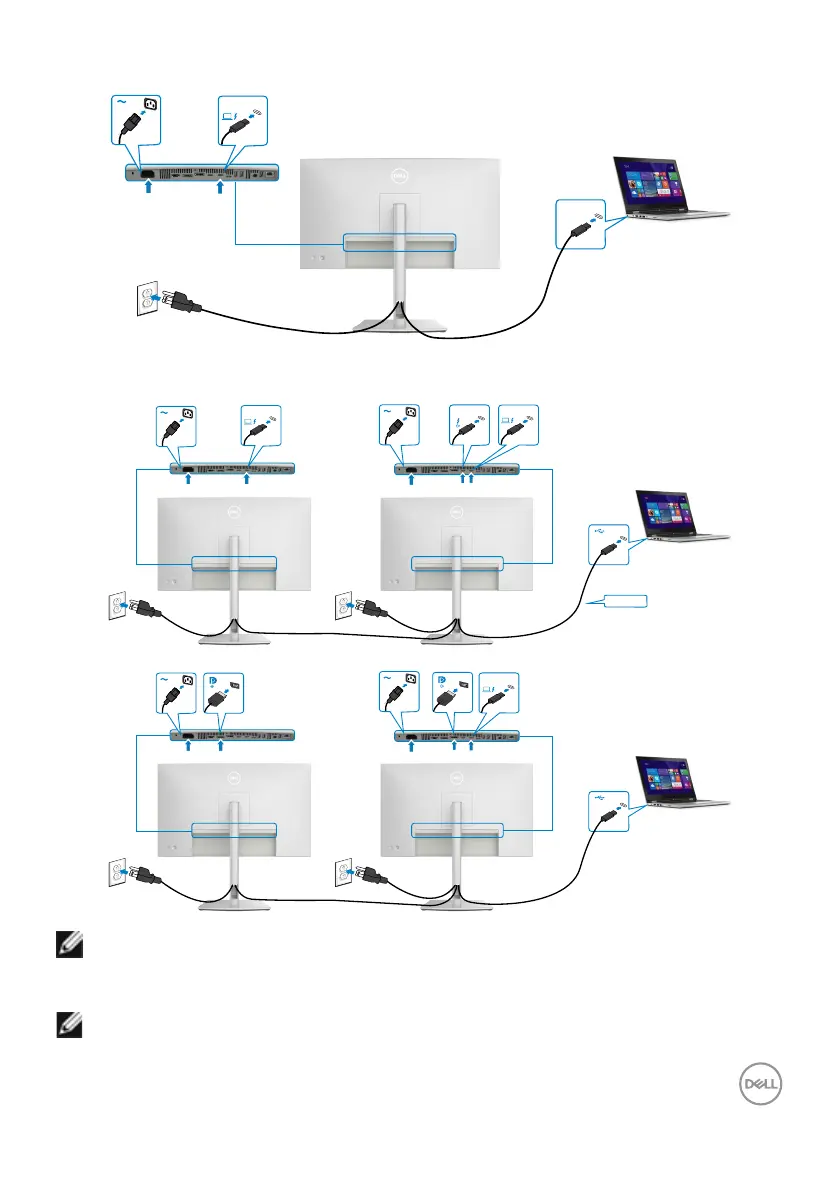
Connecting the Thunderbolt
TM
4 cable
Thunderbolt
TM
4
90W
Thunderbolt
TM
4
upstream
Connecting the Monitor for Thunderbolt
TM
4 daisy chain function
90W
Thunderbolt
TM
4
upstream
Thunderbolt
TM
4
downstream
90W
Thunderbolt
TM
4
upstream
Thunderbolt (in)
90W
Thunderbolt
TM
4
upstream
NOTE: The maximum number of supported via MST is subjected to the
bandwidth of the Thunderbolt
TM
4. Please refer to Product specific
problems - No image when using Thunderbolt
TM
4 daisy chain.
NOTE: Remove the rubber plug when using Thunderbolt
TM
4 connector.



 To Next Page