21
15. The “no water” indicator (C2)lights up: remove the tank
and ll with fresh drinking water. Reposition the water
tank in the machine.
The machine is ready for use.
Please note:
• It is normal for the grounds container to contain water
following a rinse cycle.
• (*) If the water tank has not been lled to the MAX level,
at the end of descaling, the system requests a third rinse
to guarantee that the descaler solution has been com-
pletely eliminated from the machine's internal circuits. In
this instance, repeat step 3 from point 11.
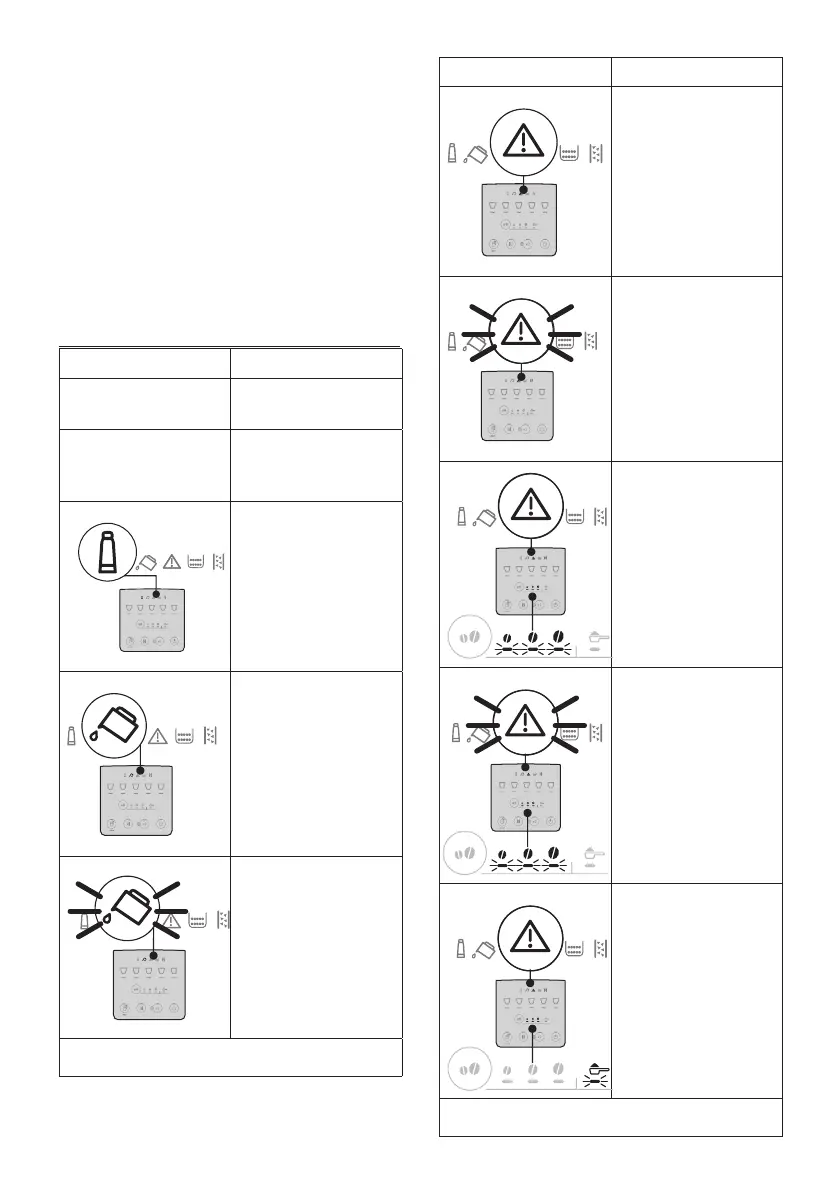
17. EXPLANATION OF LIGHTS
Indicator/Led Meaning
Drink indicators blinking The machine is warming up:
wait
Drink and settings indicators
permanently alight
The machine is ready for
use: select the desired drink
and the relative options
1 2 3 4 5
Replace the lter (see
section “4. Water softener
lter”)
1 2 3 4 5
Insucient water in tank:
ll the tank
1 2 3 4 5
The water tank is missing, or
is not positioned correctly:
ensure the tank is correctly
in place
→
Indicator/Led Meaning
1 2 3 4 5
General alarm: the inside of
the machine is very dirty.
Clean the machine thor-
oughly. If the message is
still displayed after cleaning,
contact De’Longhi Customer
Services and/or an approved
Service Centre
1 2 3 4 5
The infuser has not been
replaced after cleaning:
reinstate the infuser as
described in section “15.
Cleaning the infuser”
1 2 3 4 5
No coee beans: ll the
beans container, then press
any button to exit the alarm
condition.
1 2 3 4 5
The beans are too nely
ground, so that the coee is
delivered too slowly or not
at all. Adjust the coee mill
(A2) (section “8.8 Adjusting
the coee mill”).
1 2 3 4 5
A selection has been made
using pre-ground coee
without putting the coee
in the relative funnel (A4)
→



 To Next Page