7
87
0,5 L
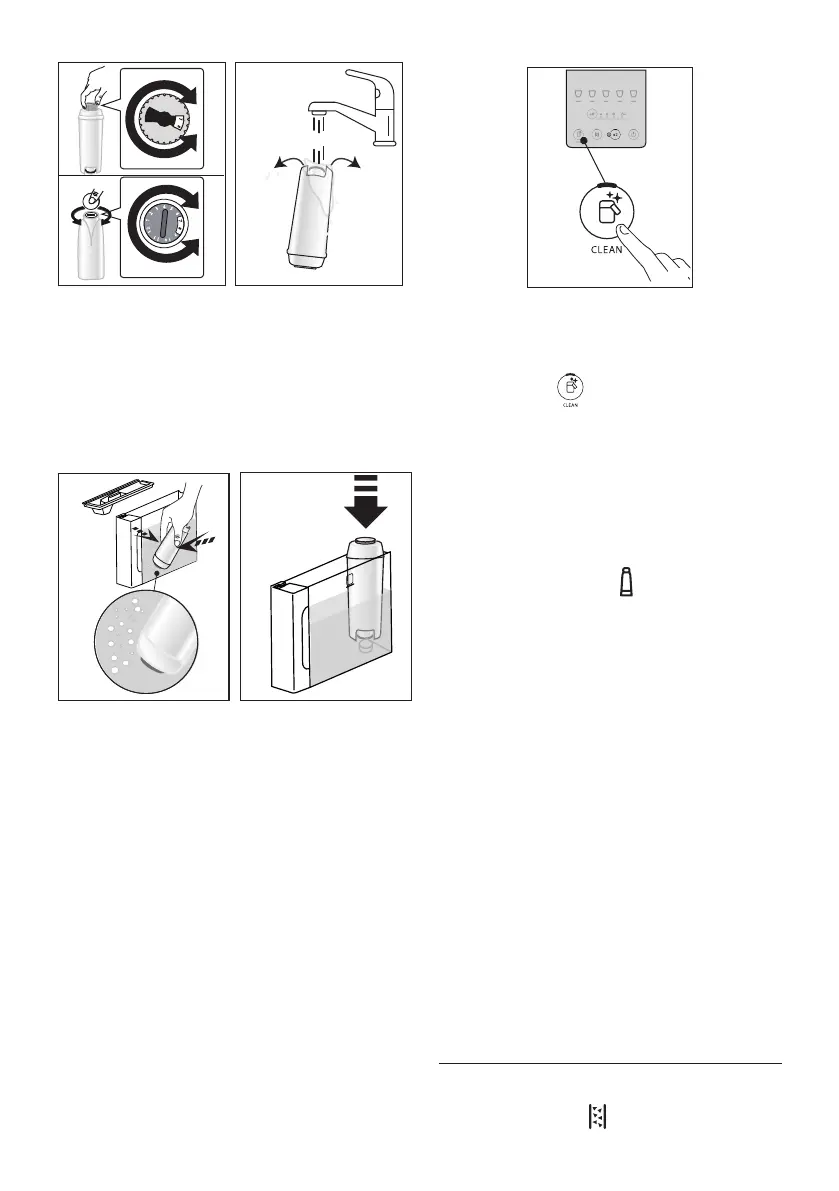
2. To activate the lter, run drinking water through the hole
in the centre of the lter until water comes out of the
openings at the side for more than a minute (g. 8);
3. Remove the tank (A9)from the machine (g. 4) and ll with
fresh drinking water; insert the lter in the water tank, im-
mersing it completely for about ten seconds, while tilting it
and applying light pressure so that the air bubbles are able
to escape (g. 9);
9
MAX
10
MAX
4. Insert the lter in the relative housing
and press fully
home (g. 10);
5. Close
the tank with the lid (A8), then reposition the tank
in the machine;
6. If not already in place, t the water spout (D5).
7. Place an empty container of at least 0.5 litres capacity
under the hot water spout (g. 5).
8. See instructions in section “12. Settings menu” for instal-
lation of the lter;
9. On the control panel, the lter indicator light (C1) blinks
steadily and the Led of the clean carafe/manual rinse but-
ton (B4) blinks rapidly;
10. Press the clean carafe/manual rinse button (g. 11);
1 2 3 4 5
11
11. The appliance delivers hot water, stopping automatically;
12. When the ow stops, the lter indicator light extinguish-
es: the lter is now active and the machine can be used.
Please note:
• If the Led of the button (B4) blinks rapidly, press the
button. This will cause the internal circuits of the machine
to start lling up, expelling the air bubbles that have been
formed and allowing the installation to proceed.
• With installation completed, the drinks Leds blink to
indicate that the machine is heating up in readiness for
normal use.
4.1 Replacing the lter
Replace the lter (D4) when the indicator (C1) lights up.
1. Remove the water tank (A9) and the spent lter;
2. Follow the operations described in the previous section to
activate the lter;
3. See instructions in section “12. Settings menu” to set the
machine and repeat steps 9 to 12 of the preceding section.
Please note:
After two months (see date indicator), or after 3 weeks if the
appliance has not been used, the lter should be replaced even
if the warning message has not yet been displayed.
4.2 Removing the lter
If the intention is to use the appliance without the lter (D4),
its removal must be indicated in the machine settings.
1. Remove the water tank (A9) and the spent lter;
2. See instructions in section “12. Settings menu” to set the
machine accordingly.
Please note:
After two months (see date indicator), or after 3 weeks if the ap
-
pliance has not been used, the lter should be replaced even if the
warning message has not yet been displayed.
5. MEASURING WATER HARDNESS
Setting the water hardness as soon as possible will enable the
machine to optimize the frequency of descaling. This means
that the descale indicator (C5) will light up as necessary




 To Next Page