Document Edition 4.2 Page 1 of 43
APPLICATION GUIDE
Delta Network Sensor / Thermostat: BACstat II
DNS-24, DNT-T103 & DNT-T221
Document Edition 4.2
Product Description
The BACstat II is a line of network room sensors/thermostats with a custom
LCD display and pushbutton interface. They can communicate directly on a
BACnet MS/TP network or Delta’s proprietary LINKnet network.
They are capable of displaying a wide-range of digital or analog values,
including setpoints, temperature, air flow, heating and cooling status, fan
speed, valve and damper position, and more. When connected on a BACnet
MS/TP network they function as independent BACnet sensors or thermostats.
When connected to a Controller on a LINKnet network they provide
programmable remote sensor and expanded I/O capabilities. BACstats that are
hardware revision 4 or greater can be flash loaded over the network, and have
termination resistors that are jumper selectable.
The DNS-24 models are network sensors they have multiple onboard sensor options including temperature
humidity, CO2 and motion, but do not have any outputs or internal control algorithms. The DNT-T103 has 1
extra input, 3 binary outputs and a number of built-in application control strategies. The DNT-T221 has 2
extra inputs, 2 analog and 1 binary output and built-in application control strategies. As a result, DNT
BACstats are capable of stand-alone control when directly connected on an MS/TP network.
Contents
OTHER RELEVANT DOCUMENTS .................................................................................................. 2
IMPORTANT INFORMATION .......................................................................................................... 2
SETUP & CONFIGURATION ............................................................................................................. 2
NETWORK COMMUNICATIONS ........................................................................................................... 2
DEVICE CONFIGURATION (KEYPAD) .................................................................................................. 2
SERVICE TOOL MODE (KEYPAD) ....................................................................................................... 7
INPUT CALIBRATION .......................................................................................................................... 8
INPUT SCALE RANGES ...................................................................................................................... 8
SOFTWARE & PROGRAMMING...................................................................................................... 9
OBJECTS............................................................................................................................................ 9
PROGRAMMING ............................................................................................................................... 12
CONTROL FUNCTIONS ................................................................................................................... 13
OVERVIEW ...................................................................................................................................... 13
SOFTWARE LOOP CONTROLLER ....................................................................................................... 15
SETPOINTS ...................................................................................................................................... 19
CONTROL DIAGRAM ........................................................................................................................ 20
CONTROL APPLICATIONS (MUX, VAV, VVT, HPU, FCU, RAD, HUM) ............................................ 21
OUTP UT FUNCTIONS & TYPES ......................................................................................................... 29
OWS FUNCTIONS .............................................................................................................................. 34
APPENDIX A: PROGRAMMING NOTES .................................................................................................... 31
APPENDIX B: LINKNET ......................................................................................................................... 32

 Need help?
 General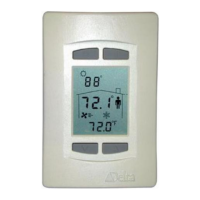

 To Next Page