18
4. OPERATION
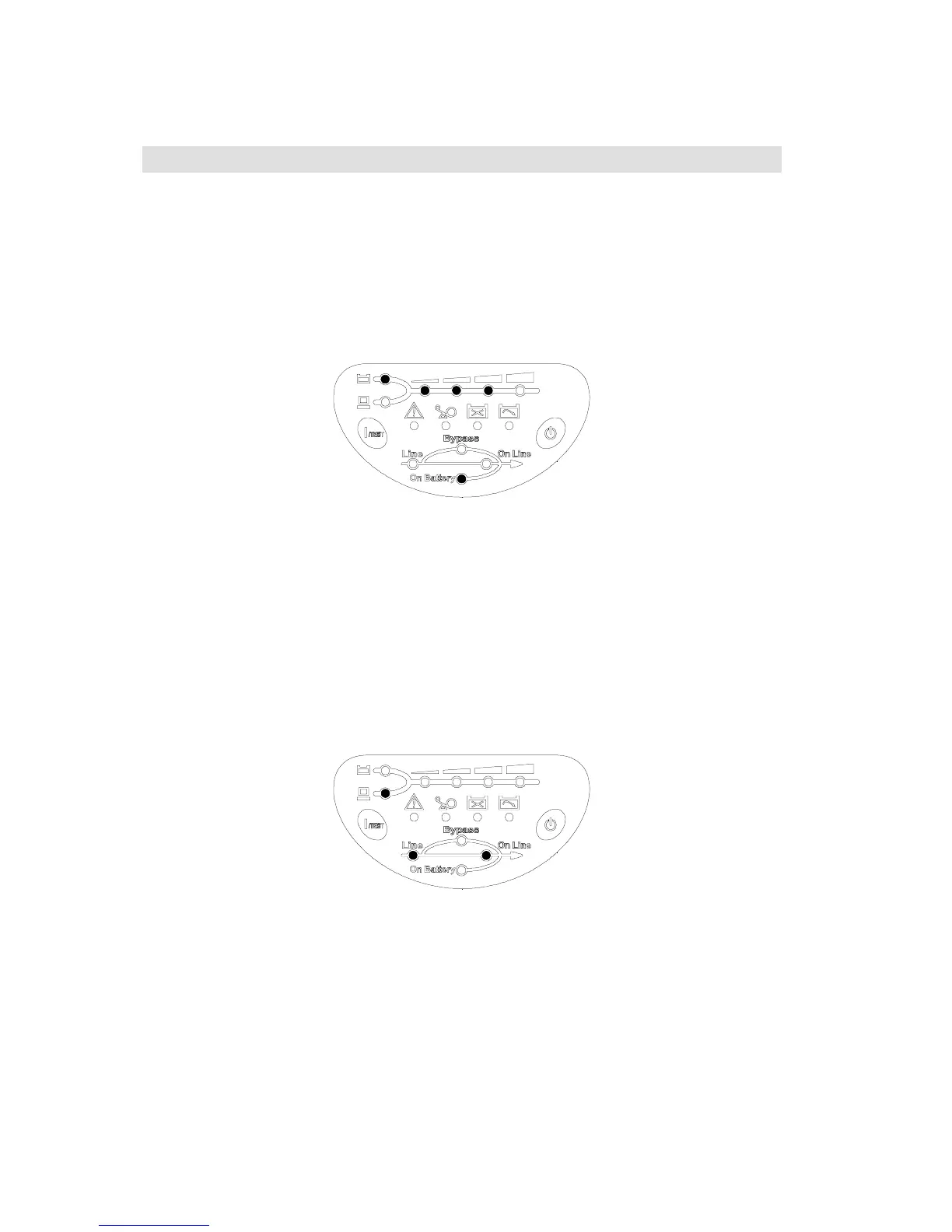
4-1 Cold start when utility is not present
Even when there is no utility power, you can still turn on the UPS. Just press the
1/TEST
button and hold for one second, the UPS will start up after you hear a “bee”. The battery
LED and on-battery LED will light on and the UPS runs on “
ON-BATTERY mode
”.
Shown as fig 4-1.
Fig 4-1On Battery Mode
4-2 Turning “ON” the UPS
When the utility power is acceptable for the UPS, you can normally turn on the UPS after
pushing the
1/TEST
button and hold a few seconds until a “bee” is heard. The bypass
LED will extinguish after shortly light on. When the on-line LED lights on, the UPS is
running on “
ON-LINE mode
”. Shown as fig 4-2.
Fig 4-2 On-Line Mode
4-3 Turning “OFF” the UPS
Push the
0
button for turning off the UPS, when a “bee” is heard release your press. After
a few seconds the UPS is off.
The UPS will keep charging when UPS is in “
STANDBY mode
” even though the
0
button has been pressed. To fully turn off the UPS, it is advised to unplug the power cord.
Refer to fig 3-1.














 To Next Page