ENGLISH
Getting Started Connections Setup Playback Remote Control Multi-Zone Information Troubleshooting
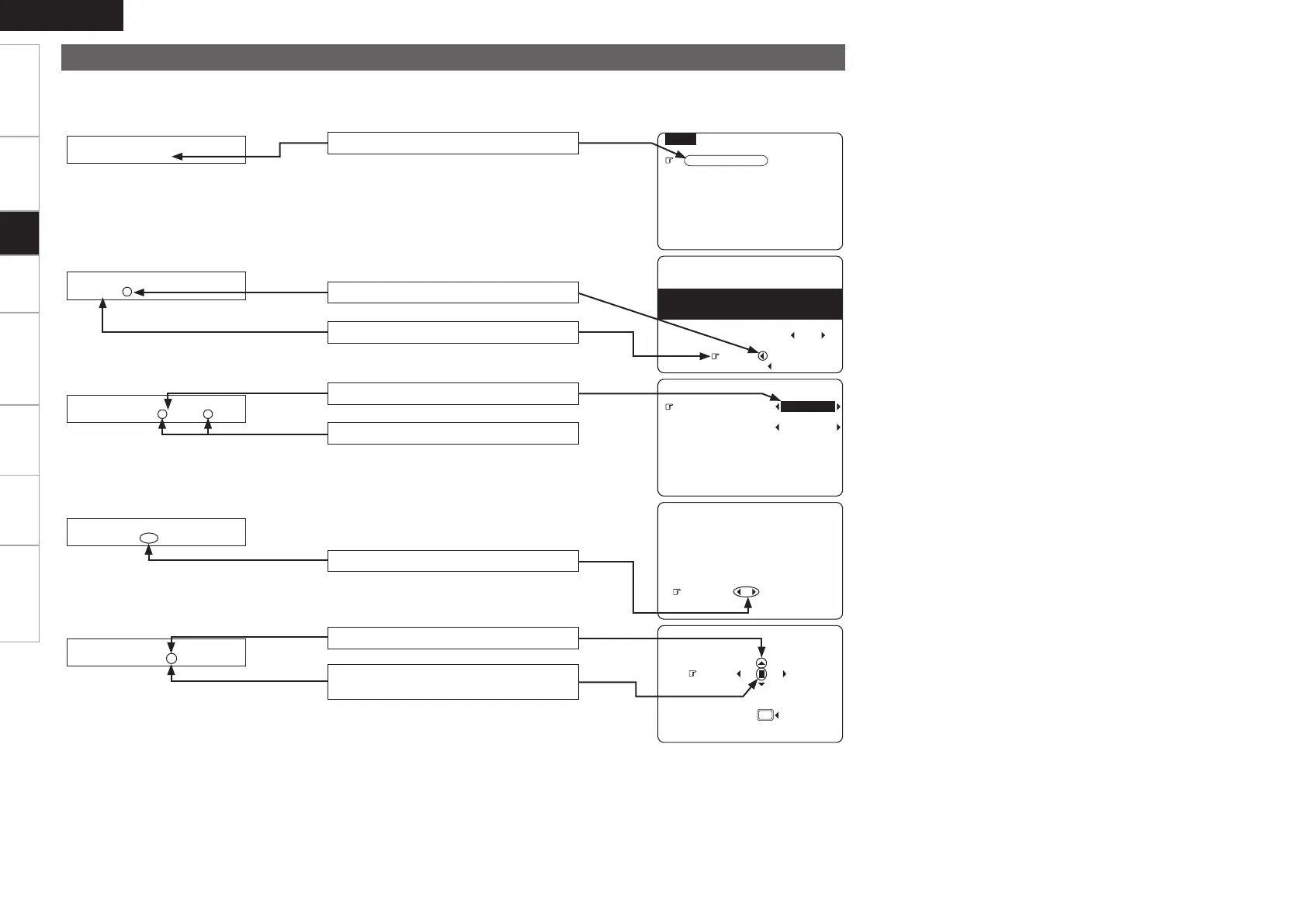
Examples of On-screen Display and Front Display
Some typical examples are described below.
MENU
1.Auto Setup
2.Manual Setup
3.Input Setup
4.Parameter
5.Information
GOn-screen displayHGFront displayH
1-1.Start Menu
Step1:Speaker Detection
at ear height at
Front Sp. A
Amp Assign
Start
Cancel
Please place microphone
main listening position.
Audyssey
MultEQ
3-1.Assign
Digital In : OPT1
iPod dock : None
2-1-3.Distance
Set The Distance To
Meters : Feet
Each Speakers
Do You Prefer
In Meters? / In Feet?
D i g i t a l : • O P T 1 –
Submenu title
Press o to execute
Press op to change the setting
Current setting
Currently selected line
Press op to select one or the other
Default
: DV
3-3.Rename
Yes
DVD
Use op to change the character input
position.
Use ui to input characters.
1.AVR788E3_ENG_108.indd 22 2007/10/05 16:21:49


 To Next Page
 Loading...