ENGLISH
Make detail settings for various parameters.
Speaker Setup
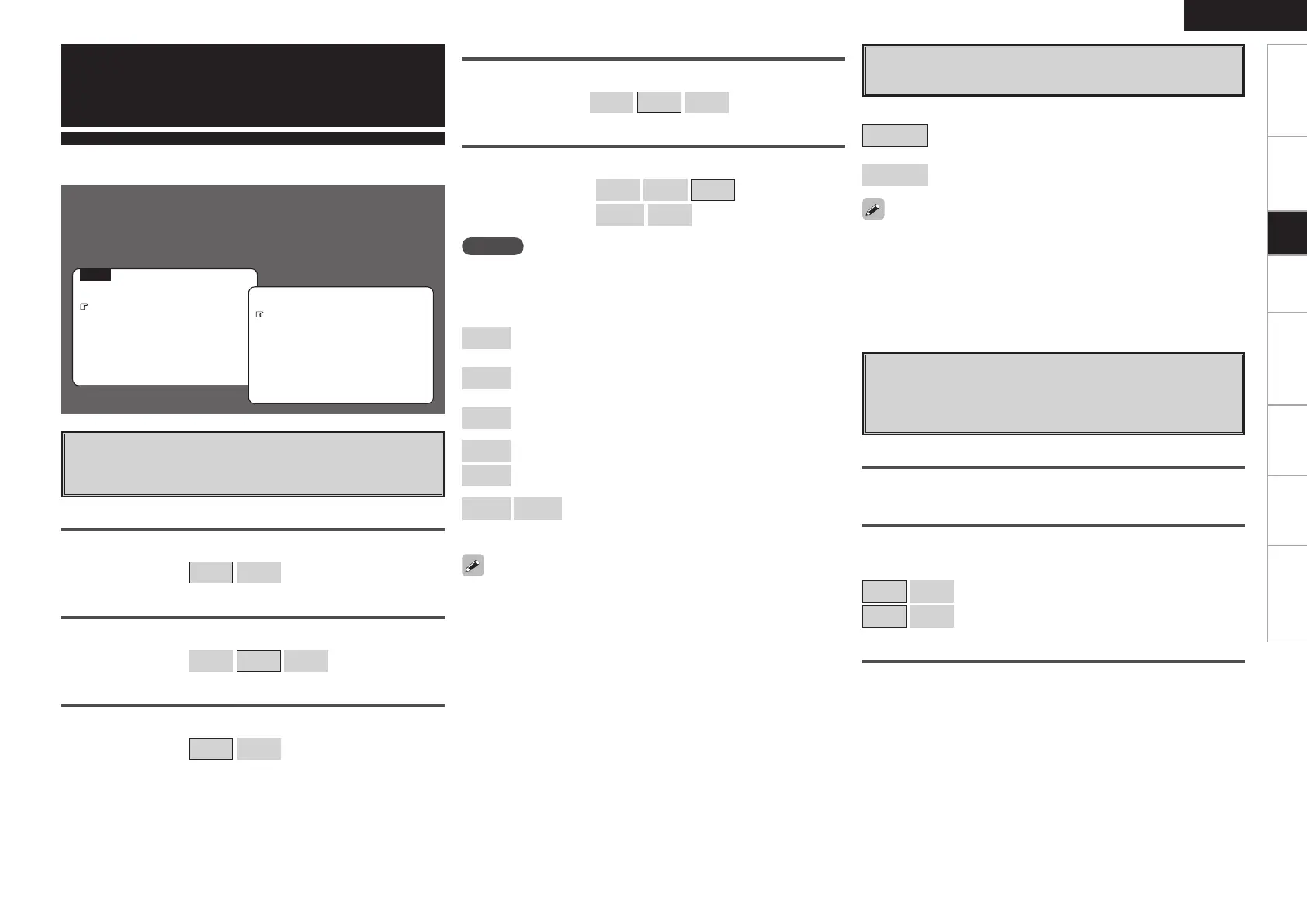
Use this procedure to set the speakers manually or if you wish to
change the settings made with the auto setup procedure.
F Menu screen F
MENU
1.Auto Setup
2.Manual Setup
3.Input Setup
4.Parameter
5.Information
Manual Setup
a
Speaker Configuration
Select speaker configuration and size.
(bass reproduction capability)
s
Subwoofer Setup
Select low range signal to be reproduced by subwoofer.
• This can be set when menu “Speaker Configuration” – “Subwoofer”
is set to “Yes”.
• Play music or a movie source and select the mode offering the
strongest bass.
• Select “LFE+Main” if you want the bass signals to always be
produced from the subwoofer.
Getting Started Connections Setup Playback Remote Control Multi-Zone Information Troubleshooting
• Select “Large” or “Small” not according to the physical size of the
speaker but according to the low frequency reproduction capabilities
based on the frequency set at “Crossover Frequency” (vpage
25).
• When “Front Speaker” is set to “Small”, “Subwoofer” is automatically
set to “Yes”.
• If “Subwoofer” is set to “No”, “Front Speaker” is automatically set to
“Large”.
• If “Surround Speaker” is set to “None”, “Surround Back Speaker” are
automatically set to “None”.
• When using just one surround back speaker, connect it to the left
channel (SBL).
Large
: Select this when using large speakers with ample low
frequency reproduction capabilities.
Small
: Select this when using small speakers without ample low
frequency reproduction capabilities.
None
: Select this when no speaker is connected.
Yes
: Select this when a subwoofer is connected.
No
: Select this when no subwoofer is connected.
2spkrs
1spkr
:
Select the number of surround back speakers.
Front Speaker
Select front speaker size.
[Selectable items]
Large
Small
Subwoofer
Select subwoofer use.
[Selectable items]
Yes
No
Surround Speaker
Select surround speakers use and size.
[Selectable items]
Large
Small
None
Surround Back Speaker
Select surround back speaker use and size.
[Selectable items]
(
Large
Small
None
)
(
2spkrs
1spkr
)
Center Speaker
Select center speaker use and size.
[Selectable items]
Large
Small
None
[Selectable items]
LFE
: Play low range and LFE signal of channels set to
“Small”.
LFE+Main
: Play low range and LFE signal of all channels.
2.Manual Setup
2.HDMI Setup
1.Speaker Setup
4.Zone2 Setup
5.Option Setup
3.Audio Setup
d
Distance
Set distance from listening position to speakers.
Before making the settings, measure the distance from the
listening position to the different speakers.
Feet / Meters
Select unit for distance.
Step
Select step. (smallest distance)
[Selectable items]
1ft
0.1ft
: Can be selected when “Feet” is set.
0.1m
0.01m
: Can be selected when “Meters” is set.
Default
Resets the settings to the default values.
NOTE
By default, the AVR-788’s “Amp Assign” setting is set to “ZONE2”. To
use as the surround back speaker for the main zone, change the “Amp
Assign” setting (vpage 28).
1.AVR788E3_ENG_108.indd 27 2007/10/05 16:22:10


 To Next Page
 Loading...