EasyManua.ls Logo

Denon AVR-2308CI - User Manual

Denon AVR-2308CI
78 pages
Print Icon
To Next Page IconTo Next Page
Loading...
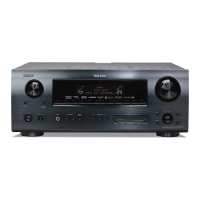
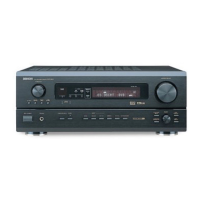
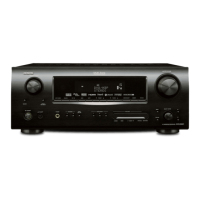
AV SURROUND RECEIVER
AVR-2308CI
Owners Manual
Manuel de l’Utilisateur

Table of Contents

Other manuals for Denon AVR-2308CI

Questions and Answers

  • H
    Heather SmithSep 10, 2025
    Why my iPod cannot be played on my Denon Stereo Receiver?
    • M
      Matthew MillerSep 10, 2025
      If your Denon Stereo Receiver is not playing your iPod, make sure that the input source assigned to “iPod dock” is selected. Check that the cable is properly connected. Ensure that the Control Dock for iPod’s AC adapter is connected to a power outlet.
  • T
    Thomas SmithAug 23, 2025
    Why is no sound is produced from subwoofer on my Denon Stereo Receiver?
    • S
      skinnerchristinaAug 23, 2025
      To resolve the issue of no sound being produced from the subwoofer connected to your Denon Stereo Receiver, first ensure that the subwoofer's power is turned on. Check that the “Subwoofer” setting at “Speaker Configuration” is set to “Yes”. Verify that the subwoofer is properly connected. Finally, adjust the subwoofer’s volume to an appropriate level, ensuring it is not turned off.
  • A
    Andrew WeaverAug 25, 2025
    Why is there no sound output from the monitor connected with HDMI connections on my Denon AVR-2308CI Stereo Receiver?
    • A
      Andrea WatsonAug 25, 2025
      If your Denon Stereo Receiver isn't outputting sound from the monitor connected via HDMI, make sure the “Manual Setup” – “HDMI Setup” – “HDMI Audio Setup” – “HDMI Audio Out” setting is set to “TV”.
  • R
    Richard MillerAug 26, 2025
    Why is no sound produced from surround speakers on my Denon AVR-2308CI?
    • L
      Lisa WuAug 27, 2025
      If your Denon Stereo Receiver is not producing sound from the surround speakers, ensure that the surround mode is set to a surround playback mode and not “STEREO”, “DIRECT” or “PURE DIRECT”.
  • M
    Michelle NavarroAug 27, 2025
    Why is no sound produced from center speaker on my Denon Stereo Receiver?
    • O
      Olivia RichardsonAug 27, 2025
      If your Denon Stereo Receiver is not producing sound from the center speaker, and you are playing a monaural source (TV, AM radio broadcast, etc.) in the STANDARD mode, set the mode to something other than “STANDARD”.
  • C
    Christopher MasonDec 1, 2025
    Why does my Denon AVR-2308CI Stereo Receiver power off suddenly and the power indicator flash red?
    • L
      Linda WestDec 1, 2025
      If the power of your Denon Stereo Receiver turns off suddenly and the power indicator flashes red, this could be due to several reasons. The protection circuit may have been activated because the internal temperature rose too high. In this case, turn off the power, allow the unit to cool completely, and then turn it back on. Another cause could be that the core wires of two speakers are touching, or a core wire is sticking out and touching the rear panel, which also activates the protection circuit. To fix this, first unplug the power cord, then twist the core wires tightly or terminate the speaker cables before reconnecting them. Using speakers with an impedance other than specified can also trigger this issue, so ensure you are using the correct speakers. Finally, if the set is damaged, ...
  • J
    Juan BellSep 18, 2025
    Why picture cannot be recorded on my Denon AVR-2308CI Stereo Receiver?
    • G
      Gerald ThompsonSep 18, 2025
      To resolve the issue of picture not being recorded on your Denon Stereo Receiver, ensure that the input source matches the recorder’s video connection connector (video or S-Video), because the video conversion function does not work for the REC OUT connectors. Match the input source and recorder connections.
  • E
    Evan ObrienSep 22, 2025
    Why are no test tones produced when TEST button is pressed on my Denon Stereo Receiver?
    • H
      Hayley WilsonSep 22, 2025
      If no test tones are produced when you press the TEST button on the main remote control of your Denon Stereo Receiver, set the surround mode to the STANDARD mode.
  • R
    Ryan NelsonSep 8, 2025
    How to output HDMI audio signals from speakers on my Denon Stereo Receiver?
    • M
      Michael SmithSep 8, 2025
      If HDMI audio signals are not output from the speakers connected to your Denon Stereo Receiver, check that the “Manual Setup” – “HDMI Setup” – “HDMI Audio Setup” – “HDMI Audio Out” setting is set to “AMP” instead of “TV”.
  • A
    Andrew PhillipsSep 5, 2025
    Why is the display off on my Denon AVR-2308CI Stereo Receiver?
    • A
      Angela HuangSep 5, 2025
      If your Denon Stereo Receiver's display is off, the “Dimmer” setting may be set to “OFF”. Change it to something other than “OFF”. Alternatively, the PURE DIRECT mode might be enabled; set a surround mode other than the PURE DIRECT mode.

Summary

SAFETY PRECAUTIONS

SAFETY INSTRUCTIONS

Detailed safety instructions to follow during operation and maintenance.

Getting Started

Handling Precautions

Important precautions to take when handling the audio equipment.

Installation Precautions

Guidelines for proper and safe installation to ensure optimal performance.

CONNECTING COMPONENTS

Speaker Connection Guide

Instructions and diagrams for connecting speakers to the unit.

Connecting Speaker Cables

Detailed steps for connecting speaker cables and protection circuit information.

HDMI Connectivity Guide

Information on connecting devices using HDMI for audio/video transfer.

Connecting iPod

Guide for connecting an iPod using a DENON Control Dock.

NAVIGATING SYSTEM MENUS

System Menu Operations

Guide to operating the unit using the on-screen menus.

MENU MAP OVERVIEW

AUTOMATIC SPEAKER SETUP

Auto Setup Error Messages

Troubleshooting common error messages during auto setup.

MANUAL SETUP PROCEDURES

Speaker Configuration

Manually setting speaker size, type, and subwoofer usage.

Subwoofer Settings

Selecting low-range signal reproduction for the subwoofer.

Speaker Distance Measurement

Setting speaker distances from the listening position.

Channel Level Adjustment

Adjusting individual channel levels for balanced volume.

Crossover Frequency Settings

Selecting crossover frequency for subwoofer bass signal handling.

HDMI Setup Options

Configuring HDMI audio and video output settings.

HDMI Video Setup

Settings for i/p scaler, resolution, aspect ratio, and color space.

Audio Setup Options

Settings for EXT. IN subwoofer level and 2ch direct/stereo modes.

Dolby Digital and Surround Modes

Setting dynamic range for Dolby Digital and auto surround mode.

Zone2 Setup Options

Configuring audio playback settings for the ZONE2 system.

Option Setup Menu

Accessing various other settings like Amp Assign and Display.

INPUT SOURCE CONFIGURATION

Presetting Input Sources

Auto preset, preset skip, and preset name assignment for radio tuning.

Input Mode and Decode Settings

Making input mode and decode mode settings for various sources.

SURROUND SOUND MODES

Multi-Channel Source Playback

Playing multi-channel sources like Dolby Digital and DTS.

DSP Simulation Modes

Selecting DENON original surround modes for enhanced audio.

AUDIO PARAMETER ADJUSTMENTS

Surround Parameter Settings

Adjusting parameters like Mode, Cinema EQ, and D.COMP.

Tone Controls and Room EQ

Adjusting bass, treble, tone defeat, and room equalization.

RESTORER Function

Restoring compressed audio signals and correcting volume.

Night Mode and Audio Delay

Optimizing settings for late-night listening and audio delay.

AUDIO AND VIDEO PLAYBACK

REMOTE CONTROL FEATURES

AMP ASSIGN AND MULTI-ZONE CONFIGURATION

Multi-Zone Settings with Amp Assign

Assigning amplifiers for different channels for multi-zone playback.

Multi-Zone Output Operations

Settings and operations for zone output in multi-zone playback.

MULTI-ZONE PLAYBACK CONTROL

SURROUND MODE AND PARAMETER GUIDE

Mode Signal and Adjustability Matrix

Shows signal compatibility and parameter adjustability across surround modes.

TROUBLESHOOTING GUIDE

General Troubleshooting Issues

Common problems like power issues and no sound from speakers.

Remote Control Troubleshooting

Troubleshooting issues related to the remote control unit.

Audio Output Problems

Troubleshooting audio output issues for center, surround, and subwoofer.

Video Output Problems

Troubleshooting video output issues, especially with HDMI connections.

iPod and XM Satellite Radio Issues

Troubleshooting problems related to iPod and XM Satellite Radio.

Denon AVR-2308CI Specifications

General IconGeneral
BrandDenon
ModelAVR-2308CI
CategoryStereo Receiver
LanguageEnglish

Related product manuals