EasyManua.ls Logo

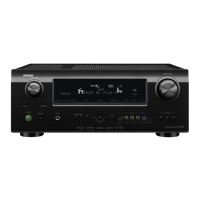
Denon AVR-2310 - User Manual

Denon AVR-2310
80 pages
Print Icon
To Next Page IconTo Next Page
Loading...
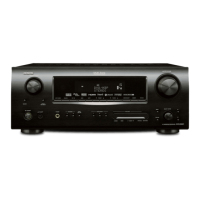
AV SURROUND RECEIVER
AVR-2310
GraphicalUserInterface
English
Use this manual in combination with the operating
guide displayed on the GUI screen.
Menu Map (vpage 20)
Examples of GUI Menu Screen Displays (vpage 21)
Remote Control Unit Operations (vpage 55)
Deutsch
Verwenden Sie dieses Handbuch zusammen mit den
Bedienungsanweisungen auf dem GUI-Bildschirm.
Menüplan (vSeite 20)
Beispiele für GUI-Bildschirmanzeigen (vSeite 21)
Bedienung mit der Fernbedienung (vSeite 55)
Français
Utilisez ce manuel en même temps que le guide
d’utilisation affiché sur l’écran GUI (Interface
graphique).
Plan du menu (vpage 20)
Exemples d’affichage sur écran et d’affichage avant
(vpage 21)
Fonctionnement de la télécommande (vpage 55)
Italiano
Usare questo manuale insieme alla guida operativa
visualizzata sulla schermata GUI.
Mappa menu (vpagina 20)
Esempi di schermate GUI (vpagina 21)
Operazioni con telecomando (vpagina 55)
Español
Utilice este manual conjuntamente con la guía de uso
que aparece en la pantalla GUI.
Estructura de los menús (vpágina 20)
Ejemplos de indicaciones que aparecen en la pantalla
GUI (vpágina 21)
Operaciones con el mando a distancia (vpágina 55)
Nederlands
Gebruik deze gebruiksaanwijzing samen met de
aanwijzingen die op het GUI-scherm worden getoond.
Overzicht van het menu (vblz. 20)
Voorbeelden van GUI menuschermen (vblz. 21)
Bedieningsmogelijkheden van de afstandsbediening
(vblz. 55)
Svenska
Använd denna bruksanvisning i kombination med
anvisningarna på GUI-skärmen.
Menyöversikt (vsidan 20)
Exempel på GUI-skärmar (vsidan 21)
Telecomando principale (vsidan 55)
Owner’s Manual
Bedienungsanleitung
Manuel de l’Utilisateur
Manuale delle istruzioni
Manual del usuario
Gebruiksaanwijzing
Bruksanvisning
The illustrations used for explaining
operations in this manual show the
buttons of the remote control unit.
The same operations can be performed
using the buttons with the same names
on the main unit panel.
Die in diesem Handbuch verwendeten
Tasten-Illustrationen für die
Betriebserklärung beziehen sich auf die
Fernbedienung.
Sie können das Gerät mit der
gleichnamigen Taste an der Frontkonsole
des Gerätes bedienen.
Les illustrations des boutons présentes
dans ce manuel servent à expliquer le
fonctionnement de la télécommande.
Vous pouvez contrôler l’appareil à l’aide
du bouton portant le même nom sur la
façade de l’appareil.
Le illustrazioni dei pulsanti mostrate
in questo manuale di spiegazione si
riferiscono al telecomando.
E’ possibile adoperare l’unità utilizzando
i pulsanti del nome corrispondente
presenti sul pannello frontale dell'unità.
Las ilustraciones de los botones
utilizadas en este manual con propósitos
de explicación son para la unidad del
mando a distancia.
Puede operar la unidad utilizando el
botón del mismo nombre en el panel
delantero de la unidad.
De gebruikte toetsillustraties in deze
handleiding voor uitleg van de bediening
zijn voor de afstandsbediening.
U kunt het toestel bedienen door de toets
met dezelfde naam op het voorpaneel
van het toestel te gebruiken.
Bilder knappar i denna bruksanvisning
för att förklara användningen gäller
fjärrkontrollen.
Du kan också använda knapparna
med samma namn frontpanelen
enheten.
b
b
b
b
b
b
b

Table of Contents

Other manuals for Denon AVR-2310

Questions and Answers

  • D
    Donald CastilloSep 3, 2025
    How to troubleshoot no picture with HDMI on Denon AVR-2310?
    • A
      Annette FreemanSep 3, 2025
      If your Denon Stereo Receiver displays no picture with HDMI connections, check the HDMI connections, ensure the HDMI input setting is correct, verify that the monitor supports copyright protection (HDCP), and ensure that the HDMI formats of the player and monitor match.
  • M
    Margaret MooreSep 18, 2025
    How to get sound from HDMI monitor on Denon Stereo Receiver?
    • R
      Renee TranSep 18, 2025
      If your Denon Stereo Receiver is not outputting sound from the monitor connected via HDMI, set the “Manual Setup” – “HDMI Setup” – “HDMI Audio Out” setting to “TV”.
  • T
    tricia71Sep 16, 2025
    Why isn't the Dolby Digital indicator on my Denon AVR-2310 showing?
    • S
      Sandra ParsonsSep 16, 2025
      If the “DOLBY DIGITAL” indicator does not appear on the display of your Denon Stereo Receiver, check the Blu-ray Disc player / DVD player’s audio output setting. Refer to the Blu-ray Disc player / DVD player’s operating instructions for details.
  • T
    tiffanygarciaSep 14, 2025
    Why is there no picture on my Denon AVR-2310 Stereo Receiver?
    • S
      sarah43Sep 14, 2025
      If your Denon Stereo Receiver isn't showing a picture, check the connections between the receiver and the monitor. Ensure the monitor's input setting is correct. Cancel the PURE DIRECT mode. If using component input connectors for the player and video output connectors for the monitor, note that high definition (1080i/720p) and progressive (480p/576p) video signals are not down-converted; set the player to interlace (480i/576i) signals.
  • A
    April StevensonSep 12, 2025
    Why won't my iPod play on my Denon AVR-2310?
    • M
      meganharrisSep 12, 2025
      If your Denon Stereo Receiver isn't playing your iPod, switch to the input source assigned at “iPod Dock”, reconnect the cable, and plug the control dock for iPod’s AC adapter into a power outlet.
  • R
    rebecca56Sep 12, 2025
    How to disable HDMI control on Denon AVR-2310 Stereo Receiver?
    • A
      Amanda OchoaSep 12, 2025
      If your Denon Stereo Receiver is experiencing issues where connected devices perform the same operations (Power ON/OFF, switching audio output, adjusting volume, switching input source), disable the HDMI's CEC function. Set “Manual Setup” – “HDMI Setup” – “HDMI Control” to “OFF”. To only control power on/off, set “Power Off Control” to “OFF.”
  • B
    bharrisSep 9, 2025
    Why is the display off on my Denon AVR-2310 Stereo Receiver?
    • P
      Patricia AndersonSep 9, 2025
      If your Denon Stereo Receiver display is off, check the “Dimmer” setting and ensure it is set to something other than “OFF”. Also, set a surround mode other than the PURE DIRECT mode.
  • M
    medinacourtneySep 7, 2025
    How to display menu on Denon AVR-2310 Stereo Receiver?
    • S
      Samuel Fleming MDSep 7, 2025
      If your Denon Stereo Receiver isn't displaying the menu screen and status indicators, and you are viewing HDMI or component video signals, press the MENU button on the main unit or remote. Also, set “Manual Setup” – “Option Setup” – “GUI” – “Text” to “ON”, set “Manual Setup” – “Option Setup” – “GUI” – “Master Volume” to “Top” or “Bottom”, ensure “Manual Setup” – “GUI” – “Tuner Information” is not “OFF”, and ensure “Manual Setup” – “GUI” – “ iPod Information” is not “OFF.”
  • M
    michael05Sep 5, 2025
    How to enable Dolby TrueHD/DTS-HD on Denon Stereo Receiver?
    • E
      Eric NunezSep 5, 2025
      If your Denon Stereo Receiver is not outputting Dolby TrueHD, DTS-HD, or Dolby Digital Plus audio, connect the HDMI, set the Blu-ray Disc player’s audio output to bitstream (refer to the Blu-ray Disc player’s manual for details), and use a DTS-compatible player.
  • E
    Elizabeth PowellAug 20, 2025
    What to do if the Denon Stereo Receiver power switches off suddenly and flashes red?
    • R
      Robert JimenezAug 21, 2025
      If your Denon Stereo Receiver's power switches off suddenly and the power indicator flashes red at 0.5-second intervals, it could be due to using speakers with impedance lower than specified, or speaker cable core wires touching each other or the rear panel. Please use speakers with the correct impedance. Unplug the power cord, twist the core wires together tightly or apply termination treatments, and then reconnect.

Summary

GUI Graphical User Interface

English

Instructions for using the manual with the GUI screen in English.

Deutsch

Instructions for using the manual with the GUI screen in German.

SAFETY PRECAUTIONS

IMPORTANT SAFETY INSTRUCTIONS

Essential safety guidelines for operating the equipment.

Cautions on Handling

Before turning the power switch on

Precautions to take before powering on the unit.

About condensation

Information regarding condensation formation inside the unit.

Cautions on Installation

For proper heat dispersal

Advice on installing the unit for effective heat dissipation.

About the Remote Control Unit

Inserting the Batteries

Guide on how to insert batteries into the remote control.

Operating Range of the Remote Control Unit

Information on the effective operating range of the remote control.

Getting Started

Flow of operations through playback

Step-by-step guide to operations leading to playback.

Accessories

List of items supplied with the product.

Part Names and Functions

Front Panel

Identification of controls and indicators on the front of the unit.

Display

Input audio signal indicators

Indicators for digital audio signal input status.

Rear Panel

Digital audio connectors

Description of digital audio input/output connectors on the rear.

Remote Control Unit

Front

Identification of controls on the front of the remote control.

Operations Possible by Remote Control Unit

Operations on the AVR-2310

Functions of the remote control for operating the AVR-2310.

Connections

Connection Flow

Overview of the connection process for various devices.

Cables Used for Connections

Details on HDMI cables for audio and video connections.

Converting Input video signals for Output (Video Conversion Function)

Important Information

Key notes regarding video signal conversion capabilities and limitations.

Installing;Setting the Speakers

Determine the Speaker Layout

Examples of speaker layouts for surround sound setup.

Connecting the Speakers

Set the Amp Assign” Mode According to the Speaker Layout

How to assign amplifier channels based on speaker configuration.

Connecting the Speaker Cables

About bi-amp connections

Explanation of bi-amp connections for improved sound quality.

Connecting Devices not Equipped with HDMI terminals

Monitor (TV)

Instructions for connecting a monitor without HDMI terminals.

Playback Components

Blu-ray Disc player; DVD player

Procedure for connecting and playing Blu-ray or DVD players.

Once Connections are Completed

Turning the Power On

Steps to power on the AVR-2310 unit.

Settings

Menu Map

Overview of the menu structure and navigation.

Examples of GUI Menu Screen Displays

Example 1) Top Menu Display

Shows the main menu structure on the GUI display.

Making the Optimum Settings for the Connected Speakers Automatically (Audyssey Auto Setup)

Audyssey Auto Setup Flow

Step-by-step guide for automatic speaker setup.

Making the Optimum Settings for the Connected Speakers Automatically (Audyssey Auto Setup)

Connect the included Setup Microphone

Instructions for connecting the setup microphone.

Making the Optimum Settings for the Connected Speakers Automatically (Audyssey Auto Setup)

Set the channel to be measured (Channel Select)

Selecting channels for measurement during auto setup.

Making the Optimum Settings for the Connected Speakers Automatically (Audyssey Auto Setup)

STEP4 Calculation

The calculation phase of the automatic speaker setup process.

Making the Optimum Settings for the Connected Speakers Automatically (Audyssey Auto Setup)

Error Messages

Troubleshooting common errors during automatic speaker setup.

Making detailed settings (Manual Setup)

Making the speaker settings (Speaker Setup)

Manual configuration of speaker parameters.

Making detailed settings (Manual Setup)

Bass Setting

Adjusting low-frequency playback settings for the subwoofer.

Making detailed settings (Manual Setup)

Channel Level

Adjusting the volume level for each speaker channel.

Making the HDMI settings (HDMI Setup)

RGB Range

Setting the RGB video range for HDMI output.

Making the ZONE2 settings (ZONE2 Setup)

Level Lch

Adjusting the output level for the left channel in ZONE2.

Making other settings (Option Setup)

Volume Control

Setting the main volume display method and limits.

Making other settings (Option Setup)

Trigger Out

Selecting conditions for activating the Trigger Out function.

Making the Input Settings (Input Setup)

Changing the Input Sources Assigned to the Input Terminals (Input Assign)

Assigning input sources to specific input terminals.

Making the input settings (Input Setup)

Input Assign (HDMI)

Assigning input sources to HDMI connectors.

Making the video settings (Video)

Resolution

Setting the output resolution for video signals.

Changing the Input Sources Input Mode and Decoding mode (Input Mode)

Auto

Automatically detect input signal and perform playback.

Correcting the Input Sources Playback Level (Source Level)

Source Level (Analog)

Correcting the playback level of analog audio input.

Playback

Playing Components

Instructions for playing various audio and video components.

Playing Components

Viewing Still Pictures or Videos on the iPod

How to view photos and videos from an iPod on the monitor.

Listening to FM;AM Broadcasts

Presetting Radio Stations (Preset Memory)

Guide to saving favorite radio stations for easy tuning.

RDS (Radio Data System)

PTY Search

Function to find RDS stations broadcasting a designated program type.

Operations During Playback

Turning Off the Sound Temporarily (Muting)

How to temporarily mute the audio output.

Selecting the Surround Mode

Selecting the Surround Mode

Playing in a DENON Original Surround Mode

Using DENON's proprietary surround sound modes.

Adjusting the Sound and Picture Quality (Audio;Video Adjust)

Adjusting the Sound (Audio Adjust)

Customizing sound settings to personal preference.

Adjusting the Sound and Picture Quality (Audio;Video Adjust)

Adjusting the Tone (Tone Control)

Adjusting bass and treble levels for tone control.

Adjusting the Sound and Picture Quality (Audio;Video Adjust)

Adjusting MultEQ, Dynamic EQ, Dynamic Volume Settings (Audyssey Settings)

Configuring Audyssey settings for room equalization and sound enhancement.

Adjusting the Sound and Picture Quality (Audio;Video Adjust)

Adjusting the Picture Quality (Picture Adjust)

Adjusting picture settings like contrast, brightness, and DNR.

Convenient functions

HDMI Control Function

Enabling control of connected HDMI devices.

Convenient functions

Setting the Power to Standby After a Certain Amount of Time (Sleep Timer Function)

Setting the unit to automatically turn off after a specified period.

Convenient functions

Saving Frequently Used Settings (Quick Select Function)

Saving and recalling frequently used setting configurations.

Playing 2-Channel Sound in ZONE2 (Multizone Function)

ZONE2 Playback by Speaker Output

Playing 2-channel sound in ZONE2 via speaker output.

Operating the Connected Devices by Remote Control Unit

Registering Preset Codes

Programming the remote control for various device codes.

Operating Registered Devices

TV

Operating registered TV devices using the remote.

Assigning buttons that are Not Used to Operate Other Devices (Punch Through Function)

TV: Assigning TV buttons to operate other devices

Reassigning TV buttons to control other devices.

Other Information

Surround

Explanation of various surround sound technologies.

Other Information

Dolby Surround

Description of Dolby Surround sound formats.

Other Information

DTS Surround

Explanation of DTS surround sound formats.

Other Information

Audyssey Dynamic Volume

Explanation of Audyssey Dynamic Volume feature.

Surround

Dolby Pro Logic II

Details on Dolby Pro Logic II matrix decoding technology.

Surround

DTS NEO:6 Surround

Explanation of DTS NEO:6 for surround playback from 2-channel sources.

Surround Modes and Parameters

PURE DIRECT, DIRECT

Modes for pure audio playback with minimal signal processing.

Surround Modes and Parameters

ROCK ARENA

A surround mode simulating a rock arena environment.

Differences in Surround Mode Names Depending on the Input Signals

STANDARD

Standard surround mode behavior based on input signal type.

Differences in Surround Mode Names Depending on the Input Signals

DIRECT

Direct playback mode behavior based on input signal type.

Restoring All the Settings to as They were at the Time of Purchase (Resetting the Microprocessor)

Video section

Specifications related to video input/output signals.

Specifications

Audio section

Technical specifications for the audio amplifier section.

Troubleshooting

[Audio]

Solutions for common audio-related problems.

Troubleshooting

[Video]

Solutions for common video-related problems.

Troubleshooting

[HDMI]

Solutions for common HDMI connection issues.

List of preset codes

DEVICE SELECT: TV

Preset codes for controlling TV devices.

List of preset codes

TV;VCR Combination

Preset codes for TV/VCR combination devices.

List of preset codes

Video Cassette Recorder

Preset codes for controlling video cassette recorders.

List of preset codes

Cable TV

Preset codes for controlling Cable TV devices.

Denon AVR-2310 Specifications

General IconGeneral
EqualizerYes
Product colorBlack
Impedance8 Ω
Frequency range10 - 100000 Hz
Total Harmonic Distortion (THD)0.05 %
AM band range522 - 1611 kHz
FM band range87.5 - 108 MHz
S-Video inputs quantity7
Component video (YPbPr/YCbCr) in3
Dimensions (WxDxH)431 x 377 x 171 mm
HDMI ports quantity5
Connectivity technologyWired
Headphone connectivity3.5 mm
S-Video outputs quantity2
Digital audio optical out1
Weight and Dimensions IconWeight and Dimensions
Weight11200 g

Related product manuals