EasyManua.ls Logo

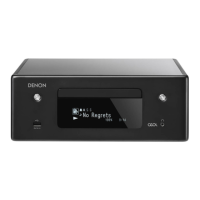
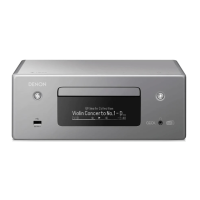
Denon CEOL RCD-N8 - User Manual

Denon CEOL RCD-N8
71 pages
Print Icon
To Next Page IconTo Next Page
Loading...
RCD-N8
NETWORK CD RECEIVER
Owners Manual
Preparations
Operations
Information

Table of Contents

Questions and Answers

  • E
    Emily SingletonSep 23, 2025
    Why is there no display and sound on my Denon CEOL RCD-N8 Car Receiver when the power is on?
    • S
      Samantha ParrishSep 23, 2025
      If there is no display and sound when the power is switched on, the power cord may not be plugged in securely. Check the connections on the set’s rear panel and the connection of the power plug to the power outlet.
  • S
    Sheena GordonAug 23, 2025
    What to do if my Denon CEOL RCD-N8 Car Receiver set does not operate properly?
    • K
      kevinkingAug 25, 2025
      If your set isn't operating correctly, it could be due to external noise or interference causing a malfunction. Resetting the microprocessor may resolve this issue.
  • A
    Alison RoweAug 25, 2025
    Why can't my Denon CEOL RCD-N8 play a CD-R or CD-RW disc?
    • S
      Stephen RogersAug 26, 2025
      If a CD-R or CD-RW disc cannot be played, it may not have been finalized, or the recording conditions might be poor, or the disc quality is low. Finalize the disc before playing it, or use a properly recorded disc.
  • J
    johnsonmarkAug 27, 2025
    How to fix continuous noise when receiving FM programs on my Denon CEOL RCD-N8 Car Receiver?
    • K
      Kayla WalkerAug 27, 2025
      If you're experiencing continuous noise while listening to FM programs, it might be due to an improperly connected antenna cable. Ensure the antenna cable is correctly connected. If the issue persists, try connecting an outdoor antenna.
  • D
    dandersonAug 27, 2025
    What to do if my Denon Car Receiver display is lit but no sound is produced?
    • S
      Sarah RodriguezAug 27, 2025
      If the display is lit but there's no sound, check the following: ensure the speaker cables are securely connected, verify that the function is switched to the correct input source, and adjust the volume to a suitable level.
  • L
    Laura WilliamsSep 14, 2025
    What causes inverted instrument positions on my Denon CEOL RCD-N8?
    • J
      janice47Sep 14, 2025
      If, for stereo sources, the positions of the instruments are inverted, the connections of the speaker cables or input cables are inverted. Check and correct the connections.
  • B
    Bruce WilliamsSep 12, 2025
    What does it mean when 'Server Full' or 'Connection Down' is displayed on my Denon CEOL RCD-N8?
    • E
      Emma VargasSep 12, 2025
      If “Server Full” or “Connection Down” is displayed for some radio stations, it indicates that the station is congested or not currently broadcasting. Wait a while before trying again.
  • D
    donaldpierceSep 13, 2025
    Why does my Denon CEOL RCD-N8 Car Receiver not play a disc when the 1/3 button is pressed?
    • E
      Elizabeth CummingsSep 13, 2025
      If the disc does not play when the 1/3 button is pressed, the disc may be dirty or scratched. Wipe the disc clean or replace it.
  • J
    John BakerSep 5, 2025
    How to troubleshoot 'Server is not found' error on my Denon CEOL RCD-N8 Car Receiver?
    • H
      Heather SmithSep 5, 2025
      If you encounter a 'Server is not found' error, it could be due to the computer's or router's firewall being activated, the computer not being powered on, the server not running, or the set's IP address being incorrect. Check the computer's or router's firewall settings, ensure the computer is turned on, launch the server, and verify the set's IP address.
  • K
    kathysteeleSep 2, 2025
    Why can't my Denon CEOL RCD-N8 Car Receiver play files stored on a computer?
    • K
      Kristin BowenSep 2, 2025
      If you're unable to play files stored on a computer, it could be due to the files being in a non-compatible format, copyright protection, or connecting the set and computer via USB cable. Ensure the files are in a compatible format. Note that copyright-protected files cannot be played on this set, and the set’s USB port cannot be used for connection to a computer.

Summary

Safety Precautions and Warnings

Important Safety Instructions

Essential safety guidelines for operating the device, including warnings and precautions.

General Safety Warnings

Specific cautions regarding electric shock, fire hazards, and hot surfaces.

Remote Operation

Connections Guide

Connecting to a Home Network (LAN)

Steps for connecting the unit to a home network via wired or wireless LAN.

Setup Procedures

General Settings - Clock

Instructions for setting the clock, including summer time, time zone, and manual/auto adjustments.

Network Setup

Wireless LAN Setup (WPS)

Methods for setting up wireless LAN connection using WPS (Push-button and PIN).

CD Playback Operations

Programmed Track Playback

Creating and managing custom track playback sequences (program playback).

MP3 and WMA File Playback

Network Audio Playback

Internet Radio Functionality

Information and operations for internet radio, including searching and favorites.

Music Server Functionality

Playing music files stored on a computer via a network.

Last.fm Integration

Information about integrating and using the Last.fm service.

Network Audio Playback - Media Sharing

Network Audio Playback - PC;NAS Files

Network Audio Playback - Last.fm

Last.fm Radio Operation

Detailed steps for listening to Last.fm radio stations.

Tuning Radio Stations

Presetting and Auto-Tuning FM Stations

Automatically preset, auto-tune, manual tune, and cancel auto-tuning FM stations.

Tuning Radio Stations - RDS Features

Program Type (PTY) and Traffic Program (TP) Search

Searching for radio stations based on program type (PTY) or traffic announcements (TP).

Tuning Radio Stations - Radio Text

Favorite Function

iPod Playback

iPod Playback Operations

Playing and Controlling iPod Content

Operations for playing, pausing, navigating, and controlling iPod content.

USB Memory Device Playback

Playing USB Files and Device Management

How to play files from USB devices, remove them, and use repeat/random modes.

Audio Input Options

AirPlay Functionality

Playing iTunes Music via AirPlay

Steps to stream music from iTunes on a computer to the unit.

Streaming Music from iPhone;iPod

Directly streaming music from iPhone or iPod touch to the unit.

AirPlay Function - Remote Control

Remote Control Operations for iTunes

Using the DENON remote control to play, pause, and skip tracks in iTunes.

Remote Play Functionality

Performing Remote Playback

Steps to initiate and perform playback operations using a DMC device.

Web Control Function

Accessing the Web Interface

Steps to enable network control and access the unit's web interface via a browser.

Web Control Function - Network Settings

Configuring Network Settings via Web Interface

Detailed steps for configuring network settings like DHCP and Wi-Fi through the web interface.

Part Names and Functions

Remote Control Guide

Media File Compatibility

iPod and AirPlay Compatibility

Information on iPod compatibility, AirPlay, and Apple device requirements.

MP3 and WMA File Formats

Specifications and compatibility information for MP3 and WMA file formats.

USB Memory Device File Compatibility

Details on supported USB file types, formats, and device limitations.

Network Audio Features

Internet Radio and Music Server Information

Information on internet radio functions and playing music from a computer server.

Last.fm Service Information

Details about the Last.fm service and its integration with the unit.

Technical Definitions Glossary

Troubleshooting Guide

CD Playback Troubleshooting

Resolving issues related to CD playback, such as unsupported discs or no sound.

General Unit Operation Troubleshooting

Troubleshooting common problems with unit operation, display, and power.

Network and Media Playback Troubleshooting

Resolving issues with network audio, iPod, and USB playback.

Last.fm Connectivity and Playback Troubleshooting

Resolving problems related to Last.fm login, playback, and network connectivity.

Wireless LAN Connection Troubleshooting

Troubleshooting network connection issues, including WPS and signal reception.

AirPlay Function Troubleshooting

Resolving issues with AirPlay icon display, sound, and connection.

Remote Control Operation Troubleshooting

Troubleshooting problems with remote control operation, such as battery issues.

Product Specifications

Denon CEOL RCD-N8 Specifications

General IconGeneral
BrandDenon
ModelCEOL RCD-N8
CategoryCar Receiver
LanguageEnglish

Related product manuals