21
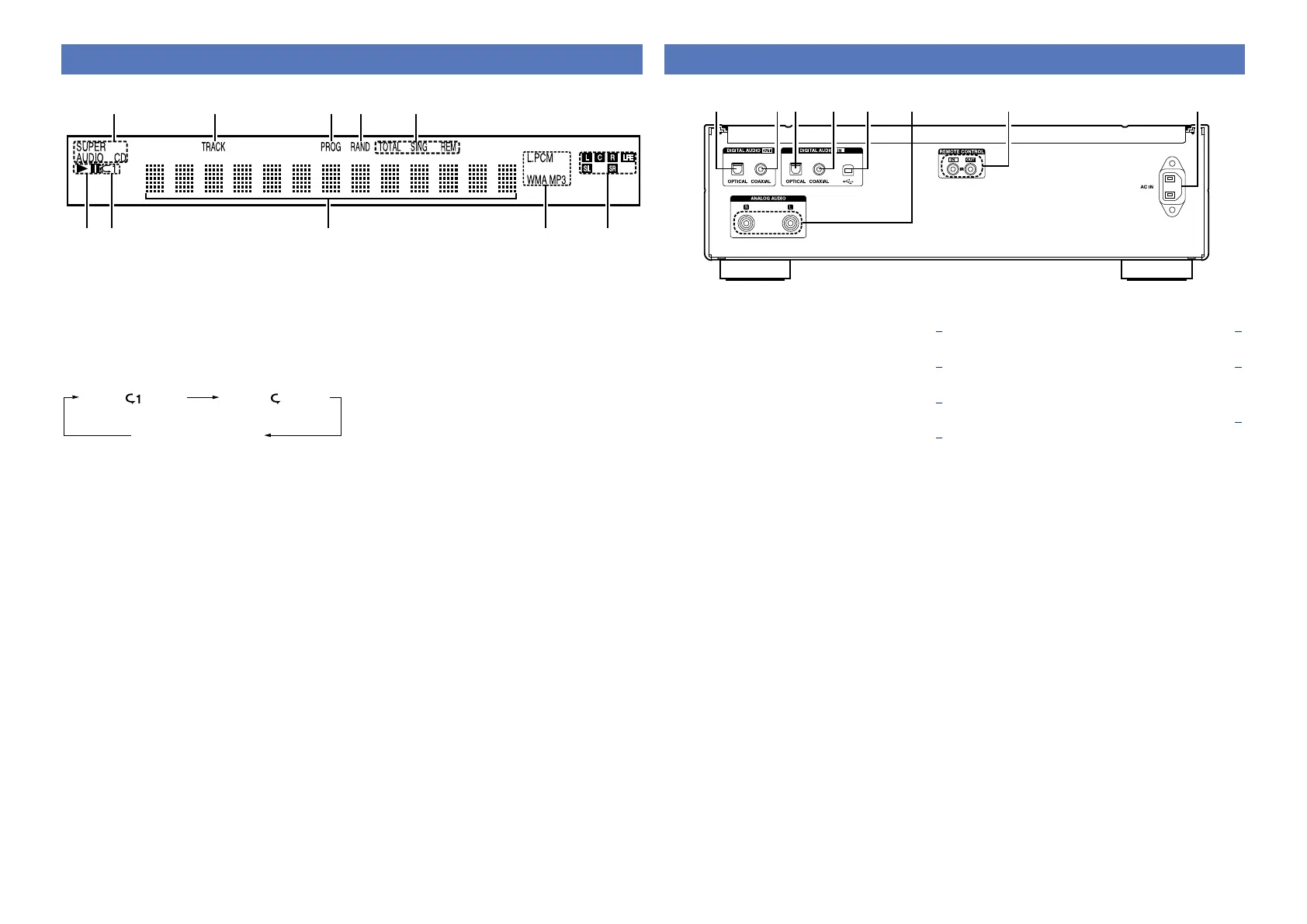
Display
wq e r
Q0
o i u y
t
Rear panel
q w r t y u ie
q Digital audio output connector
(DIGITAL AUDIO OUT OPTICAL) ················· (4)
w Digital audio output connector
(DIGITAL AUDIO OUT COAXIAL) ················ (4)
e Digital audio input connector
(DIGITAL AUDIO IN OPTICAL) ····················· (5)
r Digital audio input connector
(DIGITAL AUDIO IN COAXIAL) ···················· (5)
t Digital audio input connector
(DIGITAL AUDIO IN USB) ····························· (5)
y Analog audio output connectors
(ANALOG AUDIO OUT) ································ (4)
u REMOTE CONTROL jacks
Extension jack for future use.
i AC inlet (AC IN) ············································· (8)
q Playback mode indicators
1 : Lights up during playback.
3 : Lights up during pause.
w Repeat mode indicators
The display switches as follows each time the
REPEAT button on the remote control unit is
pressed.
Single-track repeat All-track repeat
Repeat off
(indicator turns off)
e Information display
Various information is displayed here, depending
on the operation mode.
r Playback format indicators
Lights up while an WAV/MP3/WMA file is being
played back.
t Playback signal channel indicator
L : Front left LFE : Subwoofer
C : Center SL : Surround left
R : Front right SR : Surround right
y Time display indicator
SING REM : Lights up when displaying the
remaining time in single-track
playback.
TOTAL REM : Lights up when displaying
the remaining time in all-track
playback.
u Random indicator
Lights up during random playback.
i Program indicator
Lights up during program playback.
o Track number indicator
Lights up when displaying the track number.
Q0 Playback media indicator
Displays the type of disc that is being played
back.



 To Next Page