EasyManua.ls Logo

Denon DCD-3520 - Advanced Playback Modes (Cont.); Repeating Modes and Time Search

Denon DCD-3520
51 pages
Print Icon
To Next Page IconTo Next Page
To Previous Page IconTo Previous Page
Loading...
e
When
the
1-track
repeat
button
(REPEAT-1)
is
pressed
in
the
stop
mode,
track
number
1
lights
on
the
calendar
and
the
1
track
repeat
function
is
possible.
To
start,
press
the
(
®
PLAY)
button.
«
To
cancel
1-track
repeat,
press
the
1-track
repeat
button
(REPEAT-1)
once
again.
Normal
playback
will
resume.
ri
1)
Playing
a
desired
time
or
interval
«0.00.00...
eee
Time
Search
e
With
this
function
you
can
specify
the
starting
time
and/or
ending
time
in
seconds,
allowing
playback
of
a
very
specific
section
of
a
track.
In
the
Stop
Mode
Specifying
the
starting
time
'
Press
the
TIME
SEARCH
button.
The
indicator
will
flash
on
the
display,
and
the
TRACK
display
will
read
“--”.
Use
the
number
buttons
to
set
in
order
the
track
number
and
the
time
(minutes
and
seconds).
Example:
Starting
from
2
minutes
34
seconds
into
track
3
Press
the
following
buttons
in
order:
[
TIME
SEARCH
J],
[0],
[3],
[0].
(2),
(3),
4.
NOTE:
If
a
track
number
or
time
not
on
the
disc
is
set,
the
unit
will
return
to
the
mode
it
was
in
before
the
first
buttons
were
pressed.
3)
Press
the
(
®
PLAY)
button
to
begin
playback
from
the
specified
time.
e
Specifying
the
ending
time
The
ending
time
can
be
set
before
pressing
the
play
button
while
the
L
TIME
SEARCH
|
indicator
is
flashing
using
the
following
proce-
dure:
‘4:
Press
the
TIME
SEARCH
button.
The
indicator
will
stop
flashing
and
the
TRACK
display
will
read
“--”.
(5)
Use
the
number
buttons
to
set
in
order
the
track
number
and
the
time
(minutes
and
seconds).
NOTE:
It
is
not
possible
to
set
an
ending
time
at
a
point
before
(or
the
same
as)
the
starting
time.
6)
After
specifying
the
ending
time,
press
the
(
®
PLAY)
button
to
begin
repeated
playback
between
the
two
specified
points.
(A-B
repeat
by
specifying
the
time)
W
In
the
Play
Mode
(1!
When
the
TIME
SEARCH
button
is
pressed,
the
current
track
number
and
time
(minutes
and
seconds)
are
stored
in
the
memory
and
the
indicator
begins
flashing.
(2
When
the
(
®
PLAY)
button
is
pressed,
playback
starts
from
the
starting
point
stored
in
the
memory.
To
start
playback
over
from
the
specified
point,
press
the
(
®
PLAY)
button
again.
(3)
If
the
TIME
SEARCH
button
is
pressed
again,
the
ending
time
is
stored
in
the
memory,
the
indicator
stops
flashing,
and
the
interval
between
the
starting
point
and
ending
point
is
played
repeatedly.
(A-B
repeat)
To
cancel
the
time
search
function,
press
one
of
the
following
buttons:
(1)
PROGRAM/DIRECT
(2)
DIRECT
(on
remote
control
unit)
(3)
OPEN/CLOSE
NOTE:
e
If
the
search
function
is
used
after
a
track
number
and
time
(minutes
and
seconds)
are
specified
with
the
disc
holder
open
and
no
disc
set,
playback
will
start
from
the
beginning
of
the
first
track
on
the
disc.
e
If
atime
over
the
time
on
the
disc
is
specfied,
playback
will
start
from
the
beginning
of
the
track
following
the
specified
track.
fey
10
®
inserting
blanks
between
tracks
0
ee
Auto
Space
|
(
TIMER-CONTROLLED
PLAYBACK
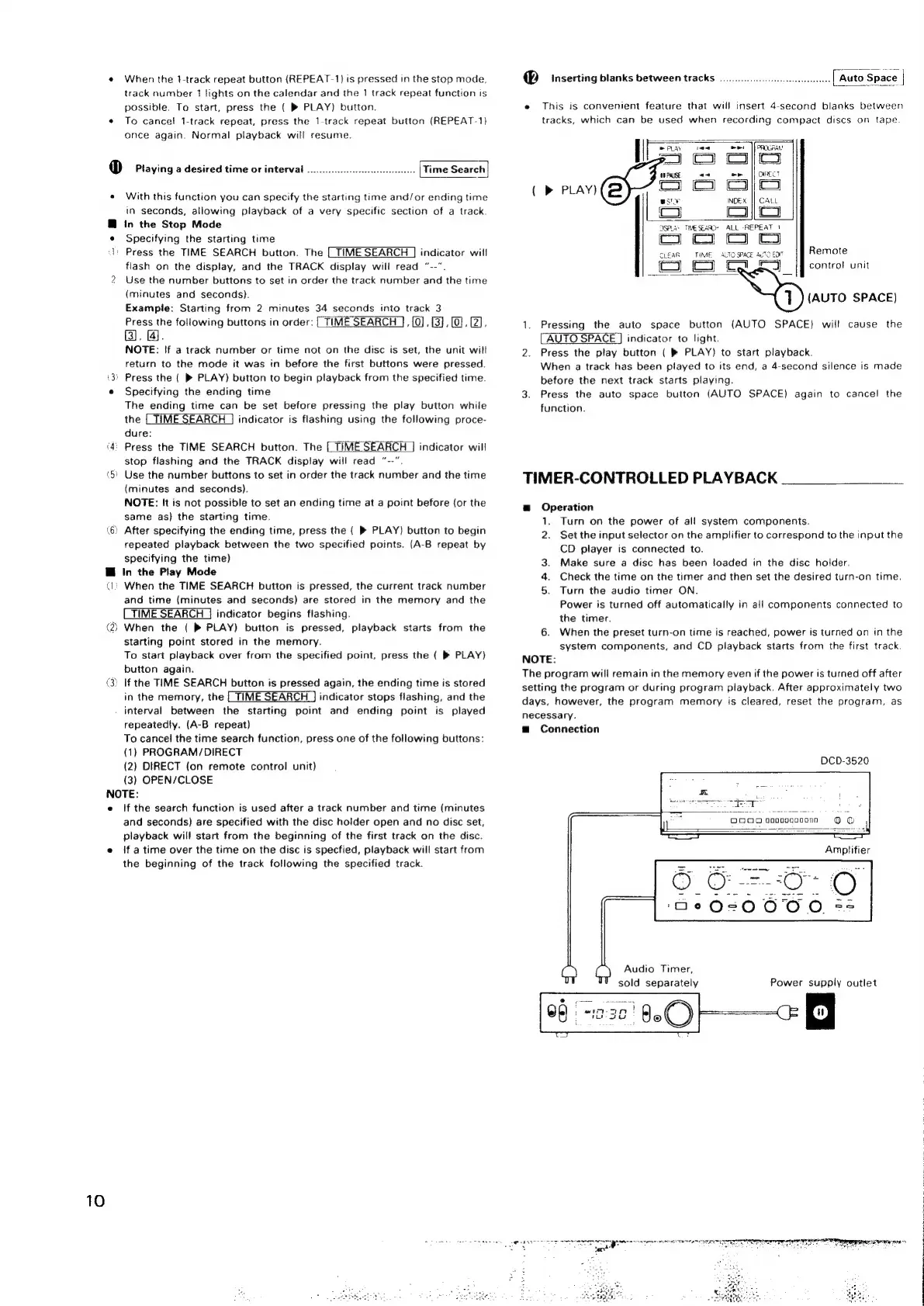
This
is
convenient
feature
that
will
insert
4-second
blanks
between
tracks,
which
can
be
used
when
recording
compact
discs
on
tape.
|
Pay
mee]
foROGRAN
p]}
CI
Coco
aU
PALSE
as
ee
|}
oncct
>
PLAY)
Co
Cc)
aj
[
INDEX
CALL
Ls
oo
OSPLAs
TIMESEAACR
«ALL
-REPEAT
1
co
co
oO
CLEAR
TIME.
3.70
SPACE
AuTO
EDT
Remote
cy
Co
Le
|
control
unit
(AUTO
SPACE)
Pressing
the
auto
space
button
(AUTO
SPACE)
will
cause
the
AUTO
SPACE
]
indicator
to
light.
Press
the
play
button
{
®
PLAY)
to
start
playback.
When
a
track
has
been
played
to
its
end,
a
4-second
silence
is
made
before
the
next
track
starts
playing.
Press
the
auto
space
button
(AUTO
SPACE)
again
to
cancel
the
function.
a
Operation
1.
Turn
on
the
power
of
all
system
components.
2.
Set
the
input
selector
on
the
amplifier
to
correspond
to
the
input
the
CD
player
is
connected
to.
3.
Make
sure
a
disc
has
been
loaded
in
the
disc
holder.
4.
Check
the
time
on
the
timer
and
then
set
the
desired
turn-on
time.
5.
Turn
the
audio
timer
ON.
Power
is
turned
off
automatically
in
all
components
connected
to
the
timer.
6.
When
the
preset
turn-on
time
is
reached,
power
is
turned
on
in
the
system
components,
and
CD
playback
starts
from
the
first
track.
NOTE:
The
program
will
remain
in
the
memory
even
if
the
power
is
turned
off
after
setting
the
program
or
during
program
playback,
After
approximately
two
days,
however,
the
program
memory
is
cleared,
reset
the
program,
as
necessary.
Connection
DCD-3520
Audio
Timer,
sold
separately
Power
supply
outlet
Sony
arrive
rnc
norte
ise
oa
Rey
CPST
A
ORR
ETRE
:
pore
eee
anes
ones
ree
|

Related product manuals