EasyManua.ls Logo

Denon DCD-3520 - Names and Functions of Parts

Denon DCD-3520
51 pages
Print Icon
To Next Page IconTo Next Page
To Previous Page IconTo Previous Page
Loading...
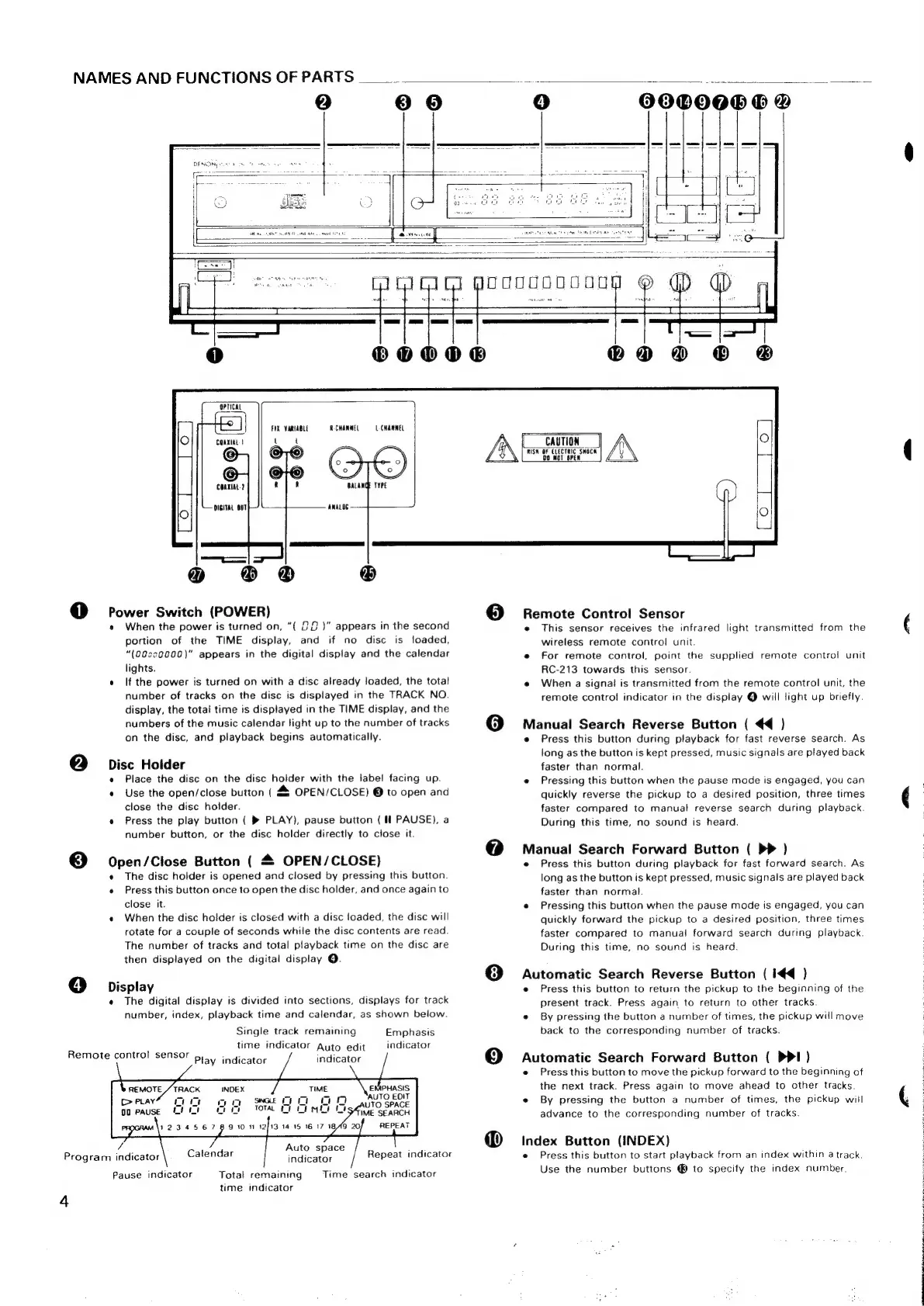
NAMES
AND
FUNCTIONS
OF
PARTS
____-
42)
® 6
4)
Remote
control
sensor
Program
indicator
4
4)
600008
©
@
OPTICAL
FIX
VARIABLE
RCHANNEL
LCHAWNEL
COAXIAL}
o
®
@
Rome
Switch
(POWER)
When
the
power
is
turned
on,
“(
22
)”
appears
in
the
second
portion
of
the
TIME
display,
and
if
no
disc
is
loaded,
“(00cc0000)"
appears
in
the
digital
display
and
the
calendar
lights.
If
the
power
is
turned
on
with
a
disc
already
loaded,
the
total
number
of
tracks
on
the
disc
is
displayed
in
the
TRACK
NO.
display,
the
total
time
is
displayed
in
the
TIME
display,
and
the
numbers
of
the
music
calendar
light
up
to
the
number
of
tracks
on
the
disc,
and
playback
begins
automatically.
Disc
Holder
Open/Close
Button
(4
Place
the
disc
on
the
disc
holder
with
the
label
facing
up.
Use
the
open/close
button
(
&
OPEN/CLOSE)
@
to
open
and
close
the
disc
holder.
Press
the
play
button
(
®
PLAY),
pause
button
(
fl
PAUSE),
a
number
button,
or
the
disc
holder
directly
to
close
it.
OPEN/CLOSE)
The
disc
holder
is
opened
and
closed
by
pressing
this
button.
Press
this
button
once
to
open
the
disc
holder,
and
once
again
to
close
it.
When
the
disc
holder
is
closed
with
a
disc
loaded,
the
disc
will
rotate
for
a
couple
of
seconds
while
the
disc
contents
are
read.
The
number
of
tracks
and
total
playback
time
on
the
disc
are
then
displayed
on
the
digital
display
O.
Display
Pause
indicator
The
digital
display
is
divided
into
sections,
displays
for
track
number,
index,
playback
time
and
calendar,
as
shown
beiow.
Single
track
remaining
time
indicator
Auto
edit
indicator
Emphasis
indicator
Play
indicator
REMOTE
/
TRACK
Cea
Mm
mo
00
PAUSE
tii
oi
iNDEX
Auto
space
indicator
Time
search
indicator
Calendar
Repeat
indicator
Total
remaining
time
indicator
CAUTION
RISK
OF
ELECTRIC
SHOCK
00
WOT
OPEN
Remote
Control
Sensor
e
This
sensor
receives
the
infrared
light
transmitted
from
the
wireless
remote
control
unit.
For
remote
control,
point
the
supplied
remote
control
unit
RC-213
towards
this
sensor.
When
a
signal
is
transmitted
from
the
remote
control
unit,
the
remote
control
indicator
in
the
display
@
will
light
up
briefly.
Manual
Search
Reverse
Button
(
€4
)
Press
this
button
during
playback
for
fast
reverse
search.
As
long
as
the
button
is
kept
pressed,
music
signals
are
played
back
faster
than
normal.
Pressing
this
button
when
the
pause
mode
is
engaged,
you
can
quickly
reverse
the
pickup
to
a
desired
position,
three
times
faster
compared
to
manual
reverse
search
during
playback.
During
this
time,
no
sound
is
heard.
Manual
Search
Forward
Button
(
PP
)
Press
this
button
during
playback
for
fast
forward
search.
As
long
as
the
button
is
kept
pressed,
music
signals
are
played
back
faster
than
normal.
Pressing
this
button
when
the
pause
mode
is
engaged,
you
can
quickly
forward
the
pickup
to
a
desired
position,
three
times
faster
compared
to
manual
forward
search
during
playback.
During
this
time,
no
sound
is
heard.
Automatic
Search
Reverse
Button
(
I4€4@
}
Press
this
button
to
return
the
pickup
to
the
beginning
of
the
present
track.
Press
again
to
return
to
other
tracks.
By
pressing
the
button
a
number
of
times,
the
pickup
will
move
back
to
the
corresponding
number
of
tracks.
Automatic
Search
Forward
Button
(
PPI)
Press
this
button
to
move
the
pickup
forward
to
the
beginning
of
the
next
track.
Press
again
to
move
ahead
to
other
tracks.
By
pressing
the
button
a
number
of
times,
the
pickup
will
advance
to
the
corresponding
number
of
tracks.
Index
Button
(INDEX)
Press
this
button
to start
playback
from
an
index
within
a
track.
Use
the
number
buttons
®
to
specify
the
index
number.

Related product manuals