EasyManua.ls Logo

Denon DCD-3520 - Program Correction and Playback

Denon DCD-3520
51 pages
Print Icon
To Next Page IconTo Next Page
To Previous Page IconTo Previous Page
Loading...
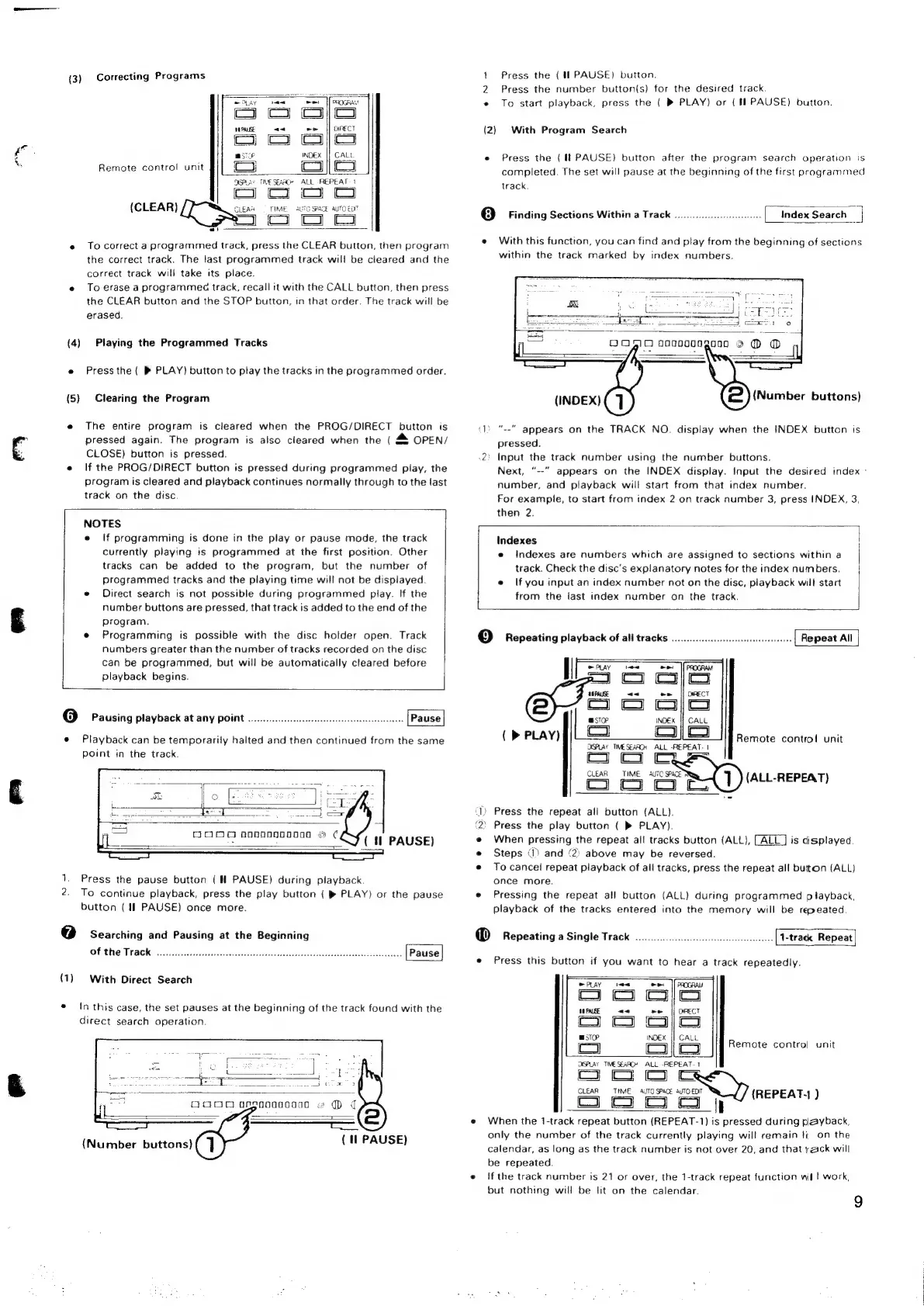
(3)
Correcting
Programs
ey
om me
OCOGRAN
oo
oo
HH
PAUSE
aa
Leal
DIRECT
co
co
coy
cS
|
PEs
INDEX
|}
CALL
Remote
control
unit
(om
Cc
||
Co
OSPLAY
TIMESEAAC*
ALL
REPEAT
1
cj
co Oo
Co
(CLEAR)
CLEAR
«©
TIME
a7
SPACE
auTO
EXT
5
co
Co
Co
«
To
correct
a
programmed
track,
press
the
CLEAR
button,
then
program
the
correct
track.
The
last
programmed
track
will
be
cleared
and
the
correct
track
will
take
its
place.
e
To
erase
a
programmes
track,
recall
it
with
the
CALL
button,
then
press
the
CLEAR
button
and
the
STOP
button,
in
that
order.
The
track
will
be
erased.
(4)
Playing
the
Programmed
Tracks
e
Press
the
(
®
PLAY)
button
to
play
the
tracks
in
the
programmed
order.
(5)
Clearing
the
Program
e
The
entire
program
is
cleared
when
the
PROG/DIRECT
button
is
pressed
again.
The
program
is
also
cleared
when
the
(
&
OPEN/
CLOSE)
button
is
pressed.
e
If
the
PROG/DIRECT
button
is
pressed
during
programmed
play,
the
program
is
cleared
and
playback
continues
normally
through
to
the
last
track
on
the
disc.
NOTES
e
If
programming
is
done
in
the
play
or
pause
mode,
the
track
currently
playing
is
programmed
at
the
first
position.
Other
tracks
can
be
added
to
the
program,
but the
number
of
programmed
tracks
and
the
playing
time
will
not
be
displayed.
e
Direct
search
is
not
possible
during
programmed
play.
If
the
number
buttons
are
pressed,
that
track
is
added
to
the
end
of
the
program.
e
Programming
is
possible
with
the
disc
holder
open.
Track
numbers
greater
than
the
number
of
tracks
recorded
on
the
disc
can
be
programmed,
but
will
be
automatically
cleared
before
[
playback
begins.
@
Pausing
playback
at
any
point
....
e
Playback
can
be
temporarily
halted
and
then
continued
from
the
same
point
in
the
track.
1.
Press
the
pause
button
(
PAUSE)
during
playback.
2.
To
continue
playback,
press
the
play
button
(
®
PLAY)
or
the
pause
button
(if
PAUSE)
once
more.
7]
Searching
and
Pausing
at
the
Beginning
OPS
TACK
esses
seceeaesoijsceacktsctsiasssaiaenvexetisecsacanibeedhbieacaidbeceonss
(1)
With
Direct
Search
e
In
this
case,
the
set
pauses
at
the
beginning
of
the
track
found
with
the
direct
search
operation.
(Number
buttons)
(
fl!
PAUSE)
1
Press
the
(4
PAUSE)
button.
2
Press
the
number
button(s)
for
the
desired
track.
«
To
start
playback,
press
the
(
®
PLAY)
or
(MH
PAUSE)
button.
(2)
With
Program
Search
e
Press
the
(1!
PAUSE}
button
after
the
program
search
operation
is
completed.
The
set
will
pause
at
the
beginning
of
the
first
programmed
track.
=
[index
Search
|
@
Finding
Sections
Within
a
Track
e
With
this
function,
you
can
find
and
play
from
the
beginning
of
sections
within
the
track
marked
by
index
numbers.
OOO
aonooongonno
9
O
D
at
(Number
buttons)
(INDEX)
(1)
“--""
appears
on
the
TRACK
NO.
display
when
the
INDEX
button
is
pressed.
2:
Input
the
track
number
using
the
number
buttons.
Next,
“--”
appears
on
the
INDEX
display.
Input
the
desired
index
-
number,
and
playback
will
start
from
that
index
number.
For
example,
to
start
from
index
2
on
track
number
3,
press
INDEX,
3,
then
2.
Indexes
e
indexes
are
numbers
which
are
assigned
to
sections
within
a
track.
Check
the
disc's
explanatory
notes
for
the
index
numbers.
e
If
you
input
an
index
number
not
on
the
disc,
playback
will
start
from
the
last
index
number
on
the
track.
C9}
Repeating
playback
of
ali
tracks
0.0...
cece
eee
eeeee
Repeat
All
(>
PLAY)
Remote
contro!
unit
OSALAY
TIMESEAAOH
ALL
REPEAT.
1
(or
CLEAR
TIME
AUTO
PAE
F
om
co
(ALL-REPEAT)
(1)
Press
the
repeat
all
button
(ALL).
{2}
Press
the
play
button
(
®
PLAY).
e
When
pressing
the
repeat
all
tracks
button
(ALL),
is
displayed
e
Steps
)
and
(2)
above
may
be
reversed.
e
Tocancel
repeat
playback
of
all
tracks,
press
the
repeat
all
button
(ALL)
once
more.
e
Pressing
the
repeat
all
button
(ALL)
during
programmed
playback,
playback
of
the
tracks
entered
into
the
memory
will
be
repeated.
@
Repeating
a
Single
Track
o.oo
eecreeseeeees
1-track
Repeat
e
Press
this
button
if
you
want
to
hear
a
track
repeatedly.
SPAY
ee
ee
|fonocraw
Co
co
Coco
10
PAUSE
a<
bal
DIRECT
Ca
cy
Cocoa
esr
INDEX
CALL
Ps
co
olo
Remote
control
unit
OSPLAY
TIME
SEARCH
ALL
-REPEAT-1
on
&
a)
CLEAR
TIME
AUTO
SPACE
AUTO
EDT
REPEAT;
Ca
co
co
co
i
{
e
When
the
1-track
repeat
button
(REPEAT-1}
is
pressed
during
payback,
only
the
number
of
the
track
currently
playing
will
remain
ti
on
the
calendar,
as
long
as
the
track
number
is
not
over
20,
and
that
rack
will
be
repeated.
e
tf
the
track
number
is
21
or
over,
the
1-track
repeat
function
wil
work,
but
nothing
will
be
lit
on
the
calendar.
9

Related product manuals