EasyManua.ls Logo

Denon DCD-3520 - Advanced Playback Modes; Track Navigation and Search; Program Management

Denon DCD-3520
51 pages
Print Icon
To Next Page IconTo Next Page
To Previous Page IconTo Previous Page
Loading...
C3]
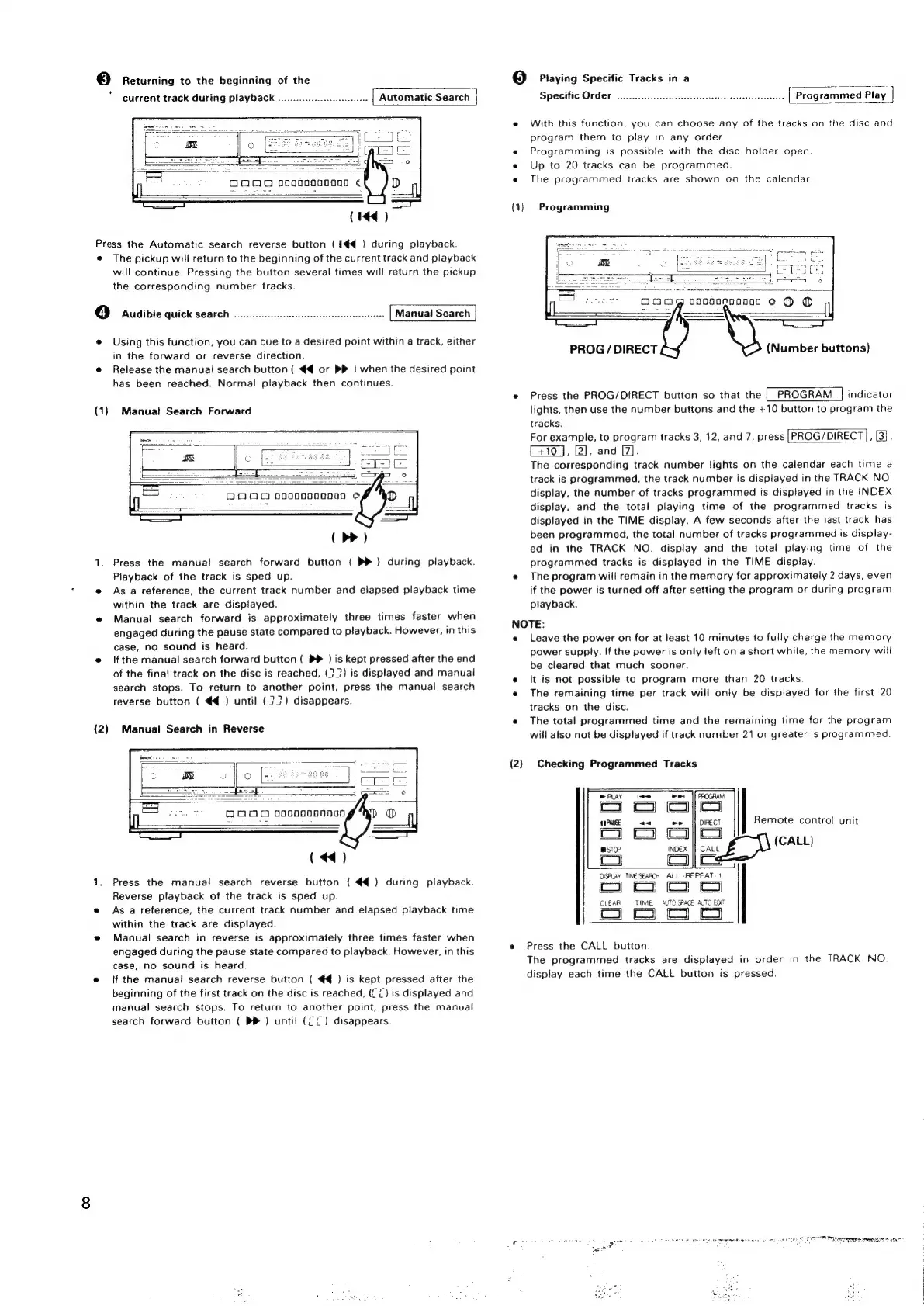
Returning
to
the
beginning
of
the
current
track
during
playback
.........0..00.0
Automatic
Search
(144)
Press
the
Automatic
search
reverse
button
(
1€4@
)
during
playback.
e
The
pickup
will
return
to
the
beginning
of
the
current
track
and
playback
will
continue.
Pressing
the
button
several
times
will
return
the
pickup
the
corresponding
number
tracks.
4]
Audible
quick
search
ooo...
ccc
cece
ceeeeseeeeeeeeeees
Manual
Search
®
Using
this
function,
you
can
cue
to
a
desired
point
within
a
track,
either
in
the
forward
or
reverse
direction.
e
Release
the
manual
search button
(
€4
or
PP
)
when
the
desired
point
has
been
reached.
Normal
playback
then
continues.
(1)
Manuat
Search
Forward
(
>>)
1.
Press
the
manual
search
forward
button
{
PP)
during
playback.
Playback
of
the
track
is
sped
up.
e
Asa
reference,
the
current
track
number
and
elapsed
playback
time
within
the
track
are
displayed.
e
Manual
search
forward
is
approximately
three
times
faster
when
engaged
during
the
pause
state
compared
to
playback.
However,
in
this
case,
no
sound
is
heard.
e
Ifthe
manual
search
forward
button
(
>>
)
is
kept
pressed
after
the
end
of
the
final
track
on
the
disc
is
reached,
(?7)
is
displayed
and
manual
search
stops.
To
return
to
another
point,
press
the
manual
search
reverse
button
(
€@
)
until
(723)
disappears.
(2)
Manual
Search
in
Reverse
(44)
1.
Press
the
manual
search
reverse
button
(
€@)
during
playback.
Reverse
playback
of
the
track
is
sped
up.
e
Asa
reference,
the
current
track
number
and
elapsed
playback
time
within
the
track
are
displayed.
e@
Manual
search
in
reverse
is
approximately
three
times
faster
when
engaged
during
the
pause
state
compared
to
playback.
However,
in
this
case,
no
sound
is
heard.
e
(f
the
manual
search
reverse
button
(
€€
)
is
kept
pressed
after
the
beginning
of
the
first
track
on
the
disc
is
reached,
(CC)
is
displayed
and
manual
search
stops.
To
return
to
another
point,
press
the
manual
search
forward
button
(
PP
)
until
(Ci)
disappears.
(5)
Playing
Specific
Tracks
in
a
Specific
Order
With
this
function,
you
can
choose
any
of
the
tracks
on
the
disc
and
program
them
to
play
in
any
order.
Programming
ts
possible
with
the
disc
holder
open.
Up
to
20
tracks
can
be
programmed.
The
programmed
tracks
are
shown
on
the
calendar
Programming
[
PROG
/
DIRECT
(Number
buttons)
Press
the
PROG/DIRECT
button
so
that
the
|
PROGRAM
|
indicator
lights,
then
use
the
number
buttons
and
the
+10
button
to
program
the
tracks.
For
example,
to
program
tracks
3,
12,
and
7,
press
|PROG/DIRECT],
[3],
[4707],
[2],
and
[7].
The
corresponding
track
number
lights
on
the
calendar
each
time
a
track
is
programmed,
the
track
number
is
displayed
in
the
TRACK
NO.
display,
the
number
of
tracks
programmed
is
displayed
in
the
INDEX
display,
and
the
total
playing
time
of
the
programmed
tracks
is
displayed
in
the
TIME
display.
A
few
seconds
after
the
last
track
has
been
programmed,
the
total
number
of
tracks
programmed
is
display-
ed
in
the
TRACK
NO.
display
and
the
total
playing
time
of
the
programmed
tracks
is
displayed
in
the
TIME
display.
The
program
will
remain
in
the
memory
for
approximately
2
days,
even
if
the
power
is
turned
off
after
setting
the
program
or
during
program
playback.
NOTE:
e
e
e
(2)
Leave
the
power
on
for
at
least
10
minutes
to
fully
charge
the
memory
power
supply.
If
the
power
is
only
left
on
a
short
while,
the
memory
will
be
cleared
that
much
sooner.
It
is
not
possible
to
program
more
than
20
tracks.
The
remaining
time
per
track
will
only
be
displayed
for
the
first
20
tracks
on
the
disc.
The
total
programmed
time
and
the
remaining
time
for
the
program
will
also
not
be
displayed
if
track
number
21
or
greater
is
programmed.
Checking
Programmed
Tracks
DIRECT
Remote
control
unit
CALL
Cs
a
OSPLAY
TIME
SEARCH
ALL
-REPEAT-1
|
cI
Co
CLEAR
TIME.
“UT0
SPACE
AUTO
ED
(om
|
3
_)
Press
the
CALL
button.
The
programmed
tracks
are
displayed
in
order
in
the
TRACK
NO.
display
each
time
the
CALL
button
is
pressed.

Related product manuals