EasyManua.ls Logo

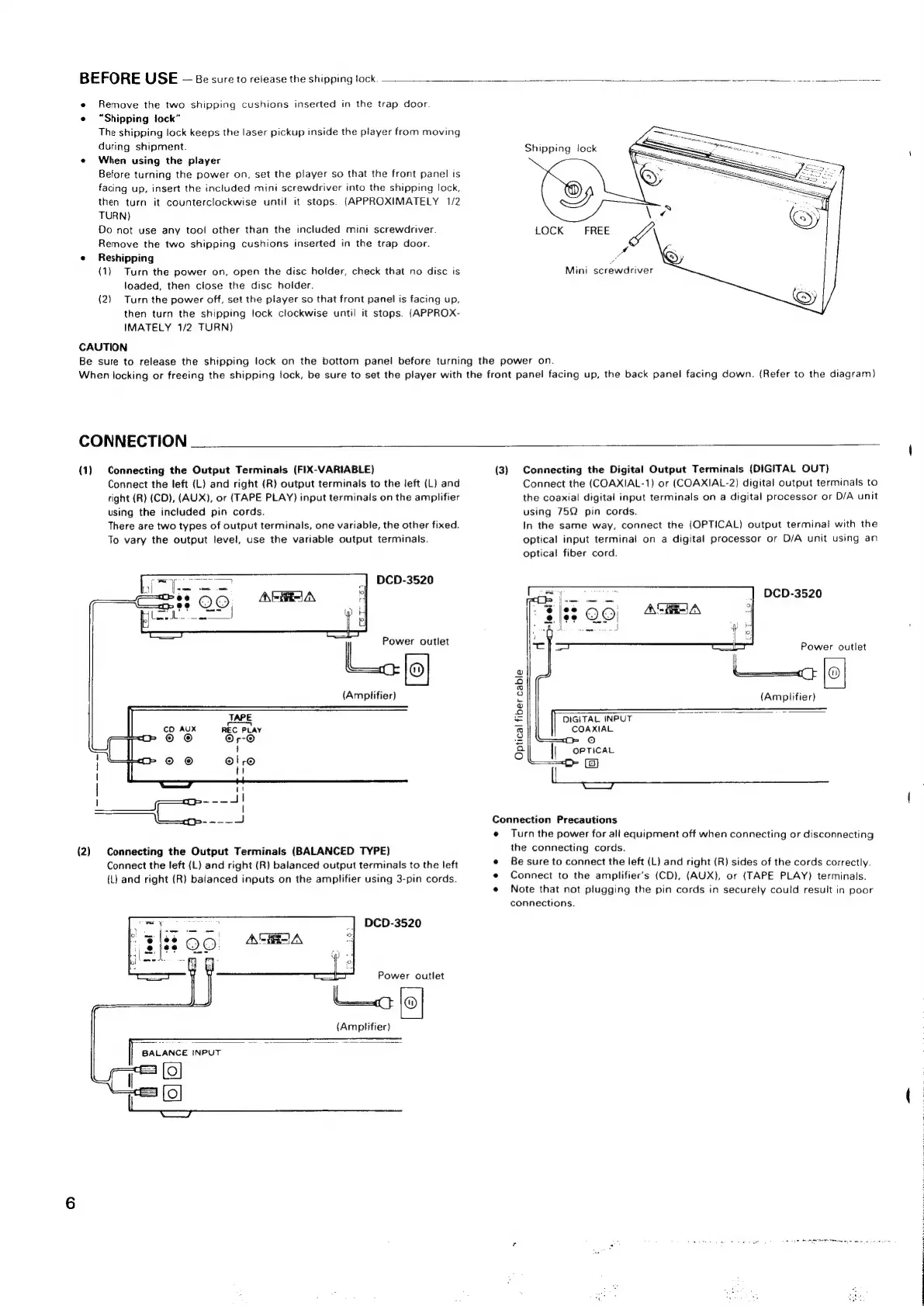
Denon DCD-3520 - Initial Setup and Precautions; Shipping Lock Release and Initial Setup; Connecting the Player; Analog and Digital Output Connections

Denon DCD-3520
51 pages
Print Icon
To Next Page IconTo Next Page
To Previous Page IconTo Previous Page
Loading...
BEFORE
USE
Be
sure
to
release
the
shipping
tock.
cneme
oa
S
ne
coame.ce
e
Remove
the
two
shipping
cushions
inserted
in
the
trap
door.
«
“Shipping
lock”
The
shipping
lock
keeps
the
laser
pickup
inside
the
player
from
moving
during
shipment.
Shipping
lock
«
When
using
the
player
Before
turning
the
power
on,
set
the
player
so
that
the
front
panel
is
facing
up,
insert
the
included
mini
screwdriver
into
the
shipping
lock,
then
turn
it
counterclockwise
until
it
stops.
(APPROXIMATELY
1/2
TURN)
Do
not
use
any
tool
other
than
the
included
mini
screwdriver.
LOCK
FREE
J
Remove
the
two
shipping
cushions
inserted
in
the
trap
door.
e
Reshipping
ra
(1)
Turn
the
power
on,
open
the
disc
holder,
check
that
no
disc
is
Mini
screwdriver
loaded,
then
close
the
disc
holder.
(2)
Turn
the
power
off,
set
the
player
so
that
front
panel
is
facing
up,
then
turn
the
shipping
lock
clockwise
until
it
stops.
(APPROX-
IMATELY
1/2
TURN}
CAUTION
Be
sure
to
release
the
shipping
lock
on
the
bottom
panel
before
turning
the
power
on.
When
locking
or
freeing
the
shipping
lock,
be
sure
to
set
the
player
with
the
front
panel
facing
up,
the
back
panel
facing
down.
(Refer
to
the
diagram)
CONNECTION
(1)
Connecting
the
Output
Terminals
(FIX-VARIABLE)
{3)
Connecting
the
Digital
Output
Terminals
(DIGITAL
OUT)
Connect
the
left
(L)
and
right
(R)
output
terminals
to
the
left
(L)
and
Connect
the
(COAXIAL-1)
or
(COAXIAL-2)
digital
output
terminals
to
right
(R)
(CD),
(AUX),
or
(TAPE
PLAY)
input
terminals
on
the
amplifier
the
coaxial
digital
input
terminals
on
a
digital
processor
or
D/A
unit
using
the
included
pin
cords.
using
75Q
pin
cords.
There
are
two
types
of
output
terminals,
one
variable,
the
other
fixed.
In
the
same
way,
connect
the
(OPTICAL)
output
terminal
with
the
To
vary
the
output
level,
use
the
variable
output
terminals.
optical
input
terminal
on
a
digital
processor
or
D/A
unit
using
an
optical
fiber
cord.
DCD-3520
DCD-3520
Power
outlet
2
2
(Amplifier)
=
(Amplifier)
3
——
=
DIGITAL
INPUT
1
COAXIAL
2
°
6
|
OPTICAL
;
ea
o_o
area
Connection
Precautions
e
Turn
the
power
for
all
equipment
off
when
connecting
or
disconnecting
(2)
Connecting
the
Output
Terminals
(BALANCED
TYPE)
the
connecting
cords.
: ;
Connect
the
left
(L)
and
right
(R)
balanced
output
terminals
to
the
left
e
Be
sure
to
connect
the
left
(L)
and
right
(R)
sides
of
the
cords
correctly.
(L)
and
right
(R)
balanced
inputs
on
the
amplifier
using
3-pin
cords.
e
Connect
to
the
amplifier’s
(CD),
(AUX),
or
(TAPE
PLAY)
terminals.
e
Note
that
not
plugging
the
pin
cords
in
securely
could
result
in
poor
connections.
DCD-3520
Power
outlet
(Amplifier)

Related product manuals