Getting Started Getting Started
5
ENGLISH
ENGLISH
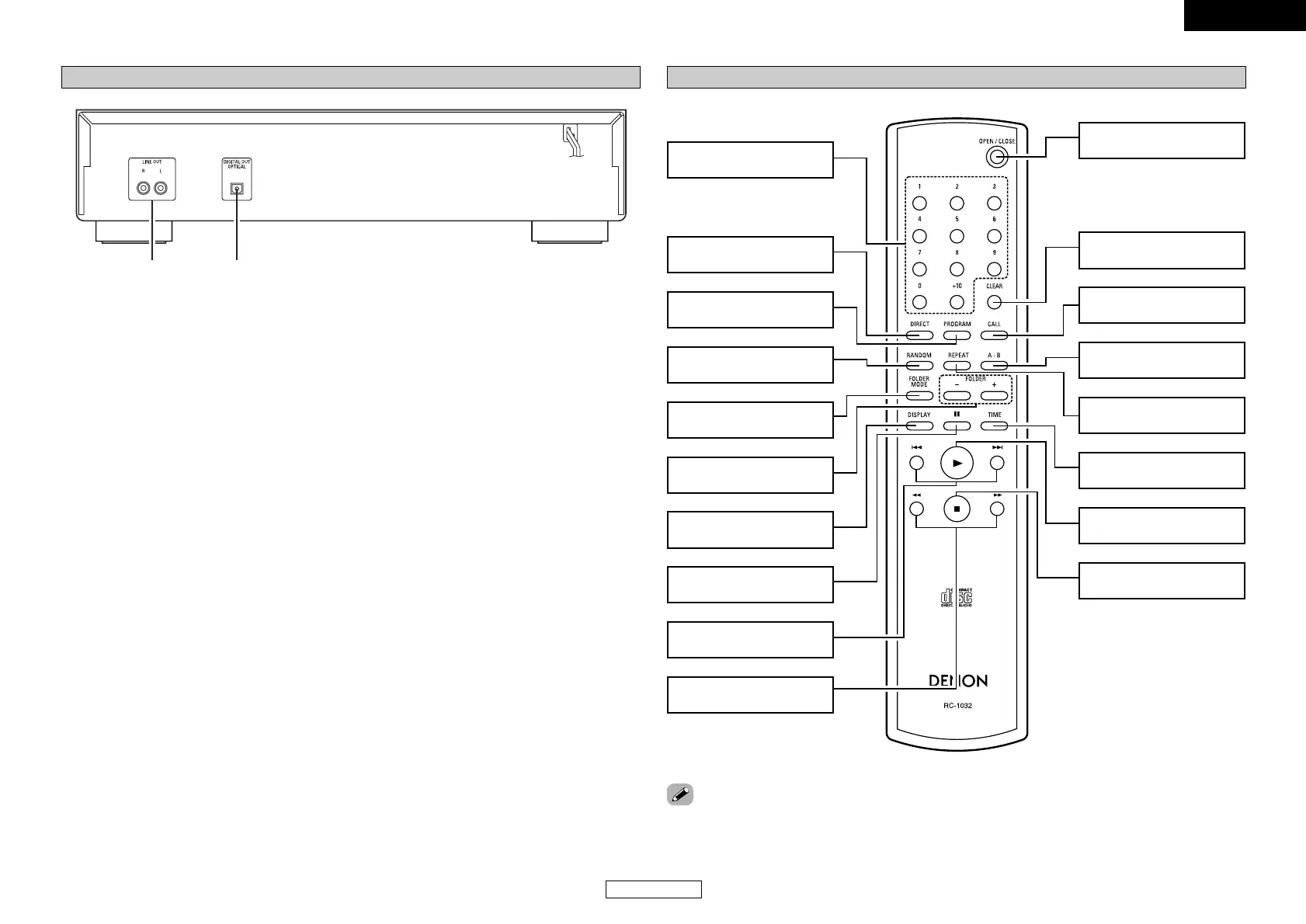
Remote control unit
Number buttons
(0 ~ 9, +10)
····················
(8, 9)
DIRECT button
···············································
(8)
PROGRAM button
··········································
(8, 9)
RANDOM button
···············································
(8)
FOLDER MODE button
·····································
(10, 11)
FOLDER +/– buttons
············································
(11)
DISPLAY button
···············································
(4)
Pause button (3)
··········································
(7, 9)
Skip buttons
(8, 9)
························
(8)
Search buttons
(6, 7)
··························
(7)
CLEAR button
···············································
(8)
CALL button
···············································
(8)
A-B button
···············································
(9)
REPEAT button
···············································
(9)
TIME button
········································
(7, 11)
Play button (1)
·······································
(7 ~ 9)
Stop button (2)
···············································
(7)
OPEN/CLOSE button
···············································
(7)
• The skip buttons (8 and 9) and +10 button operate continuously when held in.
Rear panel
q
LINE OUT terminals····································(6)
w
DIGITAL OUT OPTICAL terminal ···············(6)


 To Next Page
 Loading...