EasyManua.ls Logo

Denon DCD-720AE - Using Adobe Reader Features

Denon DCD-720AE
104 pages
Print Icon
To Next Page IconTo Next Page
To Previous Page IconTo Previous Page
Loading...
4
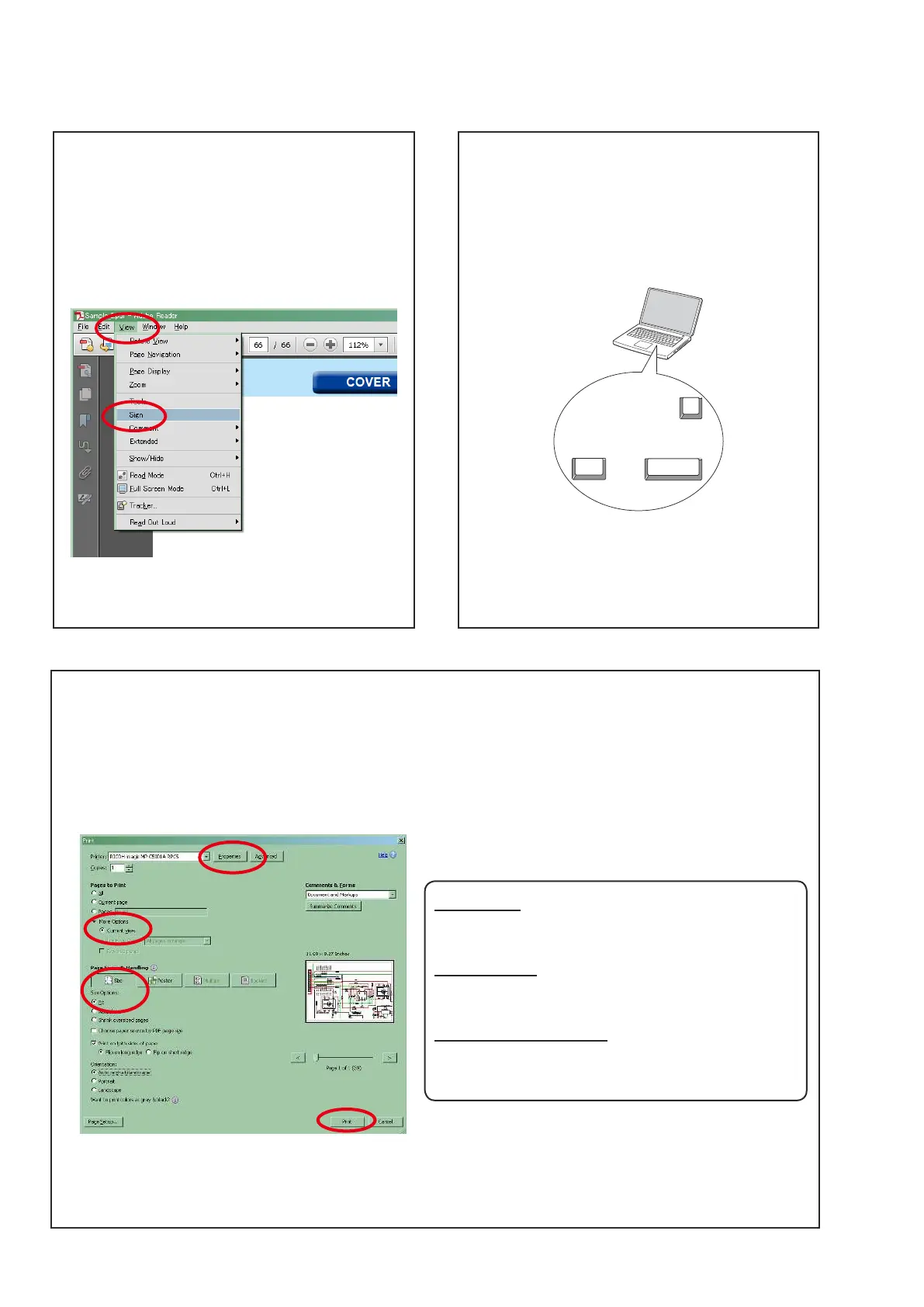
Using Adobe Reader (Windows version)
 
Click this button and check that the printer is set to a
suitable paper size.
 
Select the following checkbox.
"More Options" : "Current View"
 
Select the following checkbox.
"" / "" : "Fit"
Add notes to this data (Sign)

manual.

[Example using Adobe Reader X]
ViewSign".
 
[Example using Adobe Reader 9]
DocumentSign".
Magnify schematic / printed wiring board
diagrams - 1
(Ctrl+Space, mouse operation)
Press Ctrl+Space on the keyboard and drag the
mouse to select the area you want to view.
 
Ctrl Space
0
 
Space and drag the mouse.

Ctrl+0 on the keyboard.


1. Drag the mouse to magnify the part you want to print.
FilePrint".

4. Click the Print button to start printing.

Table of Contents

Other manuals for Denon DCD-720AE

Related product manuals