EasyManua.ls Logo

Denon DR-M33HX - Record;Playback Head Replacement and Adjustment; R;P Head Tilt Angle Adjustment

Denon DR-M33HX
48 pages
Print Icon
To Next Page IconTo Next Page
To Previous Page IconTo Previous Page
Loading...
3.
Replacing
the
Record/Playback
Head
*
Before
replacing,
remove
the
front
panel
202.
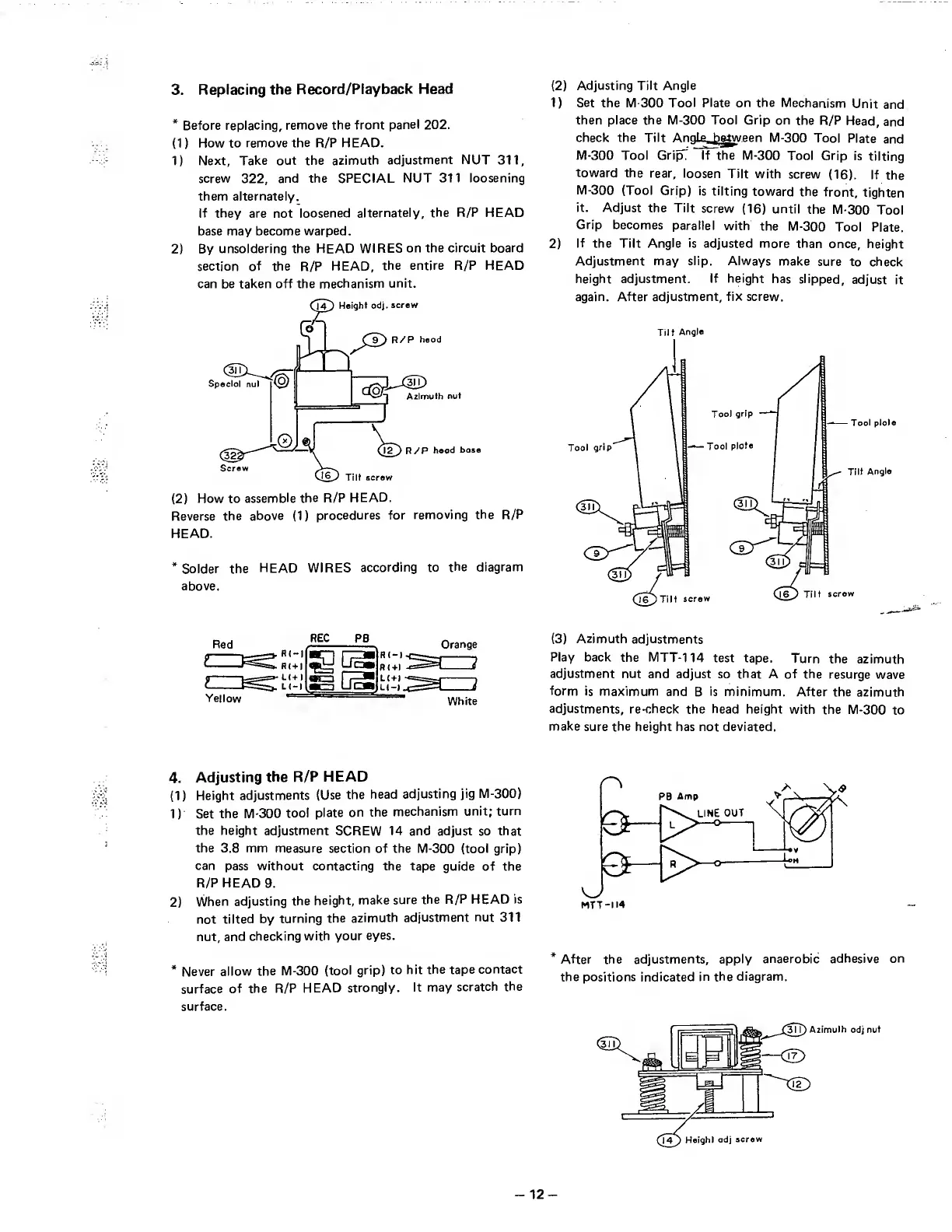
(1)
H
ow
to
remove
the
R/P
HEAD.
1)
Next,
Take
out
the
azimuth
adjustment
NUT
311,
screw
322,
and
the
SPECIAL
NUT
311
loosening
them
aiternately.
If
they
are
not
loosened
alternately,
the
R/P
HEAD
base
may
become
warped.
2)
By
unsoldering
the
HEAD
WIRES
on
the
circuit
board
section
of
the
R/P
HEAD,
the
entire
R/P
HEAD
can
be
taken
off
the
mechanism
unit.
(2)
H
ow
to
assemble
the
R/P
HEAD.
Reverse
the
above
(1)
procedures
for
removing
the
R/P
HEAD.
*
Solder
the
HEAD
WIRES
according
to
the
diagram
above.
(2)
Adjusting
Tilt
Angle
1)
Set
the
M-300
Tool
Plate
on
the
Mechanism
Unit
and
then
place
the
M-300
Tool
Grip
on
the
R/P
Head,
and
check
the
Tilt
An
nlg
h^w
Rpn
M-300
Tool
Plate
and
M-300
Tool
GripT
If
the
M-300
Tool
Grip
is
tilting
toward
the
rear,
loosen
Tilt
with
screw
(16).
If
the
M-300
(Tool
Grjp)
is
tilting
toward
the
front,
tighten
it.
Adjust
the
Tilt
screw
(16)
until
the
M-300
Tool
Grip
becomes
parallel
with
the
M-300
Tool
Plate.
2)
If
the
Tilt
Angle
is
adjusted
more
than
once,
height
Adjustment
may
slip.
Always
make
sure
to
check
height
adjustment.
If
height
has
slipped,
adjust
it
again.
After
adjustment,
fix
screw.
Tilt
Angle
REC
Yellow
Orange
ZJ
White
(3)
A
zimuth
adjustments
Play
back
the
MTT-114
test
tape.
Turn
the
azimuth
adjustment
nut
and
adjust
so
that
A
of
the
resurge
wave
form
is
maximum
and
B
is
minimum.
After
the
azimuth
adjustments,
re-check
the
head
height
with
the
M-300
to
make
sure
the
height
has
not
deviated.
4.
Adjusting
the
R/P
HEAD
(1)
Height
adjustments
(Use
the
head
adjusting
jig
M-300)
1)
Set
the
M-300
tool
plate
on
the
mechanism
unit;
turn
the
height
adjustment
SCREW
14
and
adjust
so
that
the
3.8
mm
measure
section
of
the
M-300
(tool
grip)
can
pass
without
contacting
the
tape
guide
of
the
R/P
HEAD
9.
2)
When
adjusting
the
height,
make
sure
the
R/P
HEAD
is
not
tilted
by
turning
the
azimuth
adjustment
nut
311
nut,
and
checking
with
your
eyes.
*
Never
allow
the
M-300
(tool
grip)
to
hit
the
tape
contact
surface
of
the
R/P
HEAD
strongly.
It
may
scratch
the
surface.
*
After
the
adjustments,
apply
anaerobic
adhesive
on
the
positions
indicated
in
the
diagram.
-
1
2
-

Table of Contents