EasyManua.ls Logo

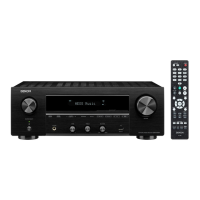
Denon DRA-700AEDAB - User Manual

Denon DRA-700AEDAB
30 pages
Print Icon
To Next Page IconTo Next Page
Loading...
AM-FM STEREO RECEIVER
DRA-700AE/700AEDAB
OPERATING INSTRUCTIONS
BEDIENUNGSANLEITUNG
MODE D’EMPLOI
ISTRUZIONI PER L’USO
INSTRUCCIONES DE FUNCIONAMIENTO
GEBRUIKSAANWIJZING
BRUKSANVISNING

Table of Contents

Other manuals for Denon DRA-700AEDAB

Questions and Answers

  • S
    Stacy LopezAug 14, 2025
    Why is the display not lit and sound not produced on my Denon DRA-700AEDAB?
    • T
      Tami HudsonAug 15, 2025
      If your Denon Stereo Receiver's display is unlit but sound is still not produced when the power switch is on, the power supply cord might not be securely plugged in. Ensure that the power supply cord plug is properly inserted.
  • F
    fdoughertyAug 18, 2025
    Why is there no sound coming from my Denon Stereo Receiver even though the display is lit?
    • D
      Daniel GriffithAug 18, 2025
      If your Denon Stereo Receiver's display is lit, but no sound is produced, several factors could be at play. Ensure that the speaker cables are securely connected. Check that the FUNCTION knob is in the appropriate position. Verify that the volume control is not set to minimum and turn it up to a suitable level. Also, make sure that MUTING is switched off.
  • J
    Joshua PhillipsAug 21, 2025
    What to do if no sound is produced from the subwoofer connected to my Denon Stereo Receiver?
    • J
      johngarciaAug 21, 2025
      If no sound is produced from the subwoofer connected to your Denon Stereo Receiver, check the following: First, ensure that the subwoofer’s power is turned on. Next, verify that the subwoofer’s output is properly connected. Finally, confirm that the subwoofer’s channel volume level is not set to “–12 dB” and turn it up if necessary.
  • J
    John CooperAug 25, 2025
    How to fix a Denon DRA-700AEDAB when the remote control doesn't work?
    • R
      robbinsshelbyAug 25, 2025
      If your Denon Stereo Receiver remote control isn't working, several factors could be the cause. First, the batteries might be dead, so try replacing them with new ones. Also, make sure you're not too far from the unit; move closer. Check for any obstacles blocking the signal between the remote and the receiver and remove them. Ensure you're pressing the correct button. Finally, verify that the batteries are inserted correctly, with the < and > ends in the proper orientation.
  • T
    Teresa MelendezAug 28, 2025
    What to do if my Denon DRA-700AEDAB Stereo Receiver power has turned off and the power indicator is blinking red?
    • S
      Sean DunnAug 28, 2025
      If your Denon Stereo Receiver's power has turned off and the power indicator is blinking red, it could be due to a few reasons. The set’s internal temperature may have risen, activating the protection circuit; ensure the DRA-700AE/700AEDAB is in a well-ventilated area. Another cause could be that the core wires of the speaker cables are touching each other or the DRA- 700AE/700AEDAB’s rear panel, which also activates the protection circuit; check all speaker cable connections. If neither of these resolves the issue, the DRA-700AE/700AEDAB might be malfunctioning.
  • E
    elizabethroseAug 31, 2025
    What does it mean when my Denon DRA-700AEDAB display says “Station not Available”?
    • J
      Jill RossAug 31, 2025
      If your Denon Stereo Receiver displays “Station not Available”, ensure that DAB coverage exists in your area and check that the antenna is connected properly.
  • D
    David ChanSep 4, 2025
    Why is nothing displayed on the monitor when using my Denon Stereo Receiver?
    • D
      Debra LongSep 4, 2025
      If you are not getting any display on your monitor when using the Denon Stereo Receiver, ensure that the DRA-700AE/700AEDAB’s video output terminals and the monitor’s input terminals are correctly connected. Also, verify that the monitor’s input setting is set to the terminals to which the video signals are connected.
  • B
    benjamin09Sep 7, 2025
    Why can't I access secondary services on my Denon Stereo Receiver?
    • E
      Evelyn LewisSep 7, 2025
      If you cannot access secondary services on your Denon Stereo Receiver, note that at the time this manual was published, not many secondary services were available. This will increase as more DAB stations start broadcasting. If a secondary service station is available, the secondary indicator “>>” will be displayed next to the station name.
  • M
    megan41Sep 10, 2025
    Why do I hear a burbling sound on some stations with my Denon DRA-700AEDAB?
    • K
      Kimberly ContrerasSep 10, 2025
      If you hear a burbling sound on some stations with your Denon Stereo Receiver, DAB, like other digital media, is good at producing quality audio from a low-level signal. However, if this signal level is too low, a “burbling” sound can sometimes be heard. To reduce this, try repositioning your antenna to gain maximum signal strength; this feature is alternatively available to the DRA-700AEDAB.

Summary

Getting Started

Accessories

Lists the parts included with the main unit.

Before Using the Unit

Important safety and usage precautions before initial operation.

Installation Precautions

Guidelines for safely and properly installing the unit in its environment.

Remote Control Unit Overview

Details on remote features, battery insertion, and operating range.

Front Panel and Display Guide

Overview of the main unit's controls, buttons, and display elements.

Connections

Cable Indications and Signal Flow

Details on connection cable types and their signal direction for hookups.

Speaker Connection Guide

How to connect speakers, including essential impedance considerations.

Connecting Audio;Video Sources

Instructions for connecting DVD players and monitors to the unit.

Connecting Audio;Video Components

Guides for connecting CD players, turntables, tape decks, and VCRs.

Antenna Terminal Connections

Instructions for connecting AM, FM, and DAB antennas for radio reception.

iPod and Multi-Zone Connectivity

How to connect an iPod and set up multi-room audio using ZONE2/ZONE3 terminals.

Power Supply Cord Connection

Procedure for safely connecting the unit to the AC power outlet.

Operation

Initial Setup and Basic Controls

Covers powering on, input selection, volume adjustment, and muting.

Listening Modes and Audio Adjustments

Details on headphone listening, speaker switching, display brightness, PURE DIRECT, and loudness.

Radio Tuning and RDS Features

Procedures for AM/FM tuning, presets, RDS, Radio Text, PTY, and TP search.

DAB Radio Operation

Introduction to DAB, tuning stations, display options, sorting, and DRC.

iPod Integration and Playback

Instructions for connecting, assigning, and playing music from an iPod.

Multi-Zone Audio and Recording

Setting up multi-room audio, controlling zones, and performing audio/video recording.

System Management and Reset

Understanding memory functions and how to perform a microprocessor reset.

Troubleshooting

Remote Control Issues

Troubleshooting problems with the remote control unit's operation.

Power and Display Problems

Resolving issues with unit power, display, or blinking indicators.

Audio Output and Connectivity Issues

Addressing sound problems, subwoofer issues, monitor display, and reception errors.

Specific Function Problems

Troubleshooting issues like DVD-VCR copying or accessing secondary services.

Specifications

Audio Specifications

Technical details for power amplifier, input sensitivity, frequency response, and distortion.

Remote Control Specifications

Details on remote units, including batteries, dimensions, and mass.

DAB Frequency Table

Frequency and level data for DAB broadcasting bands (Band III and L-Band).

Denon DRA-700AEDAB Specifications

General IconGeneral
TypeStereo Receiver
Audio Channels2.0
BluetoothYes
Wi-FiYes
AirPlayYes
Spotify ConnectYes
Input Sensitivity200 mV
TunerFM
ConnectivityEthernet
InputsOptical, Coaxial, Analog
Dimensions434 x 151 x 360 mm
Power Output100 W per channel (8 ohms)

Related product manuals