EasyManua.ls Logo

Denon DVD-5000 - Laser Pick-Up Replacement; Traverse Motor Unit Replacement; Disc Motor Replacement

Denon DVD-5000
64 pages
Print Icon
To Next Page IconTo Next Page
To Previous Page IconTo Previous Page
Loading...
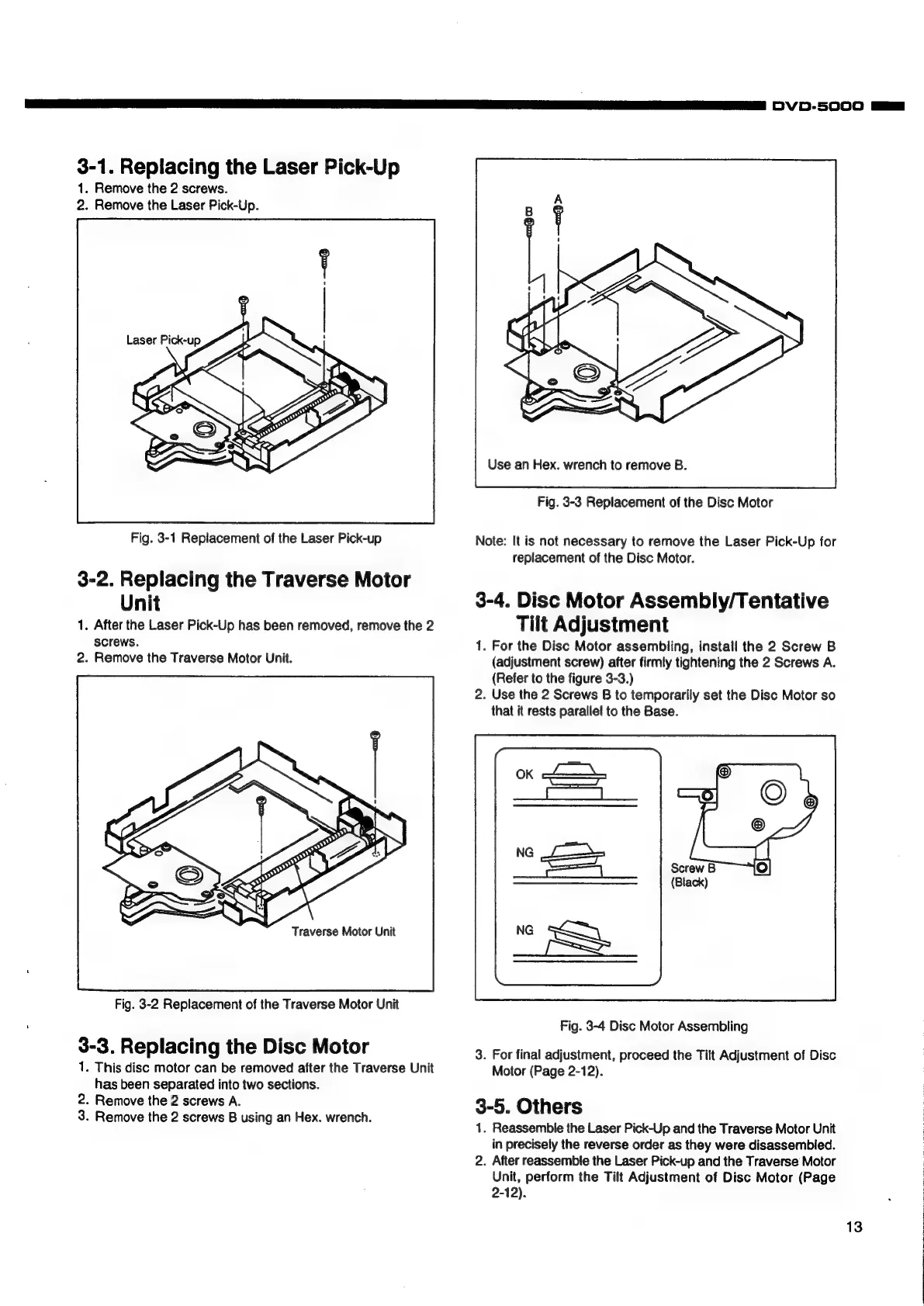
3-1.
Replacing
the
Laser
Pick-Up
1.
Remove
the
2
screws.
2.
Remove
the
Laser
Pick-Up.
Fig.
3-1
Replacement
of
the
Laser
Pick-up
3-2.
Replacing
the
Traverse
Motor
Unit
1.
After
the
Laser
Pick-Up
has
been
removed,
remove
the
2
screws.
2.
Remove
the
Traverse
Motor
Unit.
Traverse
Motor
Unit
Fig.
3-2
Replacement
of
the
Traverse
Motor
Unit
3-3.
Replacing
the
Disc
Motor
1.
This
disc
motor
can
be
removed
after
the
Traverse
Unit
has
been
separated
into
two
sections.
2.
Remove
the
2
screws
A.
3.
Remove
the
2
screws
B
using
an
Hex.
wrench.
Use
an
Hex.
wrench
to
remove
B.
Fig.
3-3
Replacement
of
the
Disc
Motor
Note:
It
is
not
necessary
to
remove
the
Laser
Pick-Up
for
replacement
of
the
Disc
Motor.
3-4.
Disc
Motor
Assembly/Tentative
Tilt
Adjustment
1.
For
the
Disc
Motor
assembling,
install
the
2
Screw
B
(adjustment
screw)
after
firmly
tightening
the
2
Screws
A.
(Refer
to
the
figure
3-3.)
2.
Use
the
2
Screws
B
to
temporarily
set
the
Disc
Motor
so
that
it
rests
parallel
to
the
Base.
Fig.
3-4
Disc
Motor
Assembling
3.
For
final
adjustment,
proceed
the
Titt
Adjustment
of
Disc
Motor
(Page
2-12).
3-5.
Others
1.
Reassemble
the
Laser
Pick-Up
and
the
Traverse
Motor
Unit
in
precisely
the
reverse
order
as
they
were
disassembled.
2.
After
reassemble
the
Laser
Pick-up
and
the
Traverse
Motor
Unit,
perform
the
Tilt
Adjustment
of
Disc
Motor
(Page
2-12).
DVD-5000
Ha
13
i
1
j

Other manuals for Denon DVD-5000

Related product manuals