EasyManua.ls Logo

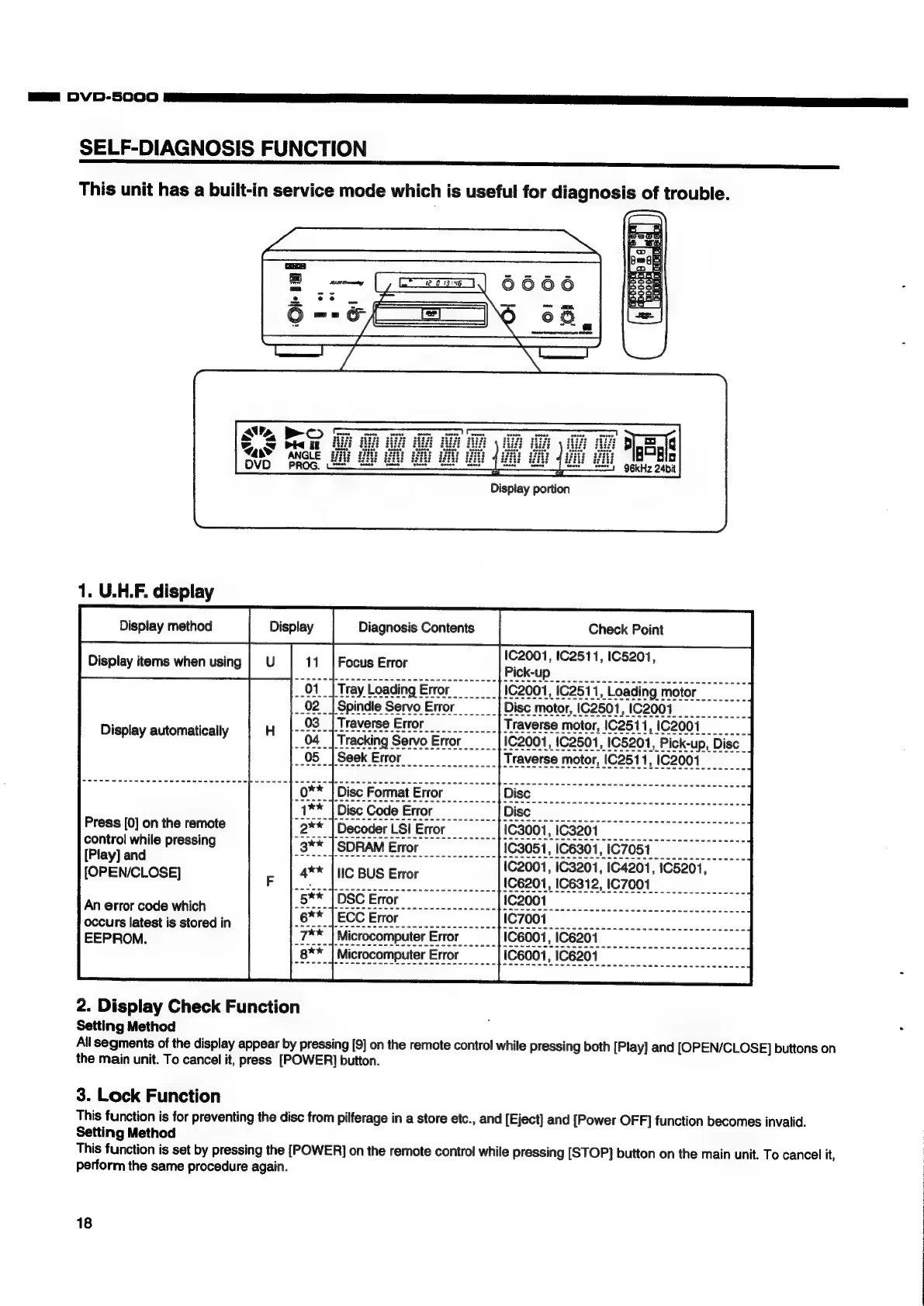
Denon DVD-5000 - Self-Diagnosis Function; U.H.F. Display Diagnostics

Denon DVD-5000
64 pages
Print Icon
To Next Page IconTo Next Page
To Previous Page IconTo Previous Page
Loading...
Ga
DVD-5000
SELF-DIAGNOSIS
FUNCTION
This
unit
has
a
built-in
service
mode
which
is
useful
for
diagnosis
of
trouble.
ae,
BO
Sa
PMI
i
3
T4as¥
ANGLE
|
PROG,
=
OVD
1.
U.H.F.
display
Display
automatically
Press
[0]
on
the
remote
control
while
pressing
[Play]
and
[OPEN/CLOSE]
An
error
code
which
occurs
latest
is
stored
in
EEPROM.
2.
Display
Check
Function
Setting
Method
Display
portion
Seek
Error
Disc
Format
Error
Disc
Code
Error
Decoder
LSI
Error
SDRAM
Error
IC
BUS
Error
DSC
Error
ECC
Error
eae
Bgl
96KHz
24bit
Check
Point
All
segments
of
the
display
appear
by
pressing
[9]
on
the
remote
control
while
pressing
both
[Play]
and
[OPEN/CLOSE]
buttons
on
the
main
unit.
To
cancel
it,
press
[POWER]
button.
3.
Lock
Function
This
function
is
for
preventing
the
disc
from
pilferage
in
a
store
etc.,
and
[Eject]
and
[Power
OFF]
function
becomes
invalid.
Setting
Method
This
function
is
set
by
pressing
the
[POWER]
on
the
remote
control
while
pressing
[STOP]
button
on
the
main
unit.
To
cancel
it,
perform
the
same
procedure
again.
18

Other manuals for Denon DVD-5000

Related product manuals