EasyManua.ls Logo

Denon DVD-5000 - Electrical Adjustment Procedures; Luminance Signal Adjustment; Chrominance Signal Adjustment

Denon DVD-5000
64 pages
Print Icon
To Next Page IconTo Next Page
To Previous Page IconTo Previous Page
Loading...
fe
DOVD-S0o00
16
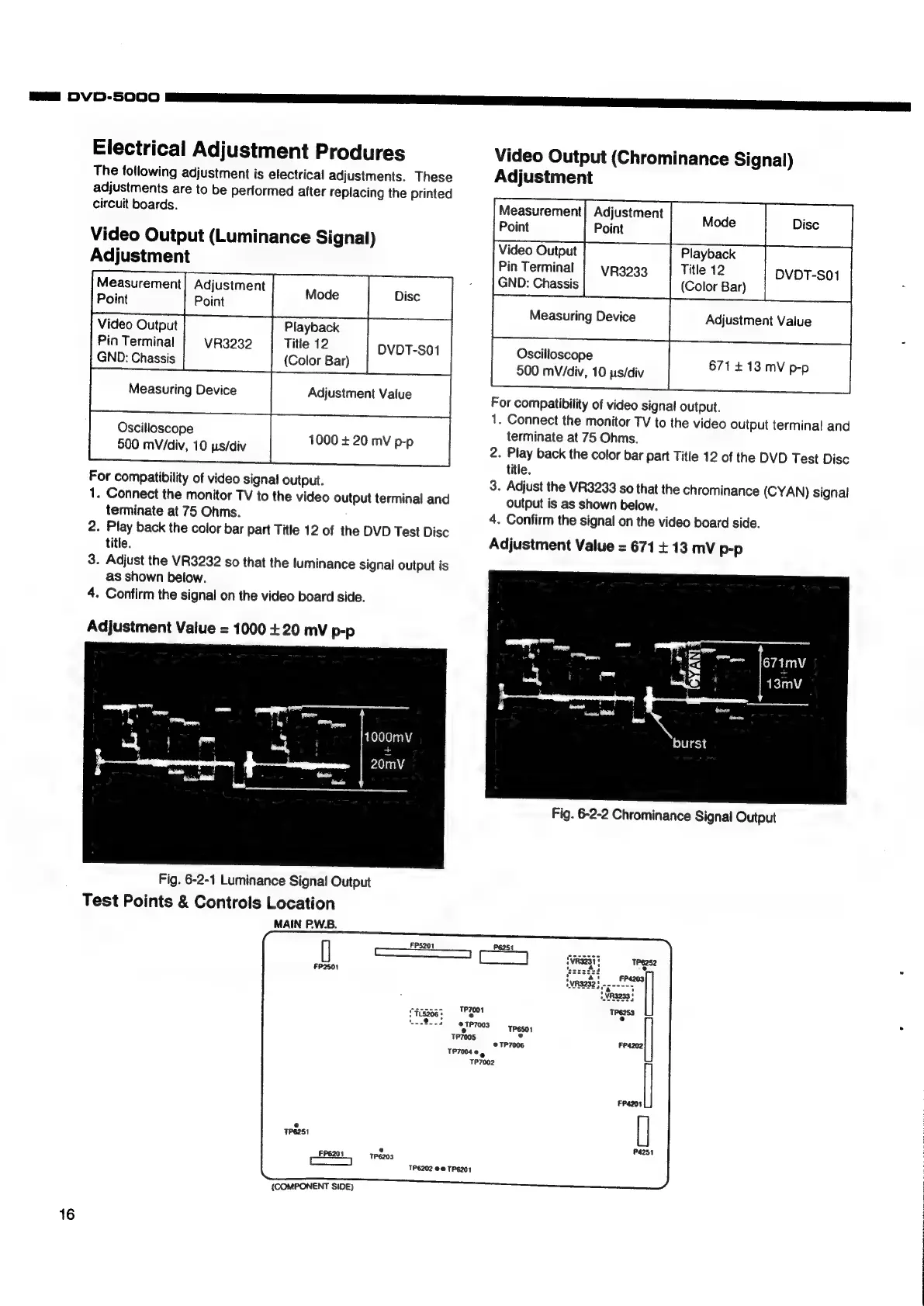
Electrical
Adjustment
Produres
The
totlowing
adjustment
is
electrical
adjustments.
These
adjustments
are
to
be
performed
after
replacing
the
printed
circuit
boards.
Video
Output
(Luminance
Signal)
Adjustment
cs
Measurement
Adjustment
Point
i
Point
Video
Output
Playback
Pin
Terminal
|
vR3232
Title
12
DVOT-SO1
GND:
Chassis
(Color
Bar)
Oscilloscope
500
mVidiv,
10
ps/div
1000
+
20
mV
p-p
For
compatibility
of
video
signal
output.
1.
Connect
the
monitor
TV
to
the
video
output
terminal
and
terminate
at
75
Ohms.
2.
Play
back
the
color
bar
part
Title
12
of
the
DVD
Test
Disc
title.
3.
Adjust
the
VR3232
so
that
the
luminance
signal
output
is
as
shown
below.
4.
Confirm
the
signal
on
the
video
board
side.
Adjustment
Value
=
1000
+
20
mv
p-p
1000mV
20mV
Fig.
6-2-1
Luminance
Signa!
Output
Test
Points
&
Controls
Location
MAIN
PW.B.
e
TP6203
TP6202
@@
TPE201
{COMPONENT
SIDE)
Video
Output
(Chrominance
Signal)
Adjustment
Measurement|
Adjustment
Dis
Point
Point
86
Video
Output
Playback
Pin
Terminal
|
yR3033
Title
12
DVDT-S01
GND:
Chassis
(Color
Bar)
Oscilloscope
500
mV/div,
10
ps/div
For
compatibility
of
video
signal
output.
1.
Connect
the
monitor
TV
to
the
video
output
terminal
and
terminate
at
75
Ohms.
2.
Play
back
the
color
bar
part
Title
12
of
the
DVD
Test
Disc
title.
3.
Adjust
the
VR3233
so
that
the
chrominance
(CYAN)
signal
output
is
as
shown
below.
4.
Confirm
the
signal
on
the
video
board
side.
Adjustment
Value
=
671
+13
mV
p-p
671413
mV
p-p
Fig.
6-2-2
Chrominance
Signal
Output
Rs
2