10
11. Shooting time setting and fog flow orientation
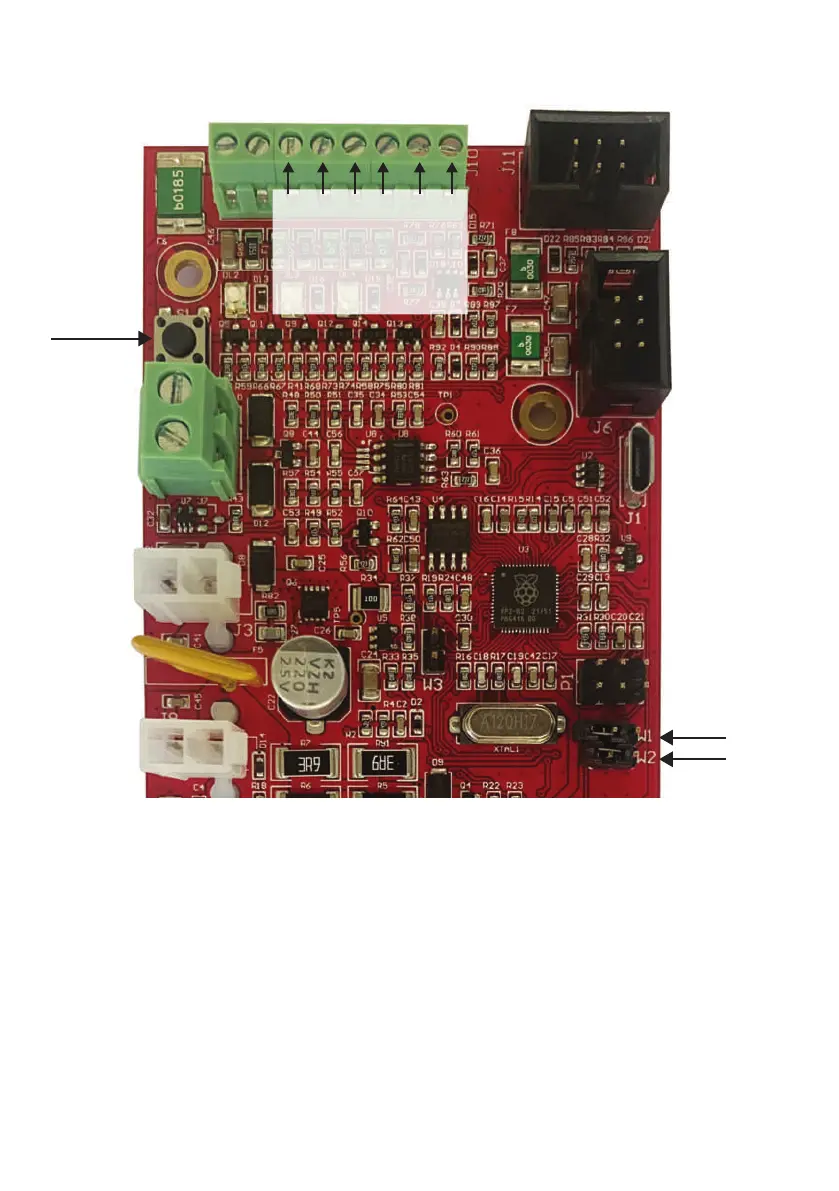
To set the shooting time, after opening the front panel, you must CLOSE the jumper W1 in SET position then, holding
down the button S1, the 3 leds on the front will flash and each flash is equivalent to one second fog emission.
If you press the button again, the shooting time is not added to the one previously set, but will restart from zero.
If S1 button is pressed for a time longer than the shooting time allowed for the unit, shooting time will be set to the
maximum possible. Shooting time can be set according to desired seconds, but to correctly activate pipes refill in full
security, it must be set to minimum 2 seconds. After setting the shooting time, to avoid wrong time settings,
is suggested to keep the W1 jumper OPENed.
W2
W1
SET TIME
RESET
S1
TRIG
ARM
ARD/SHP
EMPTY
FAULT
GND
1 8


 To Next Page