EasyManua.ls Logo

Depaepe Telecom HD2000 - Setting

Depaepe Telecom HD2000
52 pages
Print Icon
To Next Page IconTo Next Page
To Previous Page IconTo Previous Page
Loading...
HD2000 IP User Manual
Copyright © 2015 SAS HENRI DEPAEPE Page 37 of 52
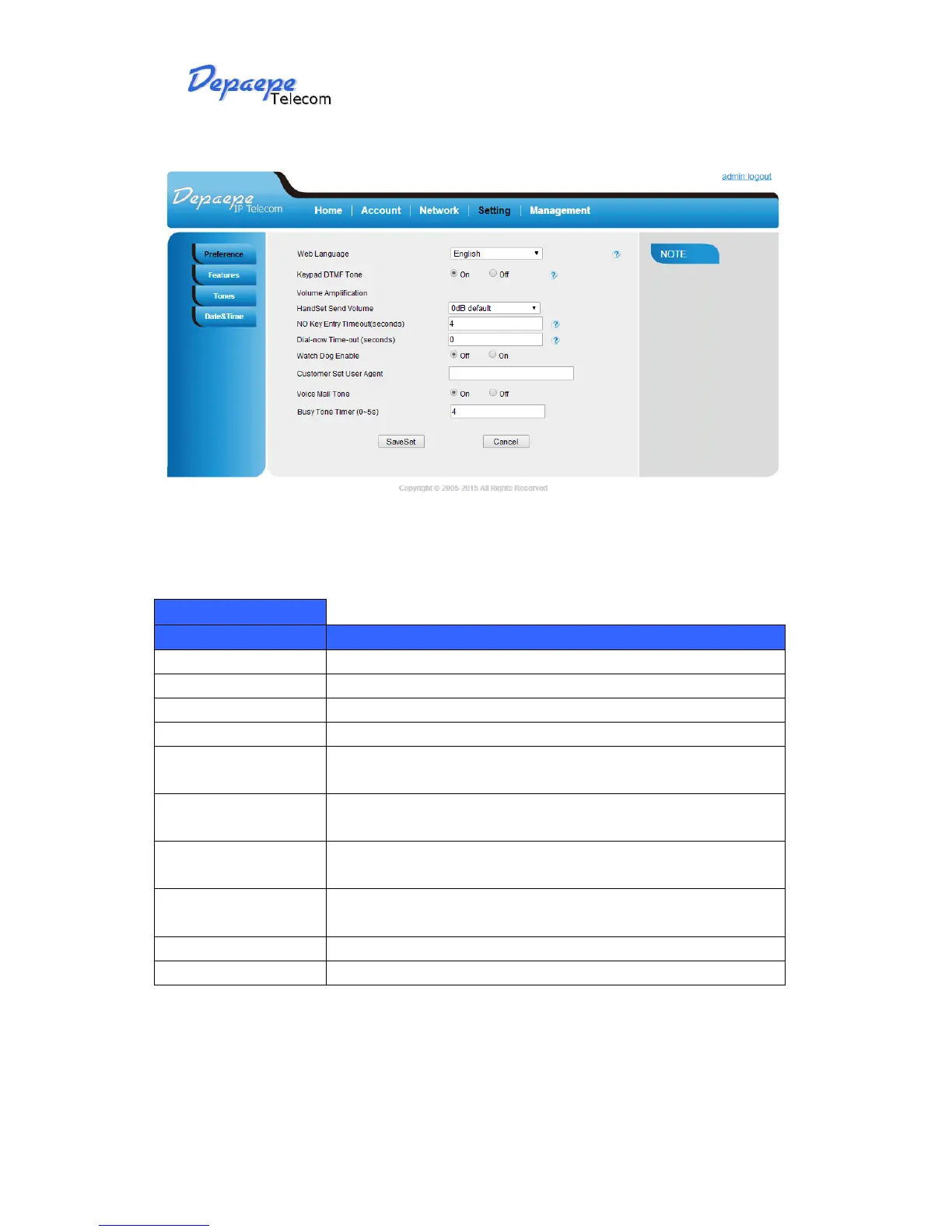
8.1.5.4 Setting
Setting -Preference
Options
Meaning
Web Language
Select the displayed language for web page
Keypad DTMF Tone
Open or close keypad DTMF Tone
Volume Amplification
HandSet Send Volume
No Key Entry
Timeout(seconds)
In seconds, 0 means never timeout, default is 0 second.
Dial now
Timeout(seconds)
In seconds, Interval for DialNow, default is 0 second.
Watch Dog Enable
Prevent phone freeze, so that it can be automatically reset when it
run error.
Customer Set User
Agent
When phone send SIP data it will make User Agent in the packet,
default use its model info.
Voice Mail Tone
Busy Tone Timer

Related product manuals