www.desatech.com
116035-01J26
FIREPLACE INSTALLATION
Continued
INSTALLING OpTIONAL WIRELESS
HAND-HELD REMOTE CONTROL
-
1. Open bottom louver and locate switch
bracket on right side.
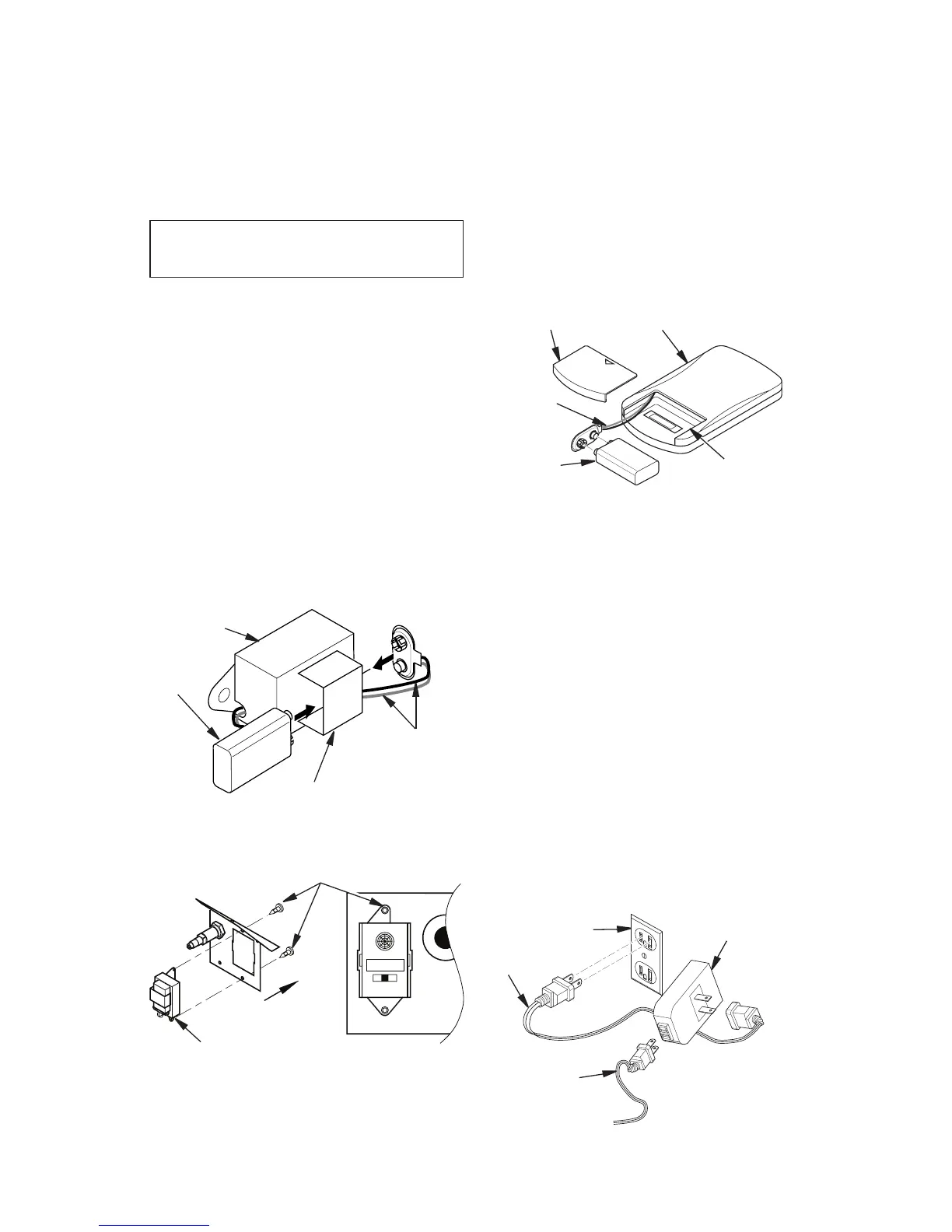
2. Locate battery clip mounted on back of
receiver. Slide a 9-volt alkaline battery
(not included) through clip
3. Attach terminal wires to battery. (see
Figure 45).
4. Connect wires from receiver to TH and
TPTH to control valve (see Figure 44,
page 25).
5. Locate two plastic mounting clips provided
with kit.
6. Use clips to mount receiver on remote
mounting bracket as shown in Figure 46.
Figure 45 - Attaching Alkaline Battery to
Receiver
9-Volt
Alkaline
Battery
Receiver
Terminal
Wires
Battery Clip
Figure 46 - Mounting Remote Receiver to
Bracket
Held Remote Control Unit
1. Remove battery cover on back of remote
control unit.
2. Attach terminal wires to a 9-volt alkaline
battery (not included). Place battery into
battery housing.
3. Replace battery cover onto remote control
unit.
Figure 47 - Installing Battery in Hand-
Held Remote Control Unit
9-Volt
Battery
Battery
Housing
Battery Cover
Terminal
Wires
Remote Control Unit
Remote Receiver
Plastic Mounting Clips
INSTALLING OpTIONAL WIRELESS
HAND-HELD REMOTE CONTROL
FOR ELECTRONIC IGNITION
1. Open bottom louver and locate plug re-
ceptacle. Plug receptacle is located either
on right or left side of cabinet.
2. The WRC model receiver does not require
a battery. To install receiver plug short
extension cord into replace receptacle.
Plug receiver unit into extension cord.
Plug ignition module plug into receiver
unit (see Figure 48).
3. Activate remote handset battery by remov-
ing insulating tab on back of handset (see
Figure 49, page 27). Battery is included
pre-installed.
Figure 48 - Connecting WRC Remote
Control Electronic
Fireplace
Receptacle
Extension
Cord
Remote
Control
Receiver
Ignition
Module Plug



 To Next Page