EN Installation
03/2020 23 / 84
How to select the network configuration
Be sure that each IP address is unique and valid.
1. The network configuration depends on the model of CONNECT you have.
CONNECT-X: tools communicate with the WI-FI access point of the production line.
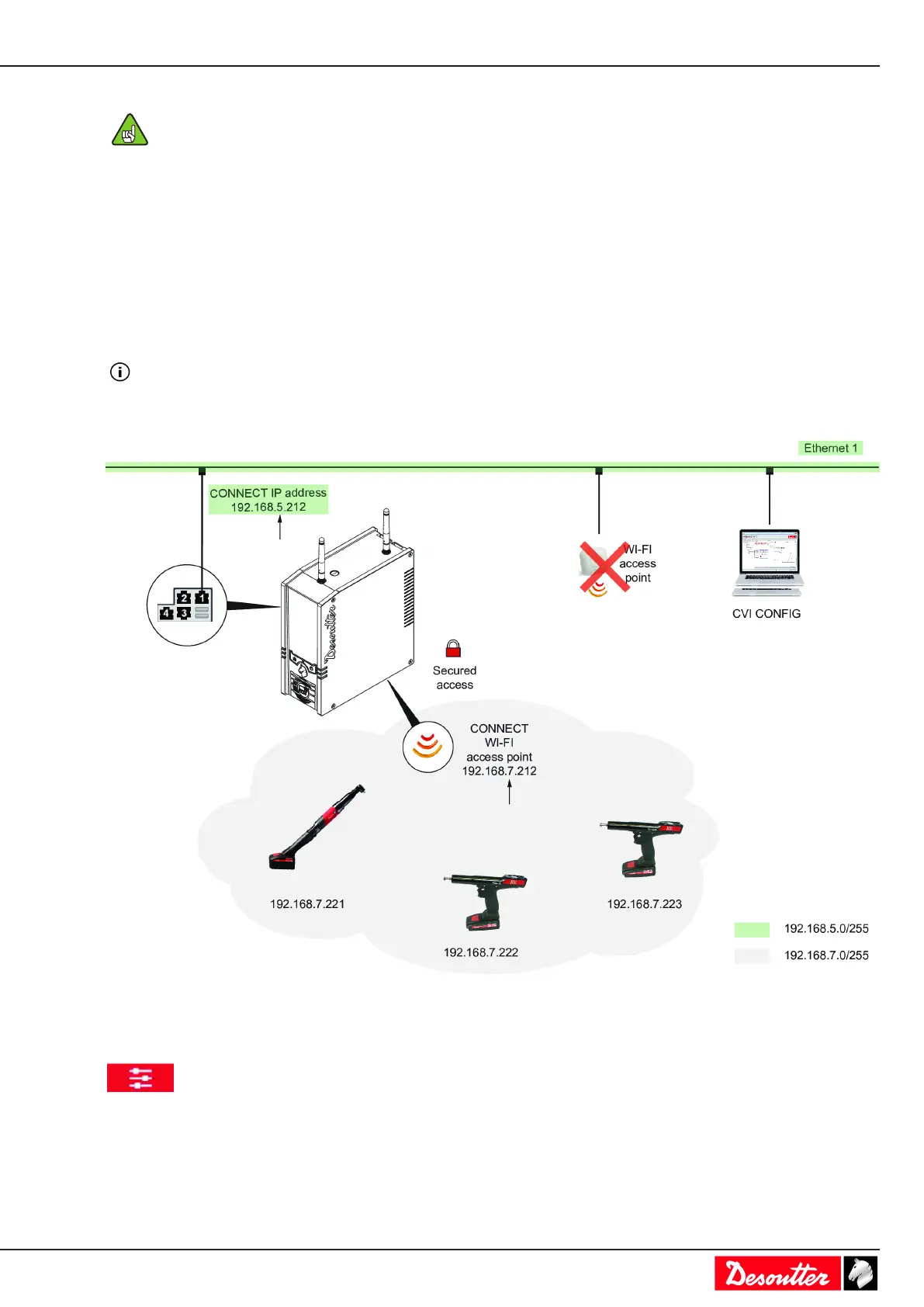
CONNECT-W: tools communicate with its embedded WI-FI access point.
2. The network configuration depends on how you want to interface CONNECT.
CONNECT can be linked to:
• 1 network i.e. Ethernet 1 or 2
• 2 networks i.e. Ethernet 1 and 2
It is possible to authorize a “bridge” between the dedicated WI-FI access point and Ethernet 1 or 2.
CONNECT-W and 1 wired network
Use any available Ethernet port of CONNECT to link it to Ethernet 1.
Go to CONNECT.
Go to the start screen and tap this icon.
Tap System > Peripherals / Networks.
Give a name to your network.
Type a valid IP address for CONNECT.



 To Next Page