Specifying basic settings for quick copying
3
3-4 ineo 223/283/363/423
3.1
d Reference
For details, refer to chapter 6 of the [User's Guide Copy Operations].
No. Item Description
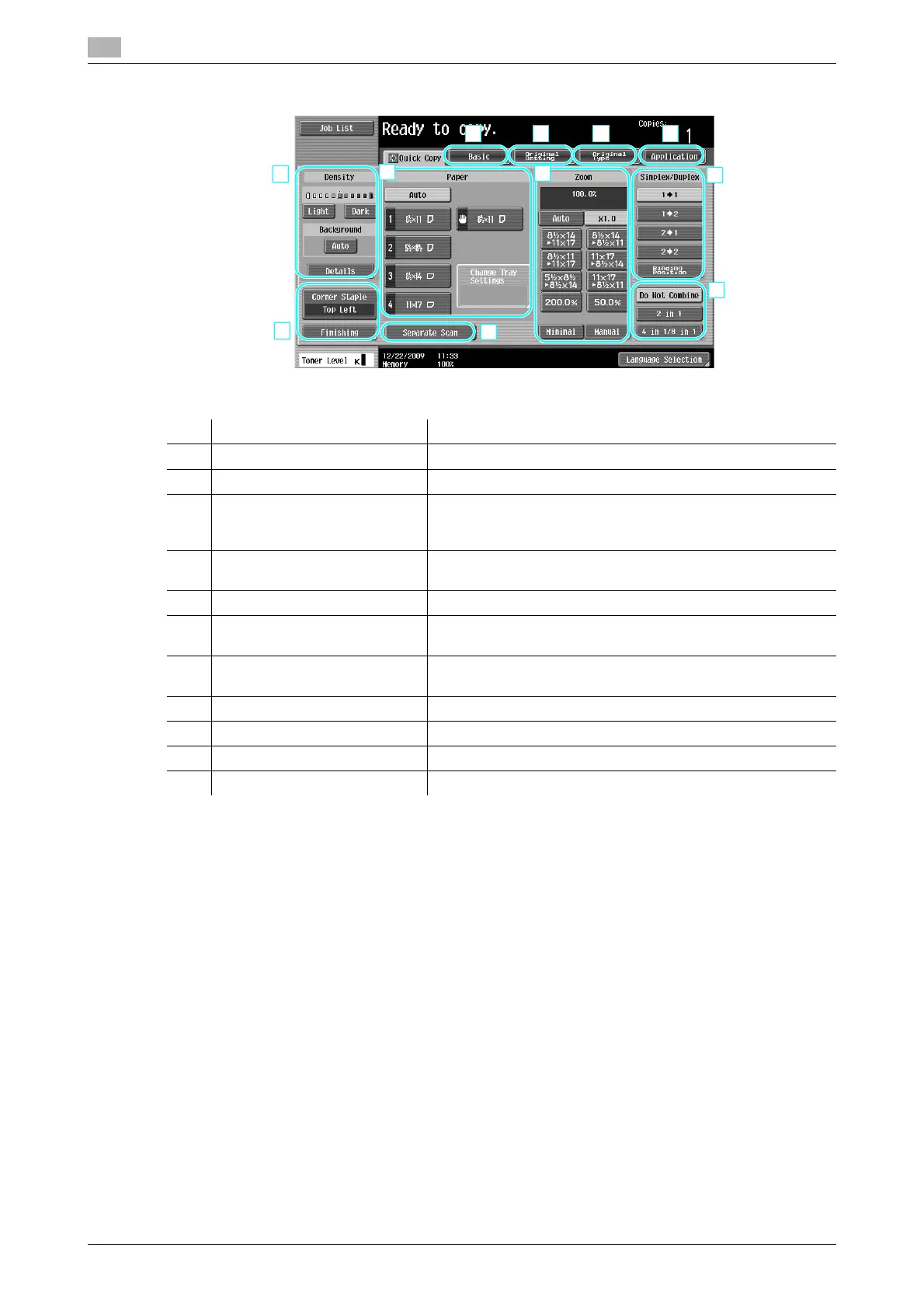
1 Density settings Select the print density.
2 Paper settings Select the type and size of paper to be copied.
3 Zoom settings The zoom ratio can be set in order to make a copy on paper
with a size different than the document or to enlarge or reduce
the size of the copy image.
4 Simplex/Duplex settings Select whether the document and copy is single-sided or dou-
ble-sided.
5 Combine settings Select the setting for combining document pages in copies.
6 [Separate Scan] key Select whether a document scanned in different batches is to
be treated as a single copy job.
7 Finishing settings Select the settings for sorting, grouping, offsetting, stapling, or
hole punching.
8 Basic tab Press to display the Basic screen.
9 Original Setting tab Press to display the Original Setting screen.
10 Original Type tab Press to display the Original Type screen.
11 Application tab Press to display the Application screen.



 To Next Page