Pos 0
Channel
Position
Dual Rate
Exponential
Normal Mode
Stunt 1
Stunt 2
Elevator
Pos 0
100%
Line
Switch
Switch
Switch
ciXenlion
DEVO Fl 2E
Welcome to use the DEVO F12E transmitter
Take ELEV for example, Press UP or DN to move navigation to desired item Elevation of U. Press R or L to
increase or decrease the servo travel range. The adjustment range is from 0.0% to 150.0%. The factory default
is 100.0%.
Press UP or DN to move navigation mark to desired item D of ELEV. Press R or L to increase or decrease
the servo travel range. The range is from 0.0% to 150.0%. The factory default is 100.0%.
All other channel's Travel Adjust like Aileron, Throttle, Rudder, Gear, Pitch, AUX2, AUX3, AUX4, AUX5, AUX6
and AUX7 can be referred to ELEV travel Ajust. Press EXT to exit after setting finished.
3.3 Sub Trim
Sub Trim can move the neutral point of the servo. But we advise you to mechanically adjust the servo bell
crank if offset is far away from the neutral point of servo, because excessive usage of the sub trim may damage
the servo.
Sub Trim
Setting method:
Press ENT to enter Main Menu, Press UP or DN to move the navigation
mark to select item Function Menu. Press ENT to enter Function Menu,
Press UP or DN to select Sub trim, and press ENT to enter Sub Trim
interface.
Elevator
Aileron
0.0%
Throttle
0.0%
Rudder
0.0%
Gear
0.0%
Pitch
0.0%
Gyro
0.0%
AUX3
0.0%
The interface show the items and the channels which are adjustable. Press R or L to change the neutral
point of Servos. The factory default is 0.0%. Press UP or DN to choose desired items. The range as below:
Channel name
Adjustment range
Channel name
Adjustment range
Elevator
D62.5% - U62.5%
Gyro
-62.5% - +62.5%
Aileron
R62.5% - L62.5%
AUX3
-62.5% - +62.5%
Throttle
L62.5% - H62.5%
AUX4
-62.5% - +62.5%
Rudder
R62.5% - L62.5%
AUX5
-62.5% - +62.5%
Gear
-62.5% - +62.5%
AUX6
-62.5% - +62.5%
Pitch
L62.5% - H62.5%
AUX7
-62.5% - +62.5%
Press EXT to exit after adjustment finished.
3.4 Dual rate and Exponential
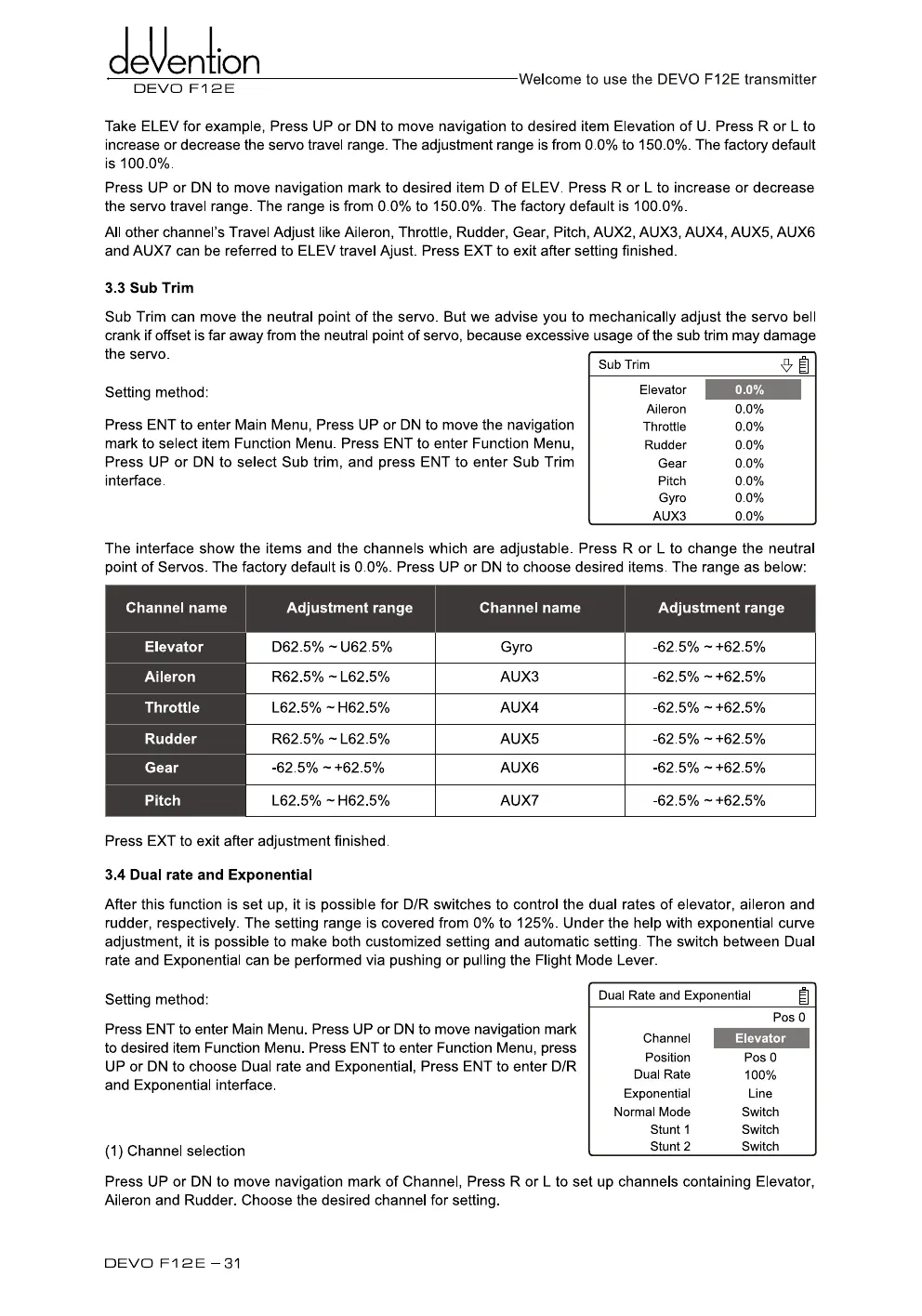
After this function is set up, it is possible for D/R switches to control the dual rates of elevator, aileron and
rudder, respectively. The setting range is covered from 0% to 125%. Under the help with exponential curve
adjustment, it is possible to make both customized setting and automatic setting. The switch between Dual
rate and Exponential can be performed via pushing or pulling the Flight Mode Lever.
Setting method:
Dual Rate and Exponential
Press ENT to enter Main Menu. Press UP or DN to move navigation mark
to desired item Function Menu. Press ENT to enter Function Menu, press
UP or DN to choose Dual rate and Exponential, Press ENT to enter D/R
and Exponential interface.
(1) Channel selection
Press UP or DN to move navigation mark of Channel, Press R or L to set up channels containing Elevator,
Aileron and Rudder. Choose the desired channel for setting.
DEVO Fl 2E -31



 To Next Page