Flap System
g
Elevator
Normal
0%
Normal
Midpoint
0%
Land
0%
Flap
Normal
U100%
Midpoint
0%
Land
D100%
Normal 1
.4
Elevator
Normal
Midpoint
Land
Flap
Flap System
Normal
U100%
Midpoint
0%
Land
D100%
0
%
0%
0%
Flap System
4
2
Normal
Throttle Stick
Inhibit
Flight Mode 0
Switch
Flight Mode 1
Switch
Flight Mode 2
Switch
Flight Mode 3
Switch
Flight Mode 4
Switch
clXention
Welcome to use the DEVO F12E transmitter
DEVO F 1 2 E
(4) Switch setting
The switch will display the current switch position. Press
UP
or DN to choose Switch, press ENT to enter
interface of Switch selection, press
UP or DN to choose desired item.
Press ENT to confirm, the desired
item whose left side will be changed
into "1" from "0". If two or more items
are selected, the item And should
be selected, whose left side should
be changed into "1" from "0". Press
EXT after finished it.
Rudder to Aileron/Elevator...
Switch
Elevator
Left
Right
Pos 0
0%
0%
Pos 1
0%
0%
Aileron
Left
Right
Pos 0
0%
0%
Pos 1
0%
0%
Throttle Stick
Inhibit
Switch
Pos 0
0 And
© Flight Mode 0
oO
FMOD 1
oO
FMOD 2
© Flight Mode 3
© Flight Mode 4
© Flap Normal
© Flap Midpoint
3.14 Flap System
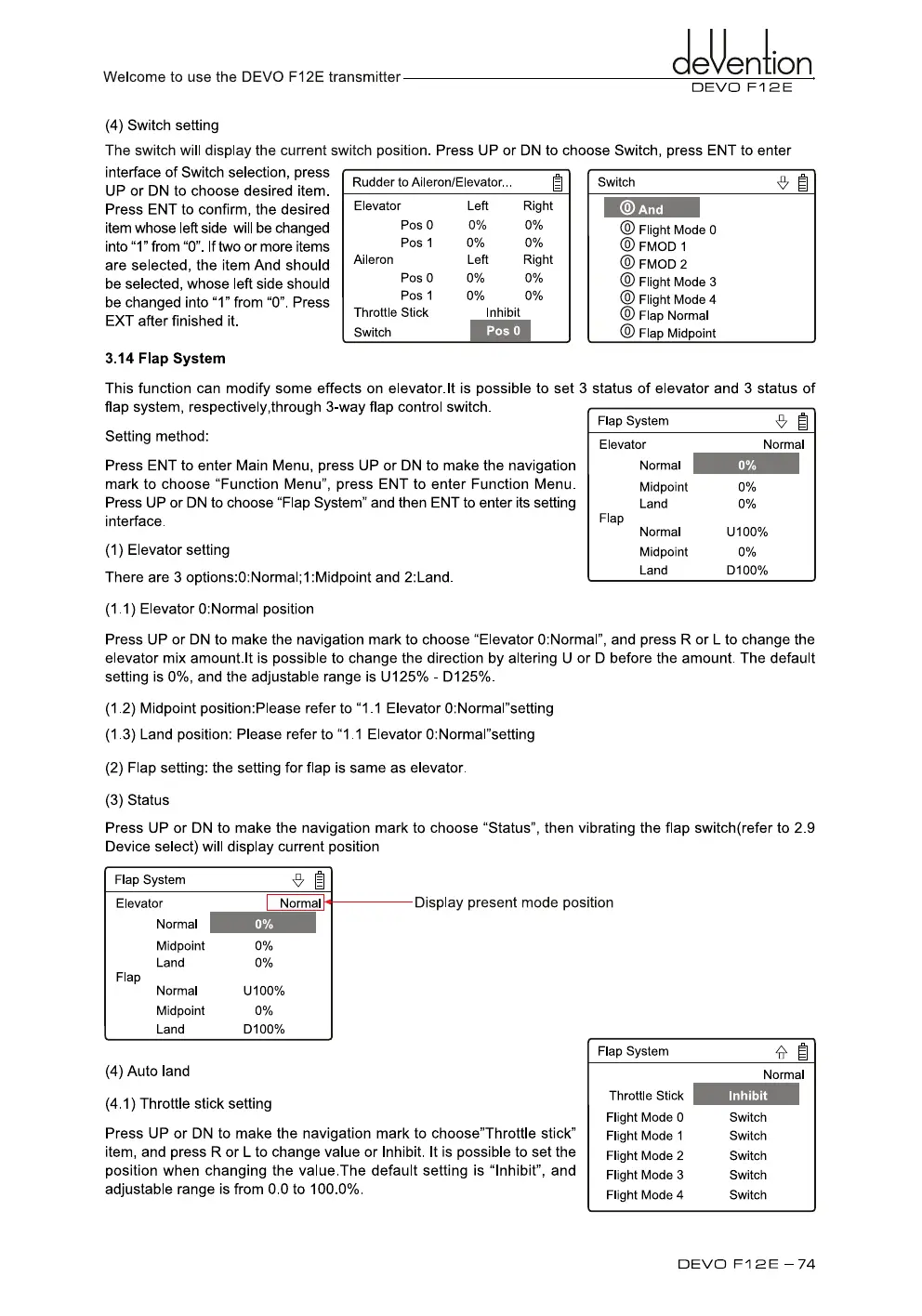
This function can modify some effects on elevator.lt is possible to set 3 status of elevator and 3 status of
flap system, respectively,through 3-way flap control switch.
Setting method:
Press ENT to enter Main Menu, press UP or DN to make the navigation
mark to choose "Function Menu", press ENT to enter Function Menu.
Press UP or DN to choose "Flap System" and then ENT to enter its setting
interface.
(1)
Elevator setting
There are 3 options:0:Normall :Midpoint and 2:Land.
(1.1) Elevator 0:Normal position
Press UP or DN to make the navigation mark to choose "Elevator 0:Normal", and press R or
L
to change the
elevator mix amount.lt is possible to change the direction by altering U or D before the amount. The default
setting is 0%, and the adjustable range is U125% - D125%.
(1.2) Midpoint position:Please refer to "1.1 Elevator 0:Normal"setting
(1.3) Land position: Please refer to "1.1 Elevator 0:Normal"setting
(2)
Flap setting: the setting for flap is same as elevator.
(3)
Status
Press UP or DN to make the navigation mark to choose "Status", then vibrating the flap switch(refer to 2.9
Device select) will display current position
Display present mode position
(4)
Auto land
(4.1) Throttle stick setting
Press UP or DN to make the navigation mark to choose"Throttle stick"
item, and press R or L to change value or Inhibit. It is possible to set the
position when changing the value.The default setting is "Inhibit", and
adjustable range is from 0.0 to 100.0%.
DEVO F 1 2 E — 74



 To Next Page