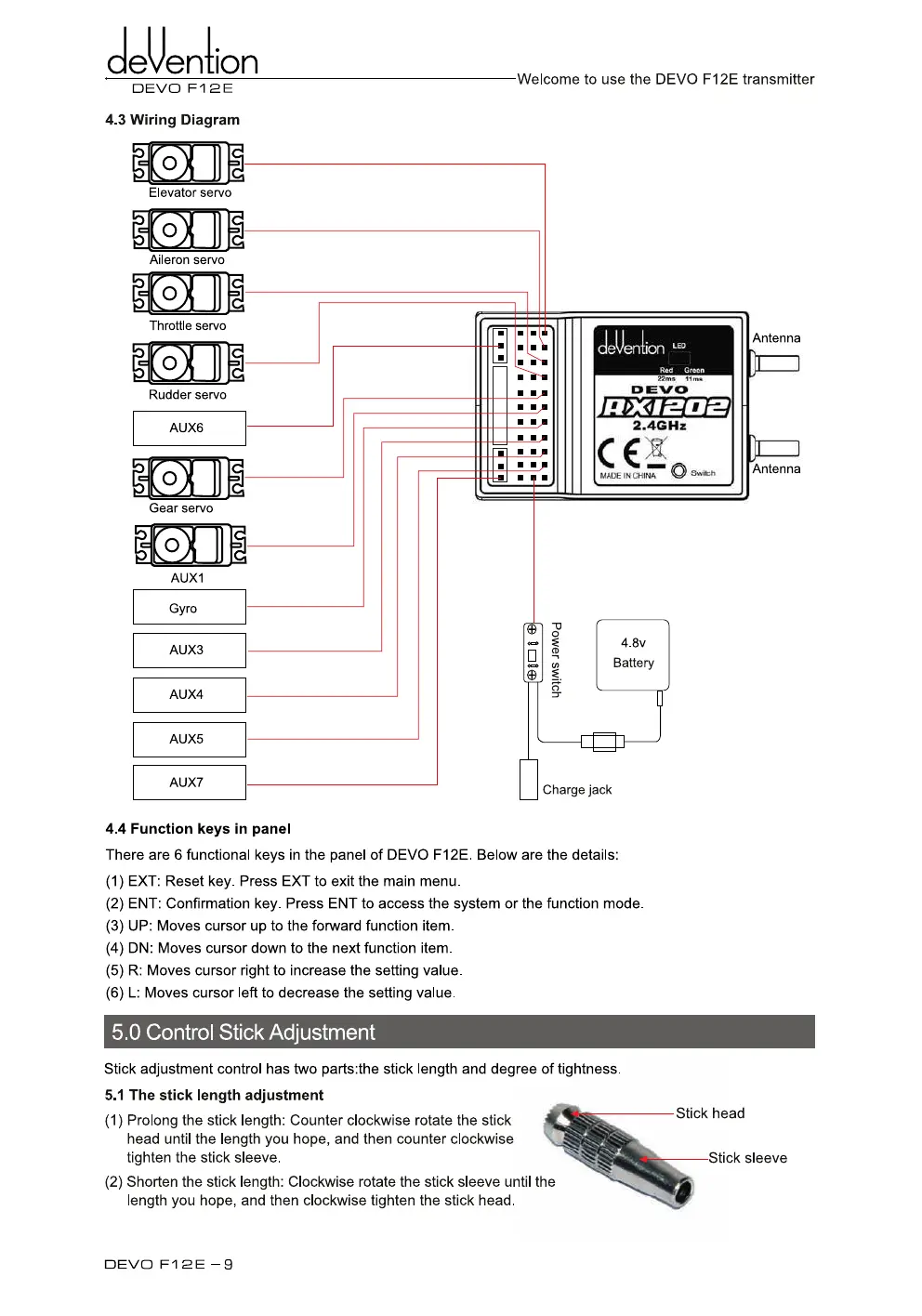
Elevator servo
E\o.11II
Throttle servo
Rudder servo
AUX6
Gear servo
AUX1
Gyro
AUX3
AUX4
AUX5
AUX7
cleention
DEVO F12E
Welcome to use the
DEVO F12E
transmitter
4.3 Wiring Diagram
cleUention "°
Rad
Green
•
•
•
:.
:1-M
•
•
•,,N
•
•,,n
22ins
51ms
13ENICI
,
11701202
-
•
•,
2.4GHz
C E
' •
MACE IN CHINA
SwIch
•
• ,•
.
• •
p
.
• • ,
,
•
._,
•
•
•
•
e
Antenna
Antenna
4.4 Function keys in panel
There are 6 functional keys in the panel of DEVO F12E. Below are the details:
(1)
EXT: Reset key. Press EXT to exit the main menu.
(2)
ENT: Confirmation key. Press
ENT
to access the system or the function mode.
(3)
UP: Moves cursor up to the forward function item.
(4)
DN: Moves cursor down to the next function item.
(5)
R: Moves cursor right to increase the setting value.
(6)
L: Moves cursor left to decrease the setting value.
5.0
on rol Stick Adjustment
Stick adjustment control has two parts:the stick length and degree of tightness.
5.1 The stick length adjustment
(1)
Prolong the stick length: Counter clockwise rotate the stick
head until the length you hope, and then counter clockwise
tighten the stick sleeve.
(2)
Shorten the stick length: Clockwise rotate the stick sleeve until the
length you hope, and then clockwise tighten the stick head.
Stick head
Stick sleeve
4.8v
Battery
Charge jack
DEVO Fi 2E —9



 To Next Page