cleUention
Welcome to use the DEVO F12E transmitter
DEVO F12E
(4) AUX3, AUX4, AUX5, AUX6, AUX7 settings please refers to the AUX2 settings. AUX3 default setting is
RUDD D/R, AUX4 default setting is AUX4 KB; AUX5 default setting is AUX5 KB; AUX6 default setting is
AUX6 KB; AUX7 default setting is AUX7 KB.
After finished the setting, press EXT to exit.
2.11 Wing Type
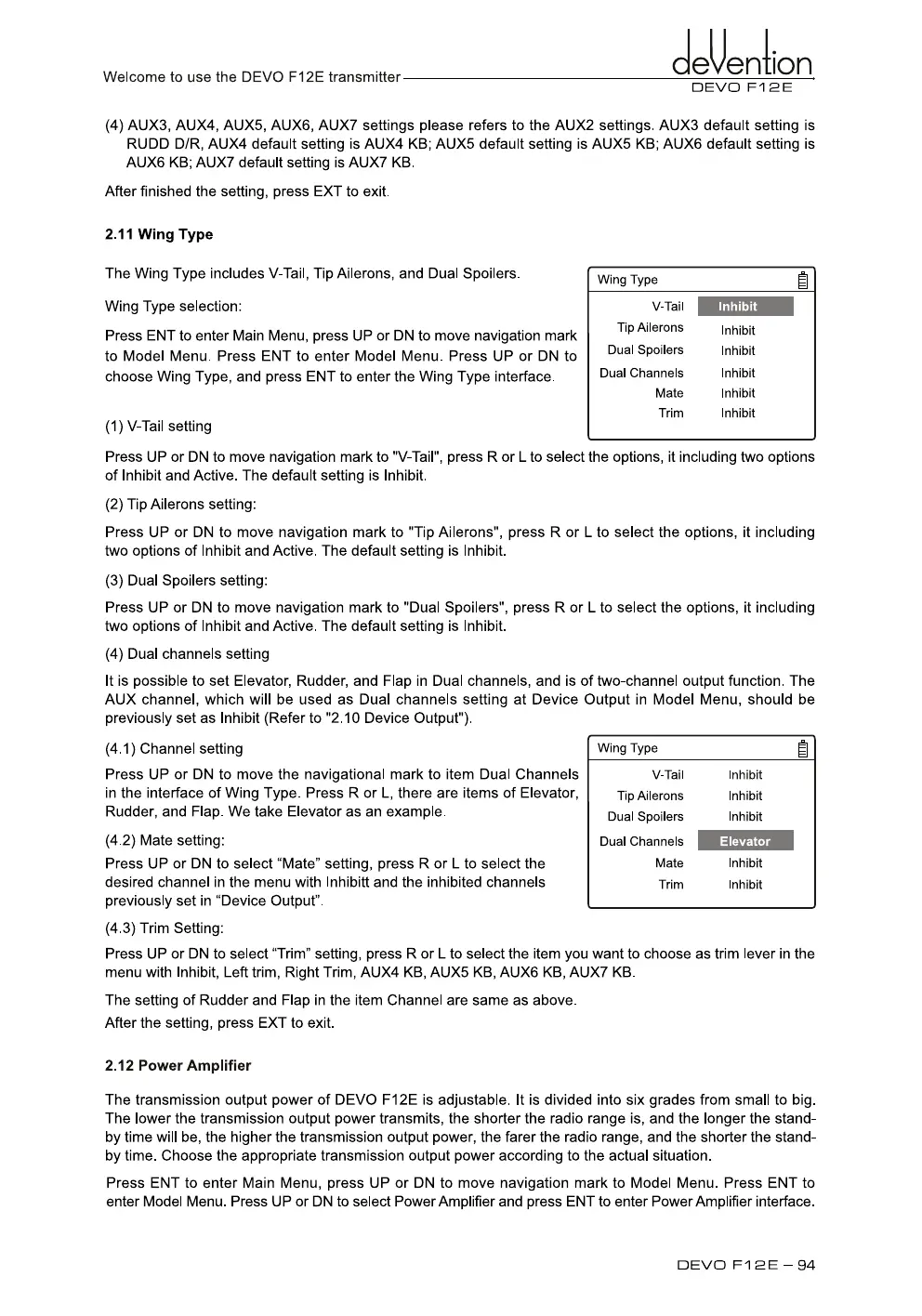
The Wing Type includes V-Tail, Tip Ailerons, and Dual Spoilers.
Wing Type selection:
Press ENT to enter Main Menu, press UP or DN to move navigation mark
to Model Menu. Press ENT to enter Model Menu. Press UP or DN to
choose Wing Type, and press ENT to enter the Wing Type interface.
Wing Type
V-Tail
Inhibit
Tip Ailerons
Inhibit
Dual Spoilers
Inhibit
Dual Channels
Inhibit
Mate
Inhibit
Trim
Inhibit
(1)
V-Tail setting
Press UP or DN to move navigation mark to "V-Tail", press R or L to select he options, it including two options
of Inhibit and Active. The default setting is Inhibit.
(2)
Tip Ailerons setting:
Press UP or DN to move navigation mark to "Tip Ailerons", press R or L to select the options, it including
two options of Inhibit and Active. The default setting is Inhibit.
(3)
Dual Spoilers setting:
Press UP or DN to move navigation mark to "Dual Spoilers", press R or L to select the options, it including
two options of Inhibit and Active. The default setting is Inhibit.
(4)
Dual channels setting
It is possible to set Elevator, Rudder, and Flap in Dual channels, and is of two-channel output function. The
AUX channel, which will be used as Dual channels setting at Device Output in Model Menu, should be
previously set as Inhibit (Refer to "2.10 Device Output").
(4.1) Channel setting
Press UP or DN to move the navigational mark to item Dual Channels
in the interface of Wing Type. Press R or
L,
there are items of Elevator,
Rudder, and Flap. We take Elevator as an example.
(4.2) Mate setting:
Press UP or DN to select "Mate" setting, press R or L to select the
desired channel in the menu with Inhibitt and the inhibited channels
previously set in "Device Output".
(4.3) Trim Setting:
Press UP or DN to select "Trim" setting, press R or L to select the item you want to choose as trim lever in the
menu with Inhibit, Left trim, Right Trim, AUX4 KB, AUX5 KB, AUX6 KB, AUX7 KB.
The setting of Rudder and Flap in the item Channel are same as above.
After the setting, press EXT to exit.
2.12 Power Amplifier
The transmission output power of DEVO F12E is adjustable. It is divided into six grades from small to big.
The lower the transmission output power transmits, the shorter the radio range is, and the longer the stand-
by time will be, the higher the transmission output power, the farer the radio range, and the shorter the stand-
by time. Choose the appropriate transmission output power according to the actual situation.
Press ENT to enter Main Menu, press UP or DN to move navigation mark to Model Menu. Press
ENT
to
enter Model Menu. Press UP or DN to select Power Amplifier and press ENT to enter Power Amplifier interface.
Wing Type
V-Tail
Inhibit
Tip Ailerons
Inhibit
Dual Spoilers
Inhibit
Dual Channels
Elevator
Mate
Inhibit
Trim
Inhibit
DEVO Fl 2E — 94



 To Next Page