Low Voltage Warning:
Please set up the low voltage warning value
when you turn it on following the battery specification.
Battery voltage
Li-Po battery
7.4V
Li-Po battery
11.1V
Dry battery
8x1.5V
Advised warning
voltage
6.4V
9.6V
8.0V
Battery
Alarm
About
1.10 About
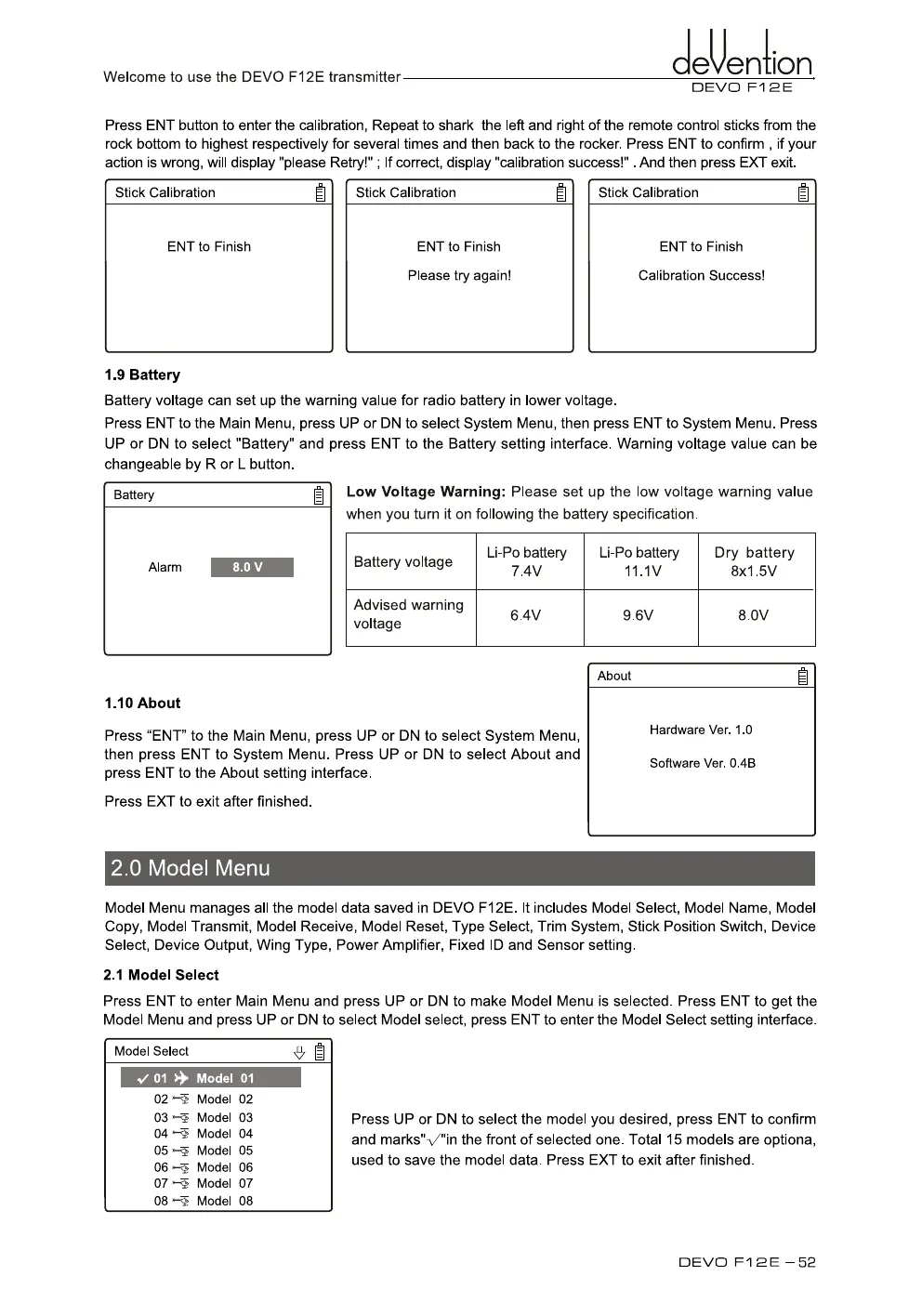
Press "ENT" to the Main Menu, press UP or DN to select System Menu,
then press ENT to System Menu. Press UP or
DN
to select About and
press ENT to the About setting interface.
Press EXT to exit after finished.
Hardware Ver. 1.0
Software Ver. 0.4B
2.0 Model Menu
ciXention
Welcome to use the DEVO F12E transmitter
DEVO F12E
Press ENT button to enter the calibration, Repeat to shark the left and right of the remote control sticks from the
rock bottom to highest respectively for several times and then back to the rocker. Press ENT to confirm , if your
action is wrong, will display "please Retry!" ; If correct, display "calibration success!" . And then press EXT exit.
Stick Calibration
ENT to Finish
Stick Calibration
ENT to Finish
Please try again!
Stick Calibration
ENT to Finish
Calibration Success!
1.9 Battery
Battery voltage can set up the warning value for radio battery in lower voltage.
Press ENT to the Main Menu, press UP or DN to select System Menu, then press ENT to System Menu. Press
UP or DN to select "Battery" and press ENT to the Battery setting interface. Warning voltage value can be
changeable by R or L button.
Model Menu manages all the model data saved in DEVO F12E. It includes Model Select, Model Name, Model
Copy, Model Transmit, Model Receive, Model Reset, Type Select, Trim System, Stick Position Switch, Device
Select, Device Output, Wing Type, Power Amplifier, Fixed ID and Sensor setting.
2.1 Model Select
Press ENT to enter Main Menu and press UP or DN to make Model Menu is selected. Press ENT to get the
Model Menu and press UP or DN to select Model select, press
ENT
to enter the Model Select setting interface.
Press UP or DN to select the model you desired, press ENT to confirm
and marks",/"in the front of selected one. Total 15 models are optiona,
used to save the model data. Press EXT to exit after finished.
Model Select
2
✓
01 4. Model 01
02
Model 02
03
Model 03
04
Model 04
05'- Model 05
06
Model 06
07
Model 07
08
Model 08
DEVO Fi 2E —52



 To Next Page