cleention
DEVO F12E
Welcome to use the DEVO F12E transmitter
1.0 System Menu
All the functional settings, which are relative to the operation system of DEVO F12E itself, are fully integrated
in System Menu. They include Language, Display, Buzzer,Vibrator,Video Setting, Stick Mode, Stick Direction,Stick
calibration, Battery and About.
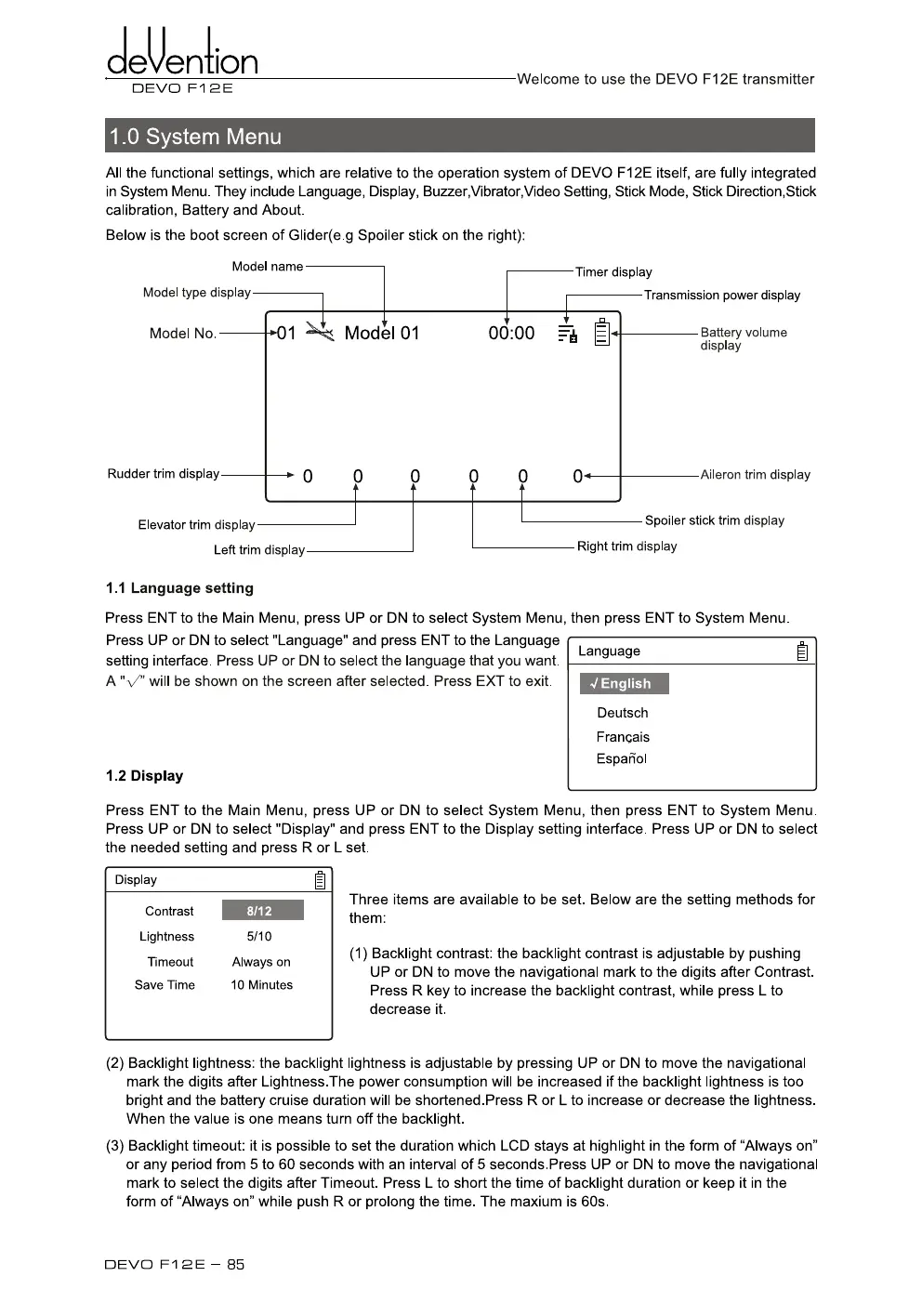
Below is the boot screen of Glider(e.g Spoiler stick on the right):
Model name
Timer display
Transmission power display
Model type display
Model No.
00:00
Rudder trim display
Elevator trim display
0.01
Model 01
0"
Right trim display
Battery volume
display
Aileron trim display
Left trim display
Spoiler stick trim display
1.1 Language setting
Press ENT to the Main Menu, press
UP
or DN to select System Menu, then press ENT to System Menu.
Press UP or DN to select "Language" and press ENT to the Language
setting interface. Press UP or DN to select the language that you want
A "V" will be shown on the screen after selected. Press EXT to exit.
4
English
Deutsch
Francais
Espaffol
1.2 Display
Language
Press ENT to the Main Menu, press UP or DN to select System Menu, then press ENT to System Menu.
Press UP or DN to select "Display" and press ENT to the Display setting interface. Press UP or DN to select
the needed setting and press R or L set.
Three items are available to be set. Below are the setting methods for
them:
(1) Backlight contrast: the backlight contrast is adjustable by pushing
UP or DN to move the navigational mark to the digits after Contrast.
Press
R
key to increase the backlight contrast, while press L to
decrease it.
Display
Contrast
8/12
Lightness
5/10
Timeout
Always on
Save Time
10 Minutes
(2)
Backlight lightness: the backlight lightness is adjustable by pressing UP or DN to move the navigational
mark the digits after Lightness.The power consumption will be increased if the backlight lightness is too
bright and the battery cruise duration will be shortened.Press R or
L
to increase or decrease the lightness.
When the value is one means turn off the backlight.
(3)
Backlight timeout: it is possible to set the duration which LCD stays at highlight in the form of "Always on"
or any period from 5 to 60 seconds with an interval of 5 seconds.Press UP or DN to move the navigational
mark to select the digits after Timeout. Press L to short the time of backlight duration or keep it in the
form of "Always on" while push R or prolong the time. The maxium is 60s.
DEVO Fl 2E — 85



 To Next Page