Website: www.devicewell.com Email: support@devicewell.cn 37
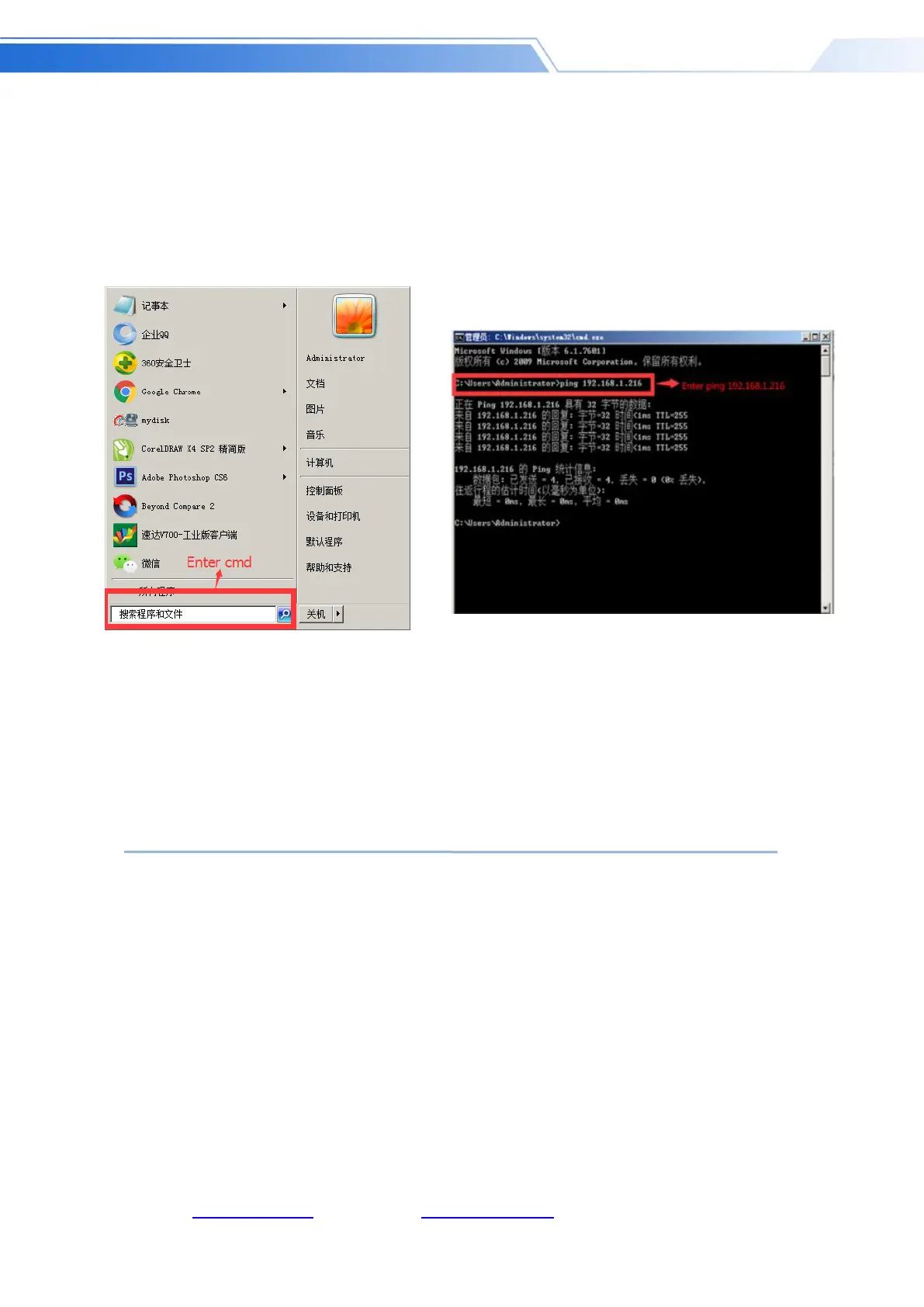
The third method: confirm whether the device IP address is properly connected to the local area
network. There is a Windows Start menu in the lower left corner of the desktop of the computer.
Click Start and a search box will pop up. Enter cmd and press Enter. A command line will pop up.
Is the so-called console, enter the IP address of the device you are searching for, such as ping
192.168.1.20 and press Enter;
(Note that you need to press the space bar after typing ping)
11. Failure and Maintenance
11.1 Common Faults and Solutions
(1) The output image may be flickered by interference. The quality of the wire used may be
poor, and the shielding layer of the wire is not well prepared. When there is a strong radio
near the use environment, radio waves may interfere with the transmission of the signal,
resulting in unstable signal flicker. Please use the wire produced by regular manufacturers,
such as Belden, Jia Nai Mei.
(2) When plugging in the audio and video interface, if there is obvious static electricity, the



 To Next Page