LT-2023
14
COMPONENT TESTING, REPAIR AND REPLACEMENT
PROPER REPAIR PROCEDURES
WARNING
When servicing the DeVilbiss Oxygen Concentrator, be absolutely certain
that the correct tools are used and that the parts are free of oil and grease
or any material not compatible with oxygen. Teon® tape is recommended
and must be applied to the male threads omitting the rst thread to
eliminate the possibility of tape particles entering the oxygen system.
Electric shock hazard. Do not remove cabinet. The cabinet should only be
removed by a qualied DeVilbiss homecare provider.
Disconnect the power cord from the wall outlet before attempting repairs
on the unit. Extra care should be taken if it is necessary to operate the unit
with the cabinet removed.
NOTE–Be sure to read all of the steps involved before beginning any of the
procedures in this manual.
NOTE– After repairing or replacing a component, run the unit for 20 minutes,
check the oxygen concentration and test for leaks.
The DeVilbiss Oxygen Concentrator is designed for ease of service. To aid
service personnel a Service Kit (part #444-501) is available which contains the
necessary gauges, tools, and testing instruments to properly service the oxygen
concentrator. See list below.
In addition, you will also need an oxygen analyzer (part #R217P62 or R218P12)
to periodically check oxygen concentration levels and leak test solution.
WARNING
A certied leak detection solution, such as SWAGELOK #MS-Snoop® or
equivalent, is needed to test for system leaks. The solution must not
contain ethylene glycol.
CAUTION–Do not apply leak test solution to any part of the rotary valve or the
main PC Board assembly.
NOTE–Apply leak test solution to all ttings and hose connections with the unit
running. If an air leak is present, the solution will bubble. All leaks should be
repaired before putting the concentrator back in service.
The following parts are included in the Service Kit:
1 Slotted bit
1 #1 Phillips bit
1 #2 Phillips bit
1 Crescent wrench
1 8” Duckbill pliers
1 Voltmeter
2 Pressure/Vacuum gauge
1 Tool box
2 Test Fittings
1 Torx screwdriver w/bits
1 Channel Lock Pliers
1 1/4” Ratchet wrench
1 10mm Socket l/4” Drive
1 1/4” Drive extension
1 Plastic storage case
CABINET REMOVAL
For units with Serial Numbers starting with J,
N or R
To remove back cabinet:
The majority of all the servicing and repairs can be done without removing the
front cabinet completely. However, it may be loosened or removed to gain access
to the components behind it.
1. Unplug the unit from the wall outlet.
2. Remove the six screws that secure the back cabinet – 2 behind handle, 2
near the bottom, and 1 on each side.
NOTE–All six screws are the same size.
3. Remove the back cabinet by sliding it toward the rear until clear.
4. To reassemble, reverse steps 2-3.
To loosen the front cabinet:
5. Remove the two screws (located directly above the hour meter) that hold
the front cabinet to the unit’s internal structure.
6. Remove the screw located near the bottom of the recessed humidier
compartment on the front of the unit. The top of the front cabinet can now
be tilted forward to allow access to the components behind it.
To remove the front cabinet completely:
7. Tilt cabinet forward and disconnect the ribbon connector from the PC
board.
8. Before disconnecting the wires from the power switch and circuit breaker
note their positions in order to reconnect them properly; then disconnect
the wires.
9. Disconnect the hose at the bottom of the ow meter and remove cabinet.
10. To reassemble reverse steps 5 – 9 making sure bottom of cabinet is
inserted securely in base of unit.
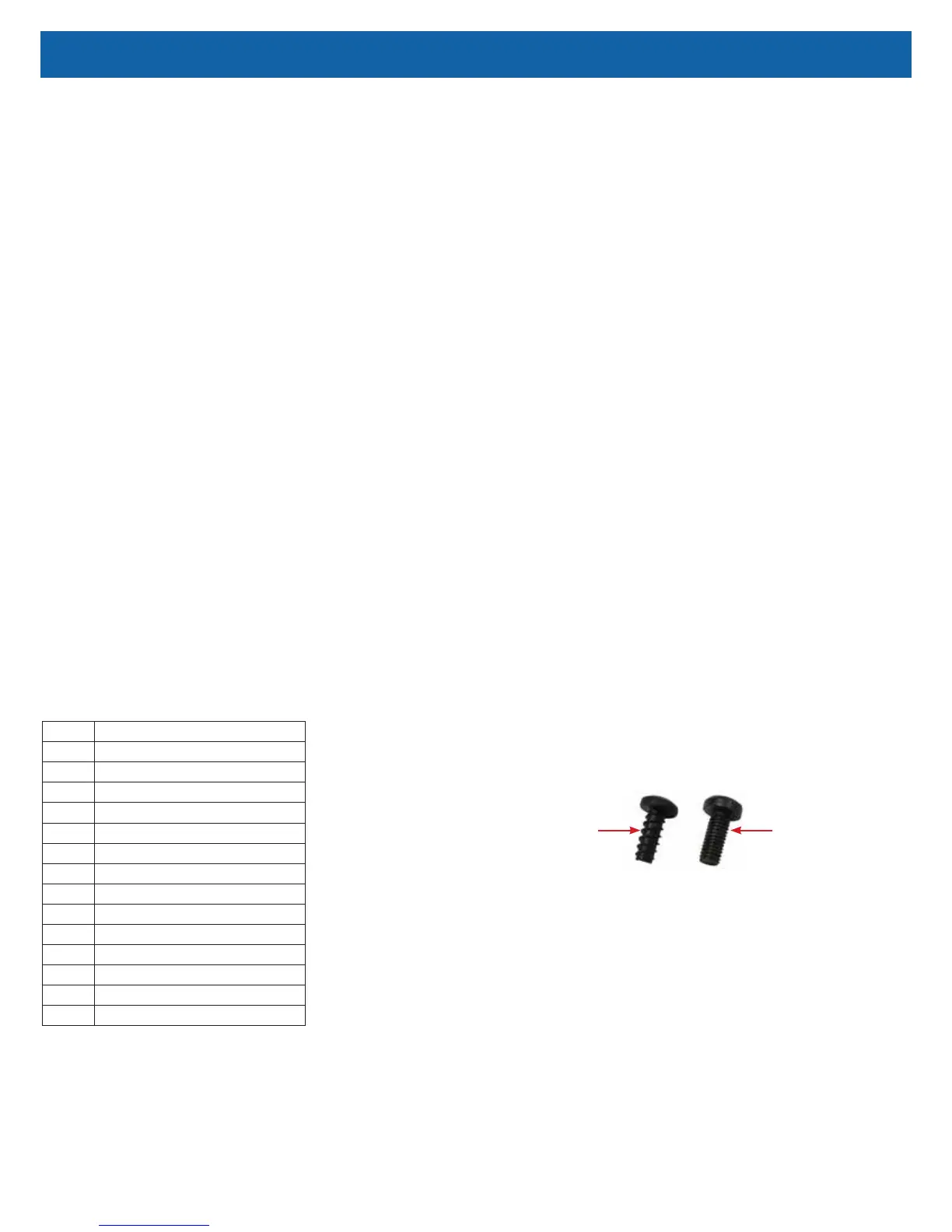
NOTE–All 525 models are now being built using Plastite cabinet screws. These
are special thread forming screws; so do not over tighten. They should be
torqued to 18 – 20 in-lbs. The original cabinet screw has much ner threads and
is not a thread forming screw.
These screws are not interchangeable, so be sure to order the correct part
number. See gure below.
Plastite Cabinet
Screw
Original Cabinet
Screw (525DD-628)
For units with Serial Numbers starting with F
To remove front and back cabinets:
1. Ensure the unit is unplugged from the wall outlet.
2. Remove the six screws that secure the back cabinet – 2 behind handle, 2
near the bottom, and 1 on each side.
NOTE–All six screws are the same size.
3. Remove the back cabinet by sliding it toward the rear until clear.
4. Remove the front cabinet by pushing the top shoulders toward the back of
the unit, then outward away from behind the bib. Tilt the top of the front
cabinet forward until it can be pulled out of the base of the unit.
5. To reassemble, reverse steps 2-4.
The majority of all the servicing and repairs can be done without removing the
front bib. However, it may be loosened or removed to gain access to the
components behind it.



 To Next Page