EN - 6
A-535D
Filling The iFill Oxygen Cylinder
NOTE– Do not use cylinder while lling.
NOTE– Refer to the
General DanGers & WarninGs and the HanDlinG WarninGs in this manual.
1. Make sure the personal oxygen station is plugged in.
2. Make sure the cylinder is securely connected to the oxygen station. Refer to Connecting The iFill Oxygen Cylinder To
The DeVilbiss iFill Personal Oxygen Station.
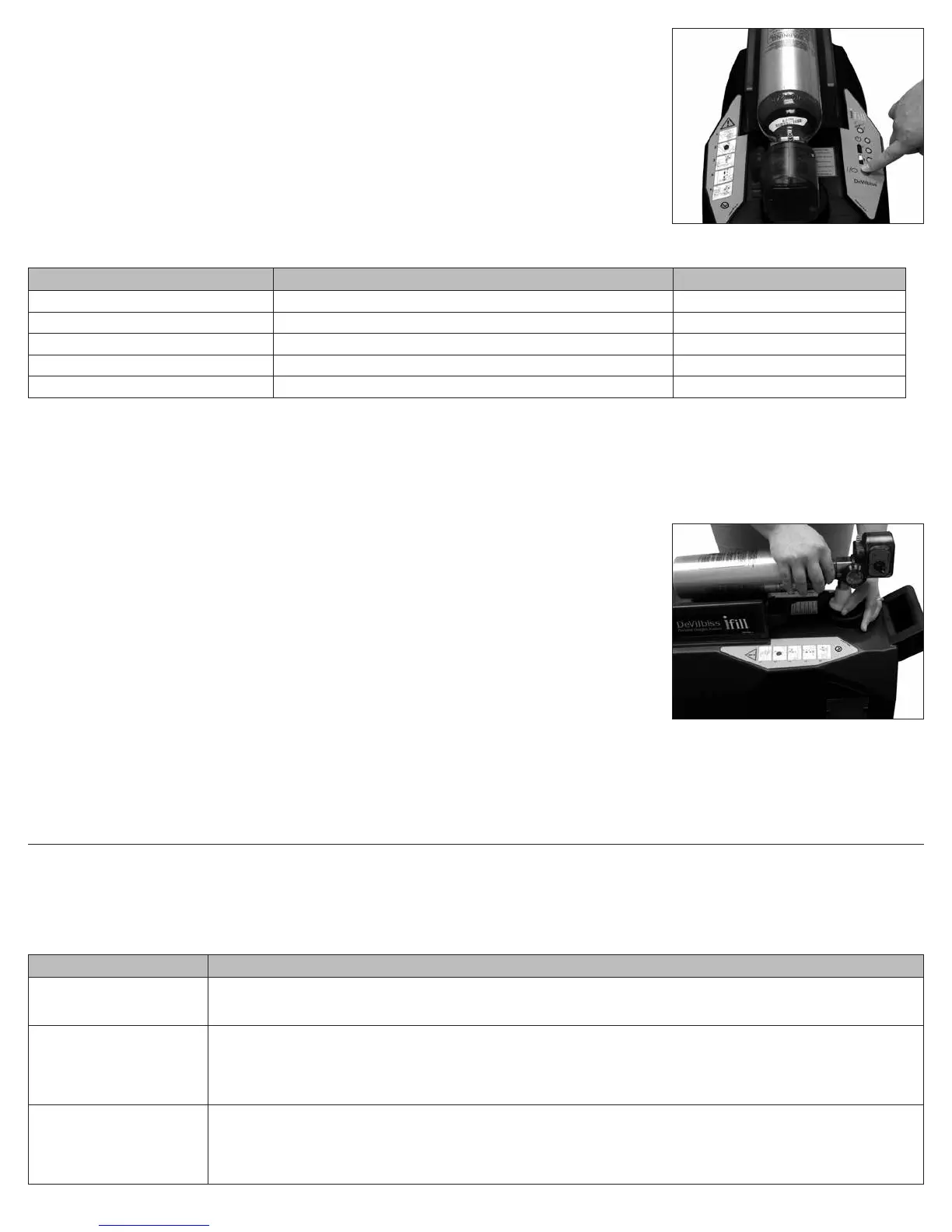
3. Push the start/stop switch on the control panel (Figure 3).
4. The following sequence of events should occur:
a. TheFILLING(green)lightwillilluminatewhilethecylinderislling(refertoiFill Oxygen Cylinder Fill Times).
b. The FULL (green) light will illuminate when the cylinder is full. Proceed to Removing the iFill Oxygen Cylinder.
NOTE– If the Service (RED) light and audible alert are on, proceed to
Trouble sHooTinG in this instruction manual.
Indicator Light Explanation
INDICATOR LIGHT COLOR OXYGEN STATION STATUS EFFECT
None Oxygen station is unplugged. None
Standby (green) Oxygenstationisreadytobeginllingcylinders. Cylinderllingnotstarted.
Filling (green) Oxygenstationisonandcylinderislling. Cylinderislling.
Full (green) Cylinder is full. Remove cylinder.
Service (red) and Audible Alert Oxygenstationisonbutcylinderisnotllingduetointernalfailure. Contact your DeVilbiss provider.
Removing The iFill Oxygen Cylinder
WARNING
Do not modify any connections on the personal oxygen station. Never lubricate the connections. Never use tools of any kind to connect/disconnect the oxygen
cylinderandtheoxygenstation.Otherwise,severeinjuryand/ordamagemayoccur.
Useextremecarewhenhandlingandllinganoxygencylinder.Fulloxygencylindersareunderpressureandcanbecomeaprojectileifdroppedormishandled.
NOTE– Refer to the
General DanGers & WarninGs and the HanDlinG WarninGs in this manual.
1. Removethefulloxygencylinderbypushingdownonthellportcollarlocatedunderthecylindernippleconnector
while using your other hand to steady the cylinder (Figure 4).
2. Liftuponthecylindertoremovefromtheoxygenllconnector.ThegreenStandbylightwillturnonafterashortdelay.
3. Oxygenwillescapefromthellconnectorforashorttimeafterthecylinderhasbeenremoved.Thismaybe
accompanied by a “pop” with a rush of air. This is normal.
4. Perform one (1) of the following steps:
a. Ifdesired,llanotheroxygencylinder.RefertotheDeVilbiss iFill Personal Oxygen
Station Operation Checklist.
b. Placetheoxygenllconnectorcoverontothellconnector.
NOTE– The oxygen ll connector cover should always be used whenever cylinders are not being lled.
Setting The iFill Oxygen Cylinder Rotary Selector To The Prescribed Setting
1. AttachthenasalcannulatothecannulattingoftheiFilloxygencylinder.
2. Turn the rotary selector to the L/min. setting prescribed by your physician.
WARNING
ChangingtheL/min.settingontherotaryselectorwillaffectthedoseofoxygendelivered,DONOTreadjusttheL/min.settingunlessdirectedbyyourphysician.
3. Toturntheowofoxygenoff,turntherotaryselectorcounterclockwisetothe“OFF”position.
TROUBLESHOOTING
The following troubleshooting chart will help you analyze and correct minor system malfunctions. If the suggested procedures do not help, call your DeVilbiss homecare
provider. Do not attempt any other maintenance.
WARNING
Toavoidelectricshockhazard,donotremovethecabinet.ThecabinetshouldonlyberemovedbyaqualiedDeVilbisshomecaretechnician.
DeVilbiss iFill Personal Oxygen Station
PROBLEM SOLUTION
No indicator lights on. 1. Check that the personal oxygen station power cord is properly plugged into the wall outlet.
2. Ensure the fuse in the Mains Power Entry Module is not open.
3. If there are still no indicator lights, contact your DeVilbiss provider.
Red light on. 1. Ensure the iFill oxygen cylinder is connected correctly.
2. Press the start/stop switch. If the Red light remains on, contact your DeVilbiss provider for service.
3. IftheRedlightturnsonduringthellingprocess,checkthatthecylinderisconnectedproperly.Removethecylinderandreinstall.
Ensure the cylinder rotary selector is in the OFF position. Press the start/stop switch to turn off the Red light and then again to restart
thecylinderllingprocess.IftheRedlightturnsonagainduringthellingprocess,contactyourDeVilbissproviderforservice.
Excessive fill times OR Green
filling light stays on.
1. Ensure the iFill oxygen cylinder rotary selector is set to OFF.
2. CheckthelltimesshowninTypicalOxygenCylinderFillTimeschart.
3. Check that the cylinder is connected properly: Press the start/stop switch to return to Standby. Remove the cylinder and reinstall.
Pressthestart/stopswitchtobeginllingthecylinder.
4. If problem persists, contact your DeVilbiss provider for service.
Figure 3
Figure 4



 To Next Page