www.dfi .com
22
Chapter 4 Mounting Options
Chapter 4 - Mounting Options
Chapter 4
Wall Mount
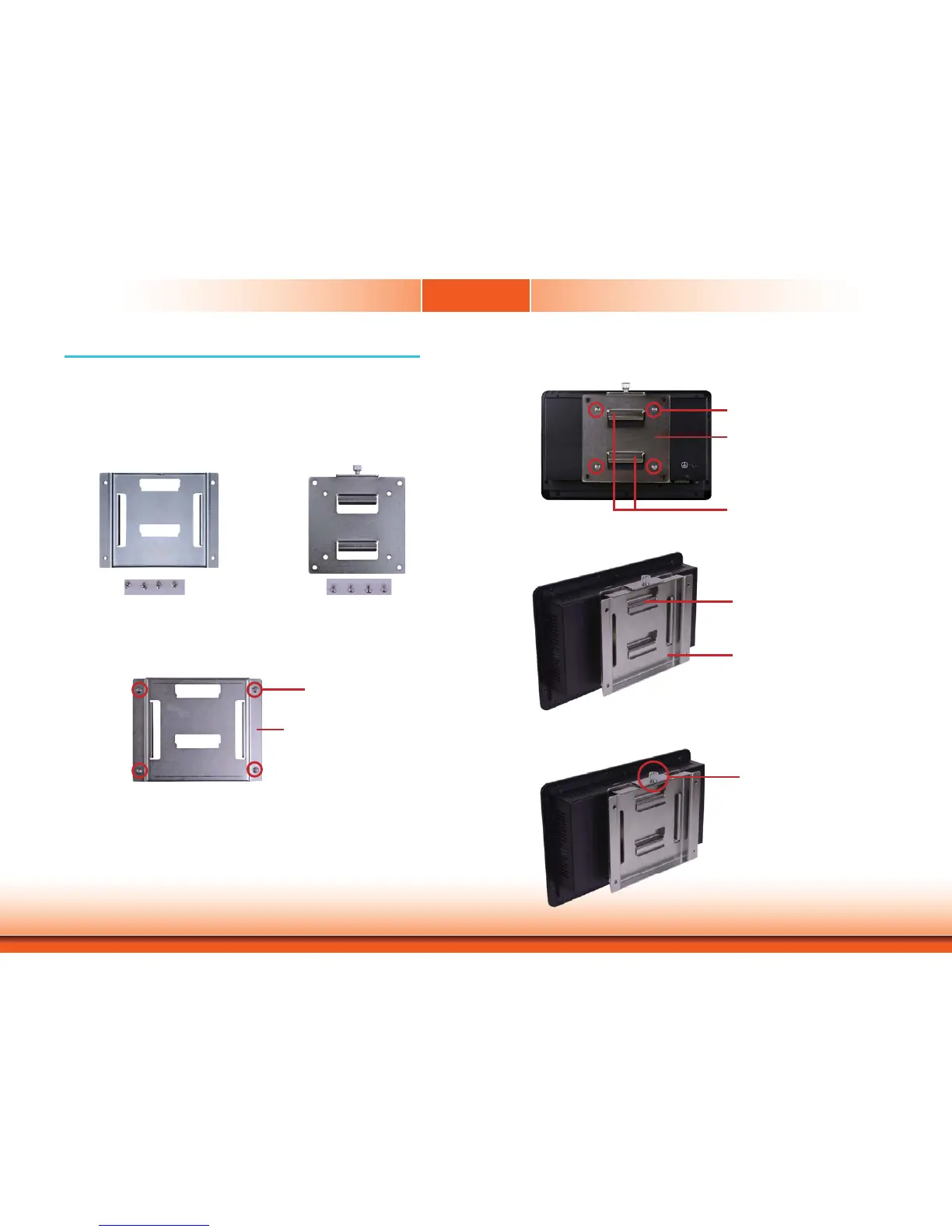
The wall mount kit includes the following:
• 2 Wall mount brackets
• Bracket screws
Wall mount bracket 1 Wall mount bracket 2
1. Select a place on the wall where you will mount the Panel PC.
2. Use the provided mounting screws to attach “wall mount bracket 1” to the wall.
Wall mount bracket 1
Mounting screw
4. Using the hooks on “bracket 2”, slide the Panel PC to “bracket 1”.
Wall mount bracket 1
Wall mount bracket 2
3. Attach the other bracket (wall mount bracket 2) to the rear of the Panel PC.
Wall mount bracket 2
Mounting screw
Hooks
5. Tighten the screw to hold the assembly in place.
Mounting screw


 To Next Page