DV300/DV301B 30" Multimedia Information Display
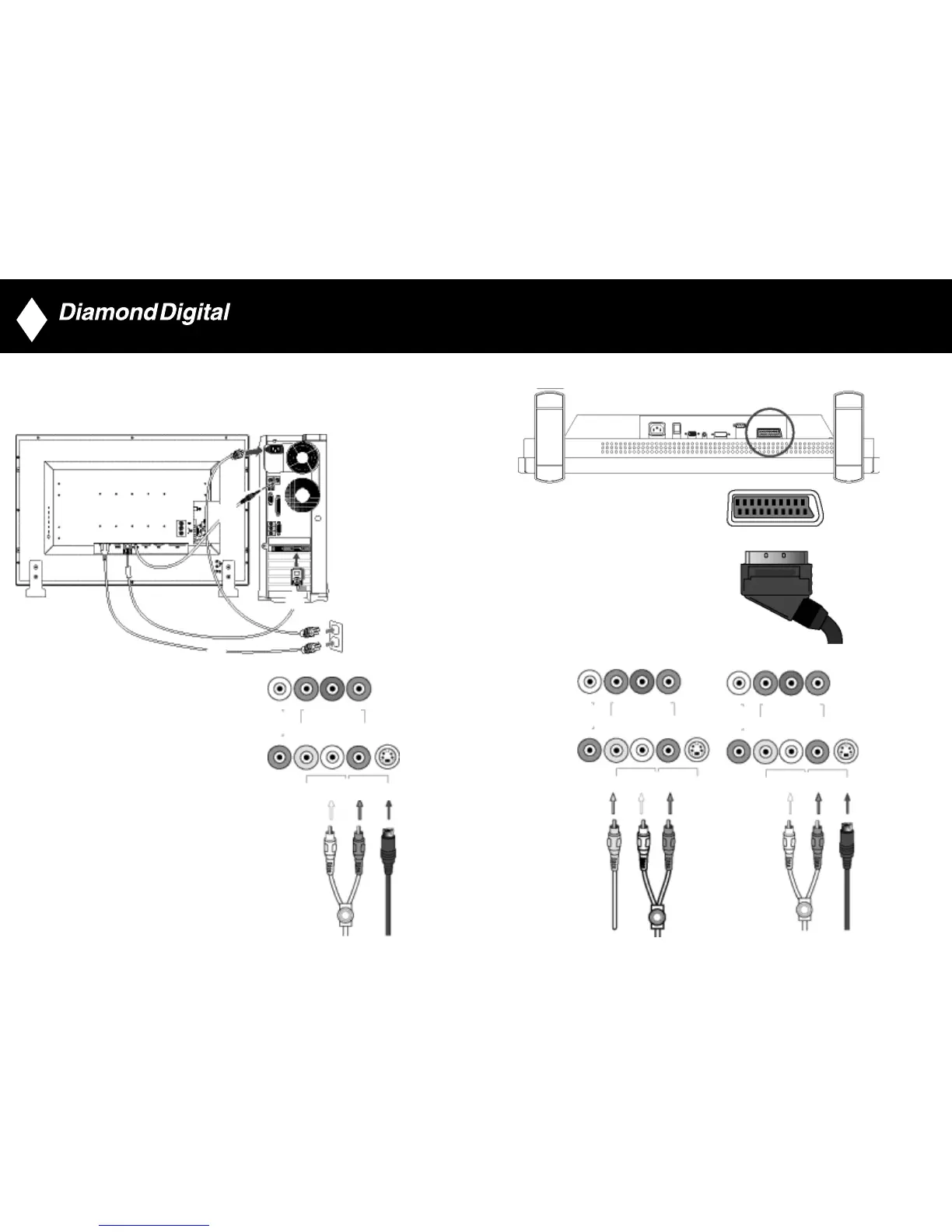
Connect to PC
• Connect the cables to the back of your computer by following step 1~3.
• If your monitor displays the computer image the installation has been completed successfully.
• If installation was not successful, see the Troubleshooting section.
Connect to DVD/VCD/VCR
Connect to DVD/VCR/VCD through S-VIDEO
• Connect to DVD/VCR/VCD through S-VIDEO
15
Connect to DVD/VCR /VCD through SCART (for Europe only)
Connect to DVD/VCR /VCD through composite video (CVBS)
16
•
3
•
•
2
1
COMPONENT VIDEO
(DVD/HD IN)
G/Y B/Cb/Pb R/Cr/Pr
COMPONENT VIDEO
(DVD/HD IN)
CVBS L R S-VIDEO
AUDIO
R
COMPONENT VIDEO
(DVD/HD IN)
G/Y B/Cb/Pb R/Cr/Pr
AUDIO
R
COMPONENT VIDEO
(DVD/HD IN)
G/Y B/Cb/Pb R/Cr/Pr
AUDIO
R
AUDIO
CVBS L R S-VIDEO
AUDIO
CVBS L R S-VIDEO
L
L
L



 To Next Page