EasyManua.ls Logo

Diamondview DV65UM - Using the Remote Control

Diamondview DV65UM
60 pages
Print Icon
To Next Page IconTo Next Page
To Previous Page IconTo Previous Page
Loading...
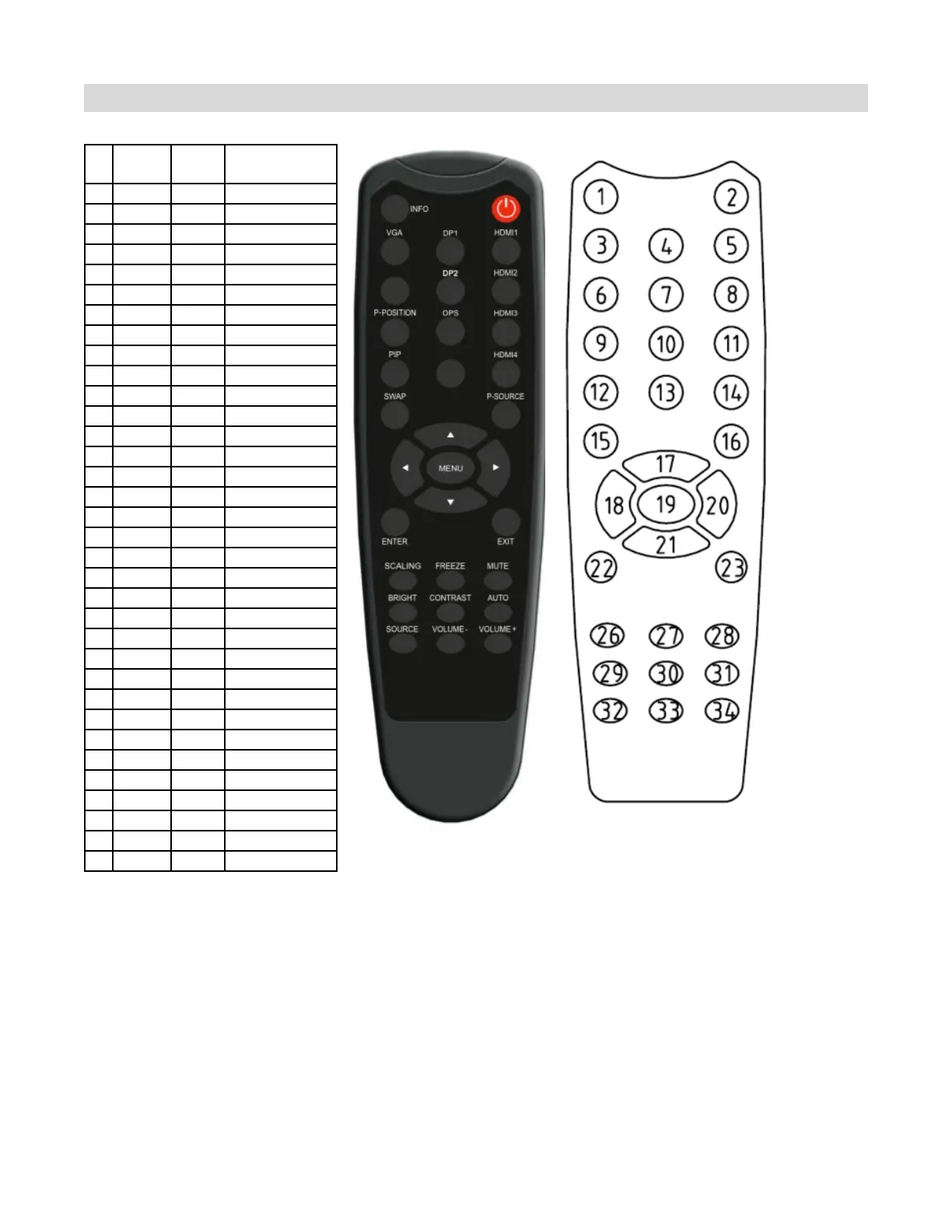
Using the Remote Control
Hot Key: Remote key and keypad Lock/Unlock Control.
Lock: Press Enter, Enter, Exit, Exit, Enter and Exit on the controller by sequence and all keys
(including remote and keypad) will be locked except RS232 and power on control.
Unlock: Press Enter, Enter, Exit, Exit, Enter and Exit on the controller by sequence again and all keys
will be unlocked.
NO
Customer
Code
Data
Code
Function
1
40AF
04FB
INFO
2
40AF
1CE3
POWER
3
40AF
07F8
VGA
4
40AF
08F7
DISPLAYPORT1
5
40AF
09F6
HDMI1
6
40AF
0AF5
────
7
40AF
0BF4
DISPLAYPORT2
8
40AF
0CF3
HDMI2
9
40AF
1AE5
PIP POSITION
10
40AF
15EA
OPS
11
40AF
10EF
HDMI3
12
40AF
11EE
PIP
13
40AF
0DF2
────
14
40AF
16E9
HDMI4
15
40AF
06F9
SWAP
16
40AF
13EC
PIP SOURCE
17
40AF
02FD
18
40AF
01FE
19
40AF
0EF1
MENU
20
40AF
03FC
21
40AF
19E6
22
40AF
12ED
ENTER
23
40AF
05FA
EXIT
24
40AF
40BF
────
25
40AF
41BE
────
26
40AF
14EB
SCALING
27
40AF
43BC
FREEZE
28
40AF
00FF
MUTE
29
40AF
17E8
BRIGHTNESS
30
40AF
18E7
CONTRAST
31
40AF
1EE1
AUTO
32
40AF
0FF0
SOURCE
33
40AF
1BE4
VOLUME -
34
40AF
1DE2
VOLUME +