CAB SIM
The integrated DSP does provide an IR based cabinet simulation as
well. Specifically developed for the VHX, it allows you to quickly
connect to FOH, without the hassle of configuring the microphones on
stage.
CAB SIM could then be used in both CABLESS mode, without cabinet
or load, or in parallel with the POWER AMP with a connected cabinet.
Both HEADPHONES and XLR are controlled from the CABSIM screen
and could be used in parallel.
HEADPHONES and XLR supports DI mode, to be used with your
preferred cabinet simulation hardware/software, or for reamping
purpose.
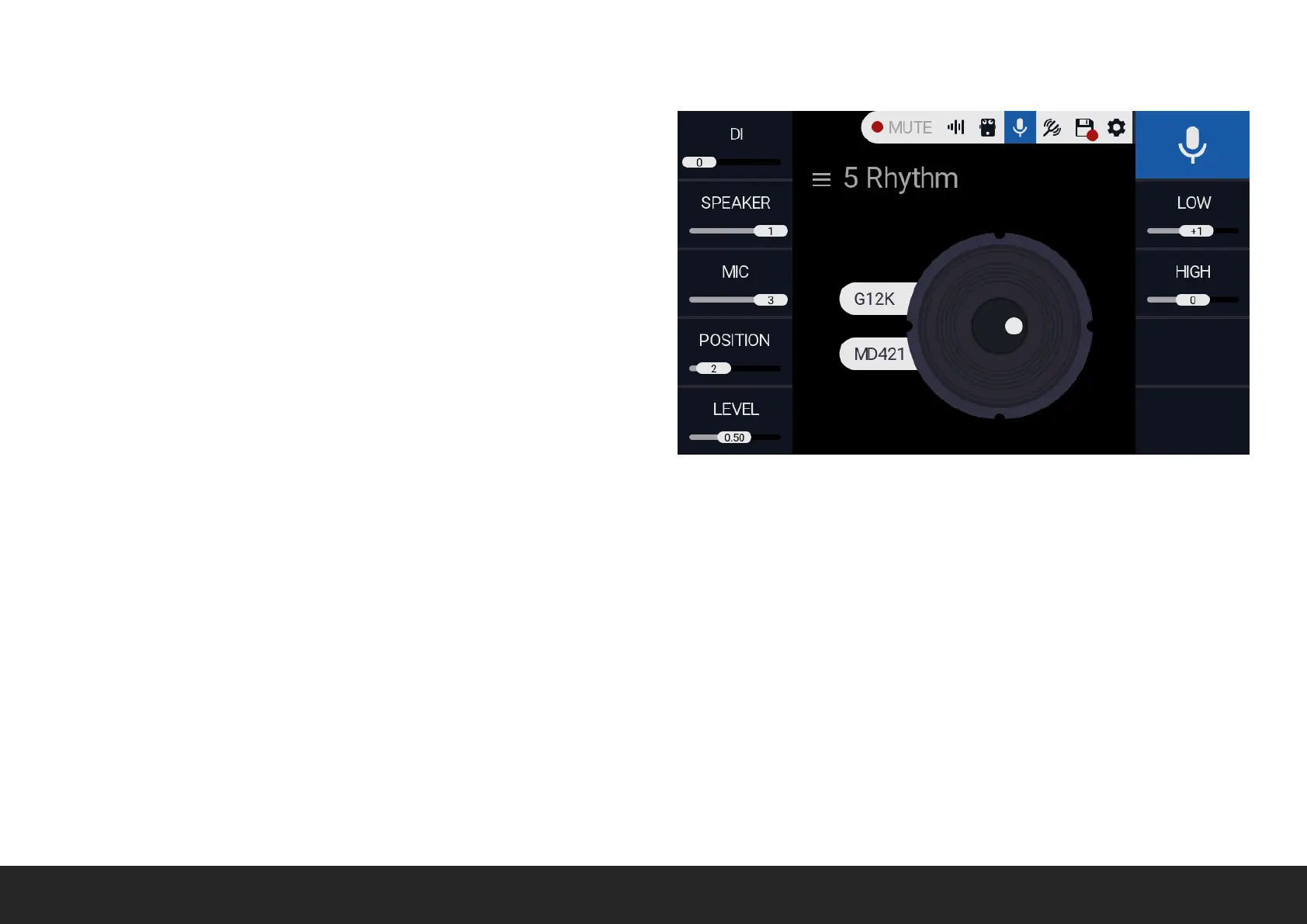
DI Rotate the relative encoder to toggle DI MODE.
SPEAKER Rotate the relative encoder to scroll between the available SPEAER: V30, G12K-100.
MIC Rotate the relative encoder to scroll between the available MIC: SM57, R121, C414, MD421.
POSITION Rotate the relative encoder to choose the MIC position relative to the speaker.
LEVEL Rotate the relative encoder to adjust output level. Please note that output level will affect both HEADPHONES and XLR.
HIGH Rotate the relative encoder to adjust the high frequency response.
LOW Rotate the relative encoder to adjust the low frequency response.


 To Next Page