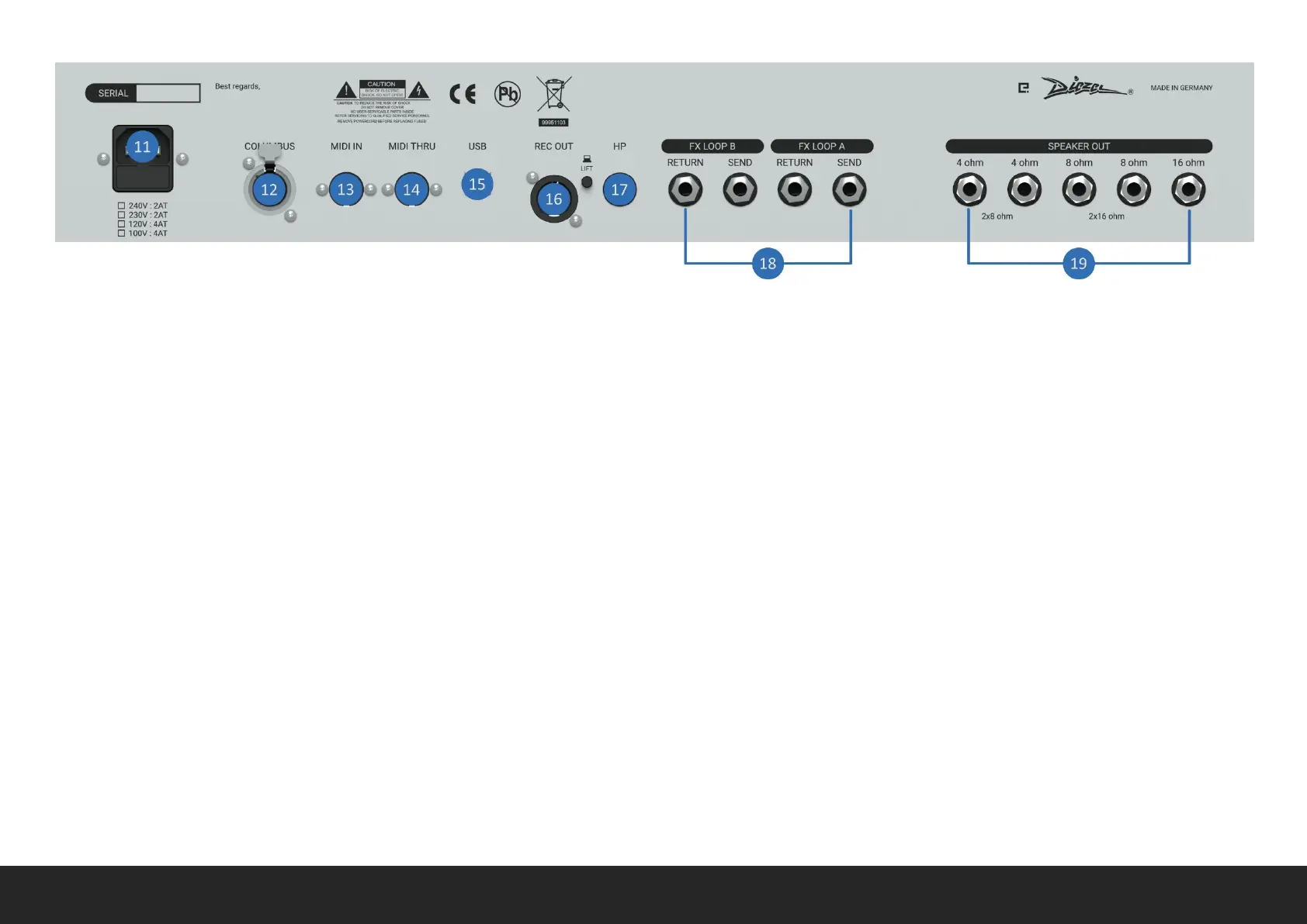
REAR PANEL
11 AC IN Connect to a PROPERLY GROUNDED AC power outlet. Make
sure the voltage shown matches with the location you are using VHX
in.
12 COLUMBUS Connect your COLUMBUS controller here.
13 MIDI IN Connect your MIDI controller here. Please note that
PHANTOM POWER is available at 9V DC on pin 1-6 (-) and 3-7 (+) with
a maximum 500mA current.
14 MIDI THRU Connect other chained MIDI devices here.
15 USB Connect with a PC for updates and presets backup. Avoid
using USB HUB for reliable operation.
16 REC OUT This is the CAB SIM Balanced XLR output. It could be used
in parallel to HEADPHONES and POWER AMP. Adjust LEVEL and other
settings trough the CAB SIM screen. If you are experiencing GROUND
LOOP or HUM, you could use the LIFT push button. AVOID connection
with 48V PHANTOM POWER enabled device.
17 HEADPHONES Connect your headphones here. This output could
be used in parallel to XLR REC OUT and POWER AMP. Adjust LEVEL and
other settings trough the CAB SIM screen.
18 FX LOOP A/B Connect your effects chain here. FX LOOP A and FX
LOOP B are completely independent and wired after the PREAMP and
could be placed anywhere in the integrated DSP EFFECT chain. Each
one has independent SEND, RETURN and MIX level adjustments,
controlled trough FX LOOP A/B effect screen section.
19 SPEAKER OUT Connect your CABINET(s) here. Make sure that the
IMPEDANCE of the CABINET(s) matches the one shown on the relative
output jack.


 To Next Page