14
10.2 Ramp Mode
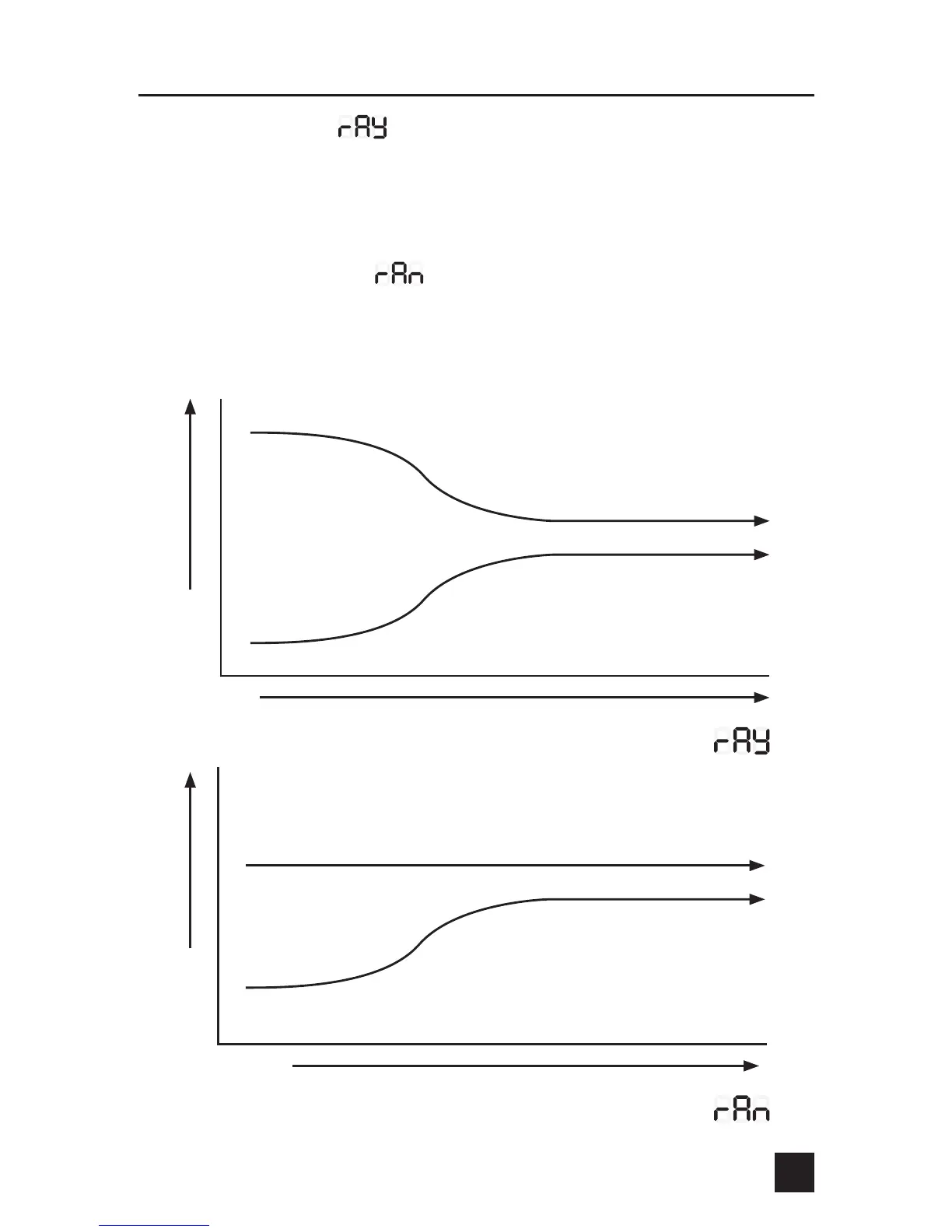
When the ramp is set to (ramp yes), the low and slow ramp mode is enabled.
This mode is used for slow cooks so the food never overcooks. This feature will
gradually lower the pit temperature to the food setpoint temperature when the
food is within 30 degrees of being done. The controller will hold the pit temperature
slightly above the food setpoint as long as there is fuel.
The factory default setting is (ramp no), so ramp must be enabled to use
it. Note: when using this feature, the pit temperature can be started higher than
normal to reduce cook time and not overcook the food. If the food probe is not
plugged in and the ramp mode is turned on, the ramp LED will be on but no
ramping will take place.
Temperature
Time
Pit Temperature
Food Temperature
Food/Pit Plot with Ramp Set to Yes
Time
Temperature
Pit Temperature
Food Temperature
Food/Pit Plot with Ramp Set to No


 To Next Page