Digital Ally, Inc. | Status Indicators
7-2
FirstVu HD Operation Guide | 860-00177-00 Rev J
Go Back To Table of Contents
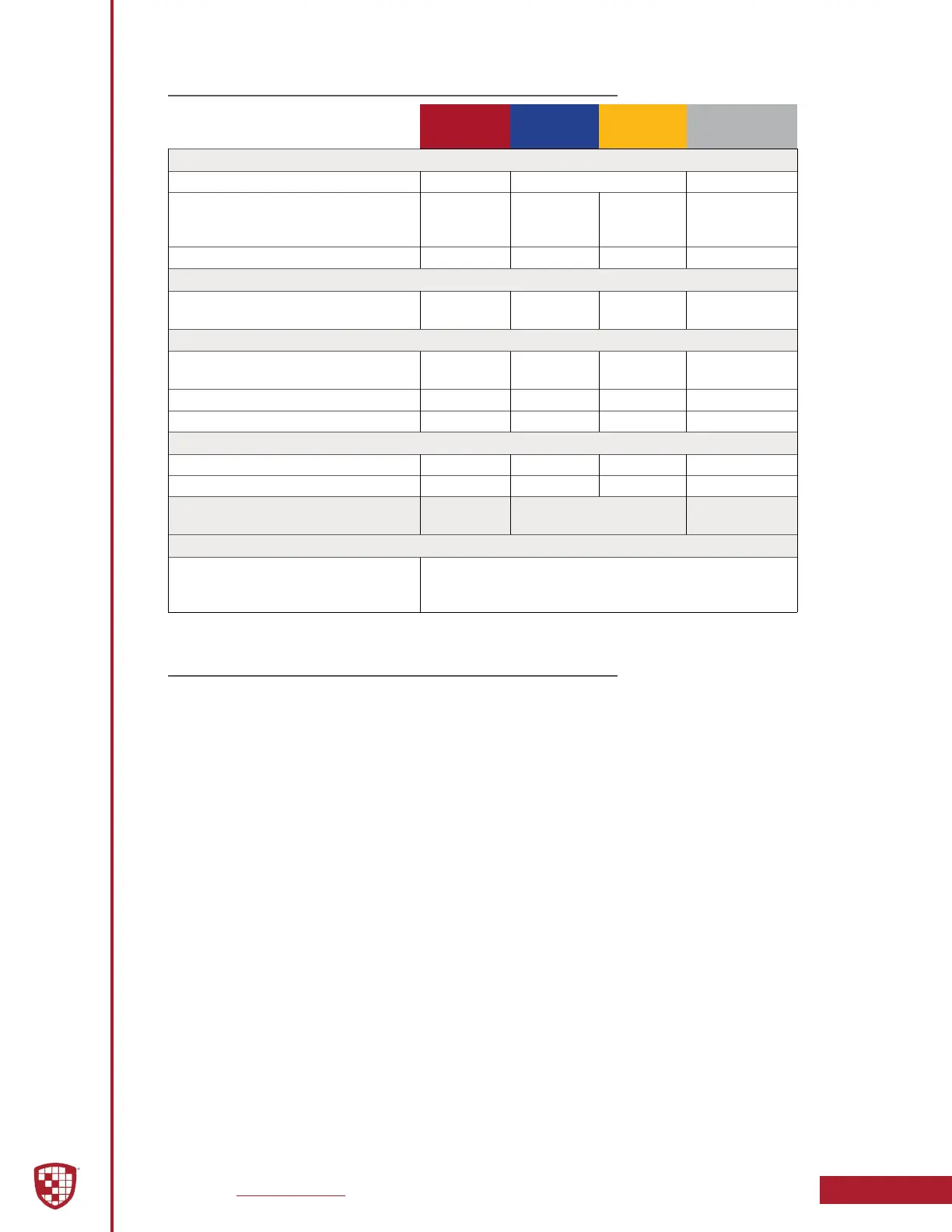
7.2 Covert Mode
Camera DVR DVR
DVR
VIBRATE
Power & Record
Powering ON Alternating Flash 1 Pulse
Event Recording
Pulse
(Frequency
Congurable)
Standby or Standby Pre-Event
Memory Alerts
15 Minutes Remaining
1 Pulse /
5 Seconds
Battery Alerts
15% Charge Remaining
2 Pulses /
5 Seconds
Charge in Progress Flash
Charging Complete On
Data Transfer
Transfer in Progress Flash
Transfer Complete On
Error
3 Pulses /
5 Seconds
VuLink
Connected to VuLink
®
VuLink
®
will display a ashing LED when searching for
your FirstVu HD, and display a solid yellow LED when
connected to your FirstVu HD.
7.3 Memory & Battery Alerts
Memory Alert:
• If the Yellow status indicator ashes once every 5 seconds and 1
vibratory pulse is emitted every 5 seconds; this indicates the memory
is nearly full and has 15 minutes or less of recording space remaining.
Battery Alerts:
• 2 ashes of the Blue status indicator every 5 seconds and 2 vibratory
pulses every 5 seconds indicates the user should take immediate
action as there is approximately 15 minutes or less of recording time
remaining based on battery power level.
• When the FirstVu HD is plugged into a USB port and power is turned on,
a fast ash of the Blue status indicator indicates battery charging is in
progress.
• When the FirstVu HD is plugged into a USB port and power is turned
on, a constantly lit Blue status indicator indicates battery charging is
complete.
Battery Replacement:
• Always power OFF the FirstVu HD prior to removing the battery.
Replacement batteries may be obtained by contacting Digital Ally.


 To Next Page